FOXDIP / SOFTWARE HELP

OBS Studio

Find your microphone, check a recording and get your scene sources in order.

All devices & apps
PICK THE PROBLEM

Let’s get it working.

80 guides for OBS Studio

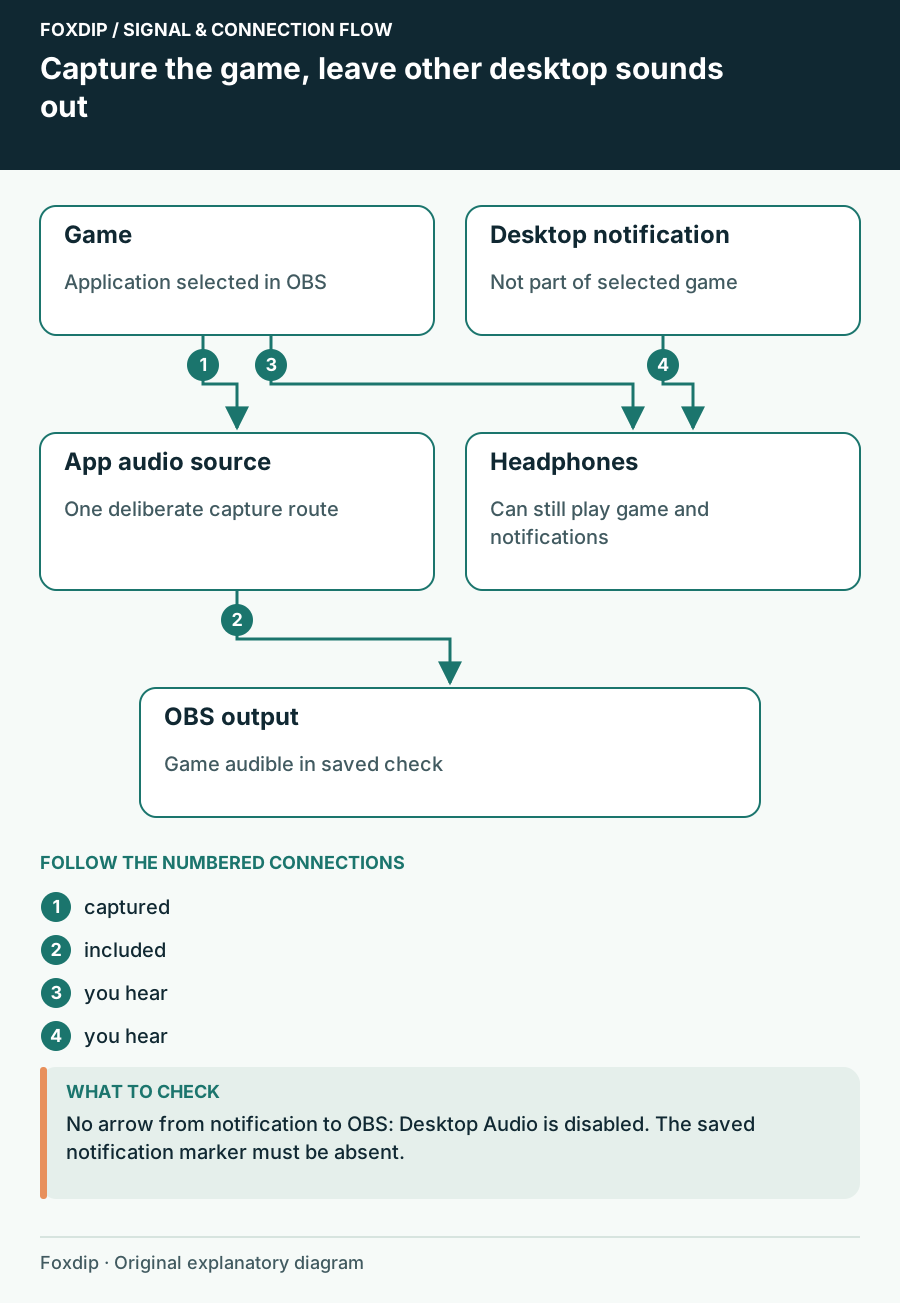
Capture the game, leave other desktop sounds out. Labels show the relationships described in the guide.
Tutorial

How to Capture Only Game Audio in OBS (No Discord or Music)

Send only your game's sound to the stream. No notifications, no Discord, no Spotify.

4 min read ·Nov 13, 2026
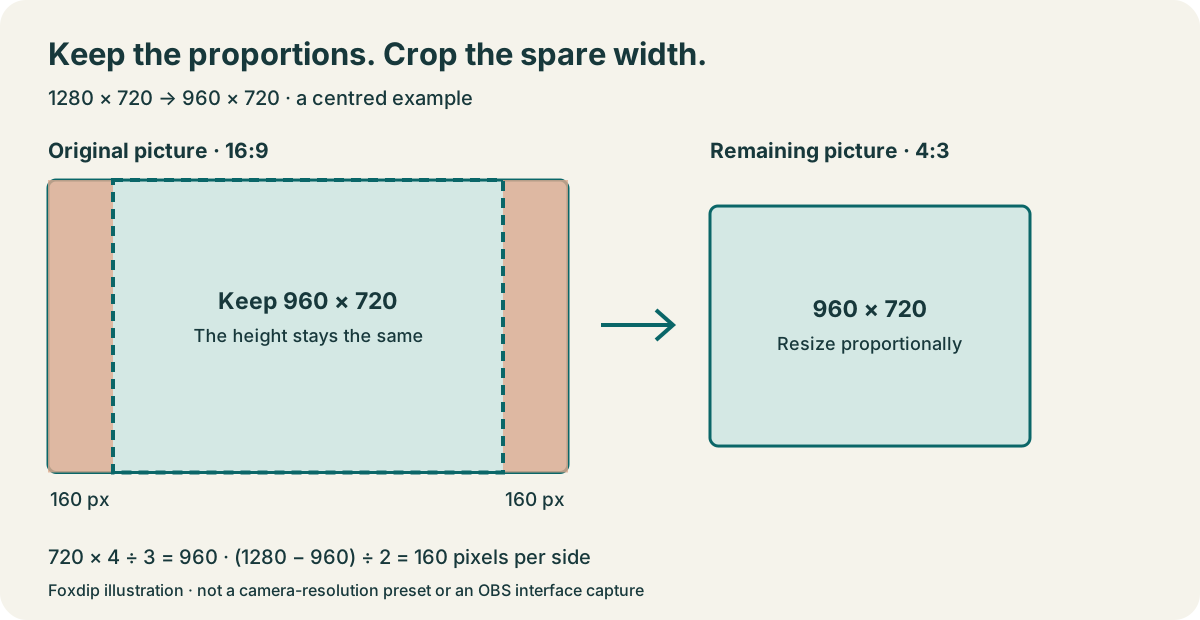
A 1280 by 720 image cropped by 160 pixels on each side leaves a 960 by 720 image with a four-to-three aspect ratio.
Tutorial

How to Crop Your Webcam in OBS (Without Stretching It)

The quick way to crop your webcam in OBS: hold Alt (Option on Mac) and drag the edge. Here's how to keep your face from looking stretched.

5 min read ·Nov 13, 2026
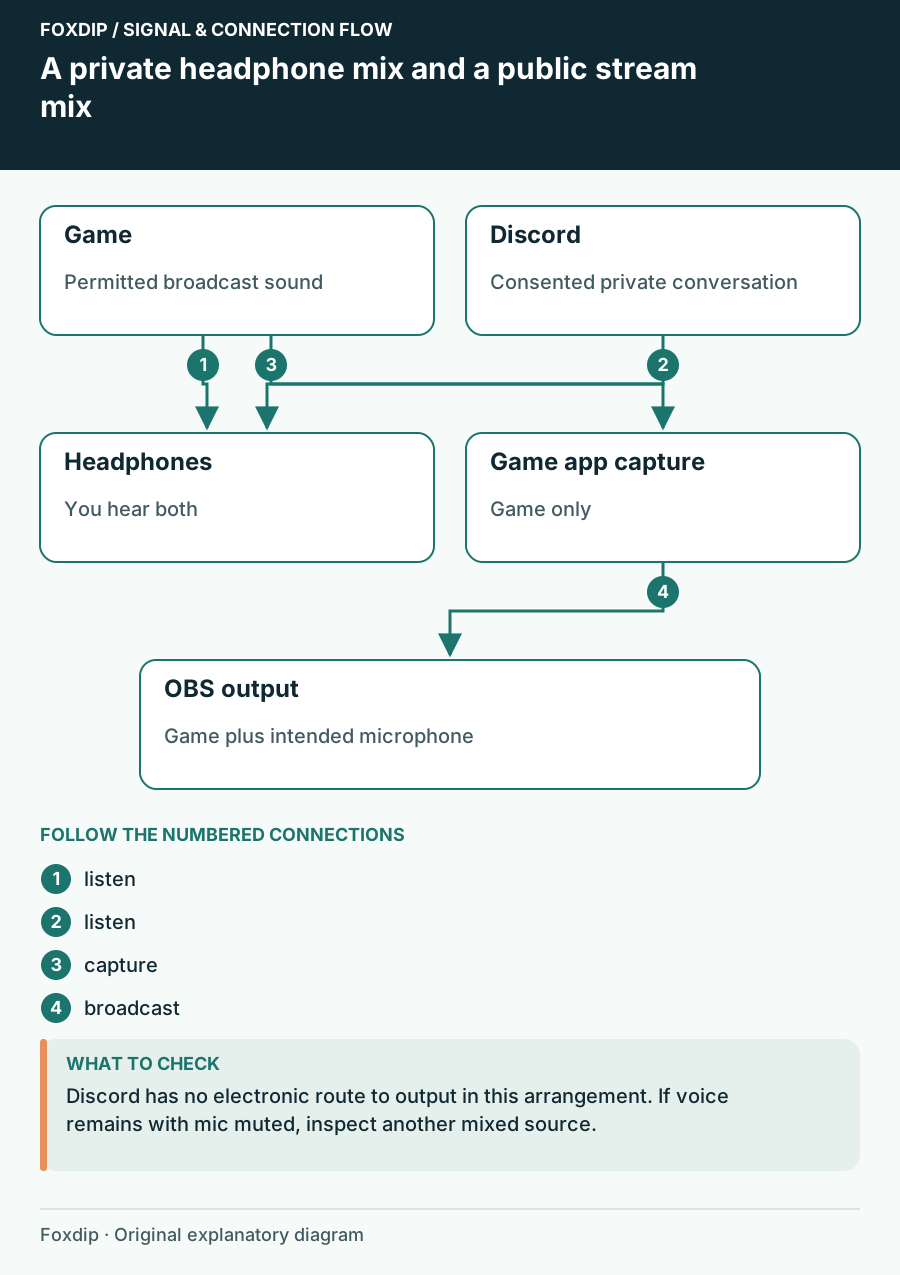
A private headphone mix and a public stream mix. Labels show the relationships described in the guide.
Tutorial

How to Keep Discord Out of Your OBS Stream (and Still Hear Friends)

Your viewers hear your Discord call? Here's how to stop it in OBS while you keep talking to your friends.

4 min read ·Nov 13, 2026
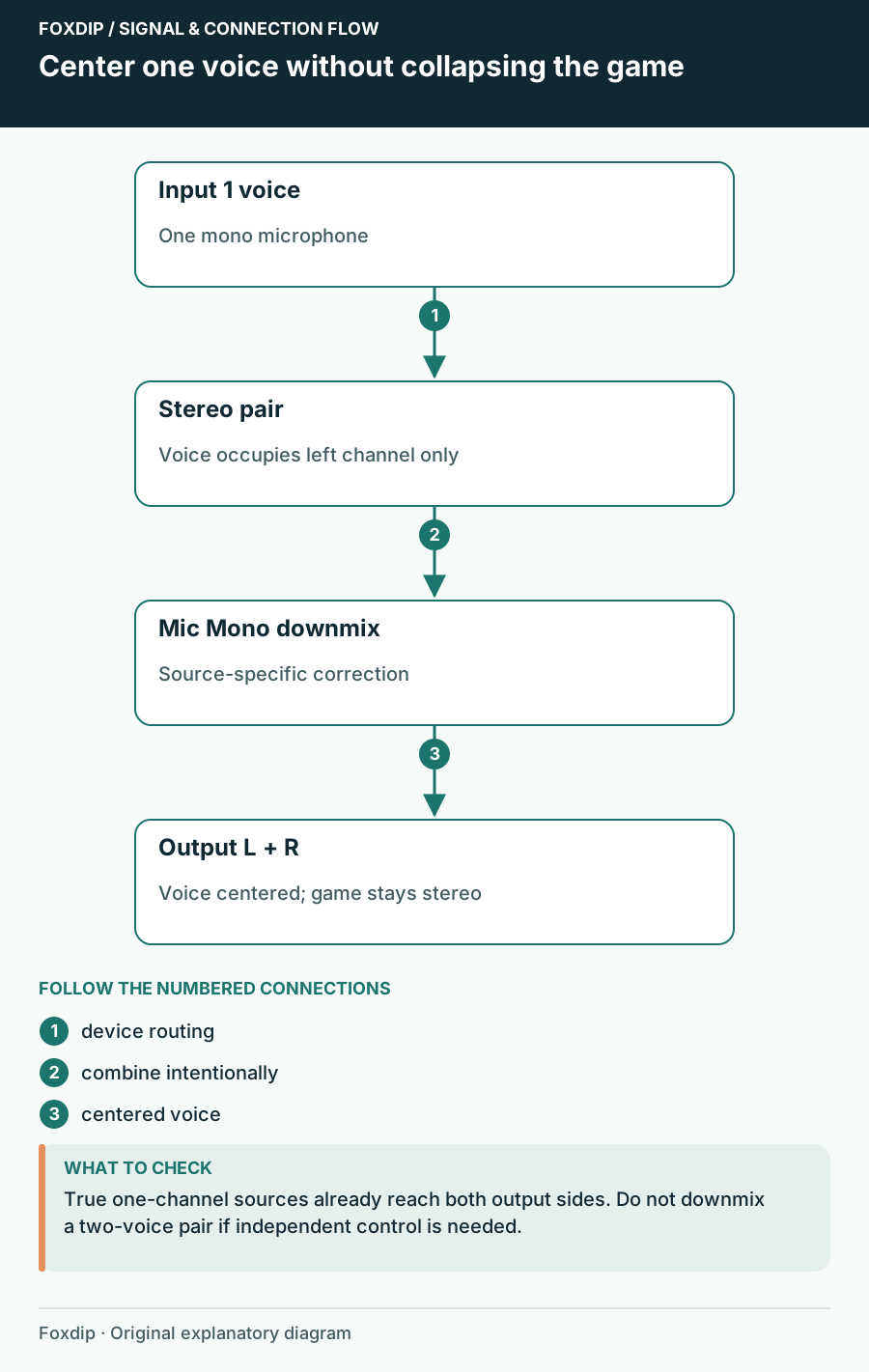
Center one voice without collapsing the game. Labels show the relationships described in the guide.
Tutorial

Mic Only in One Ear in OBS? Here's the Fix

If your voice only comes out of the left side, one checkbox in OBS fixes it. Your game sound stays stereo.

4 min read ·Nov 13, 2026
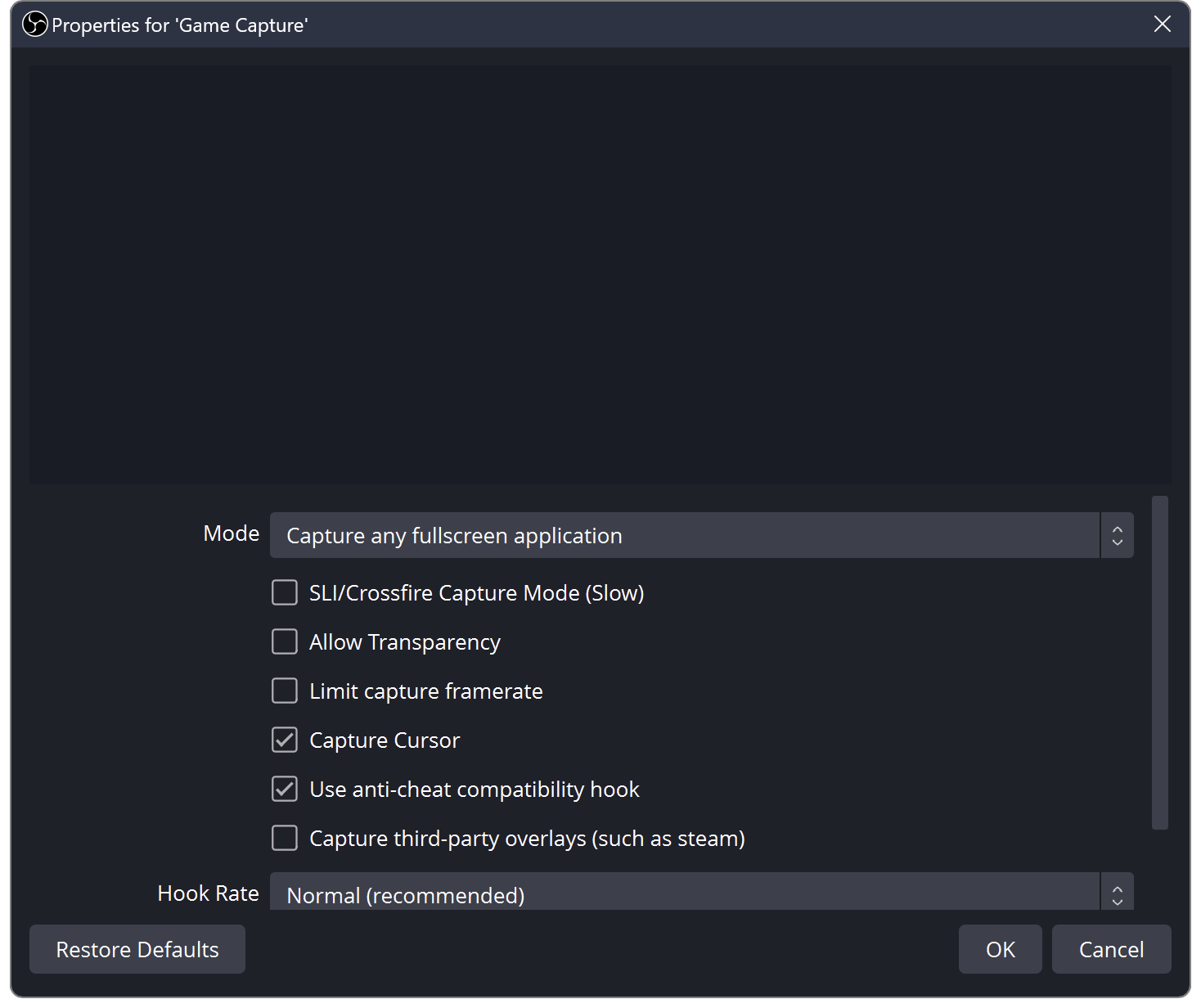
OBS Game Capture properties with the capture mode selector and capture options.
Tutorial

OBS Black Screen? How to Fix Game, Window and Display Capture

OBS shows black instead of your game or screen? Try these quick checks for Windows and Mac.

5 min read ·Nov 13, 2026
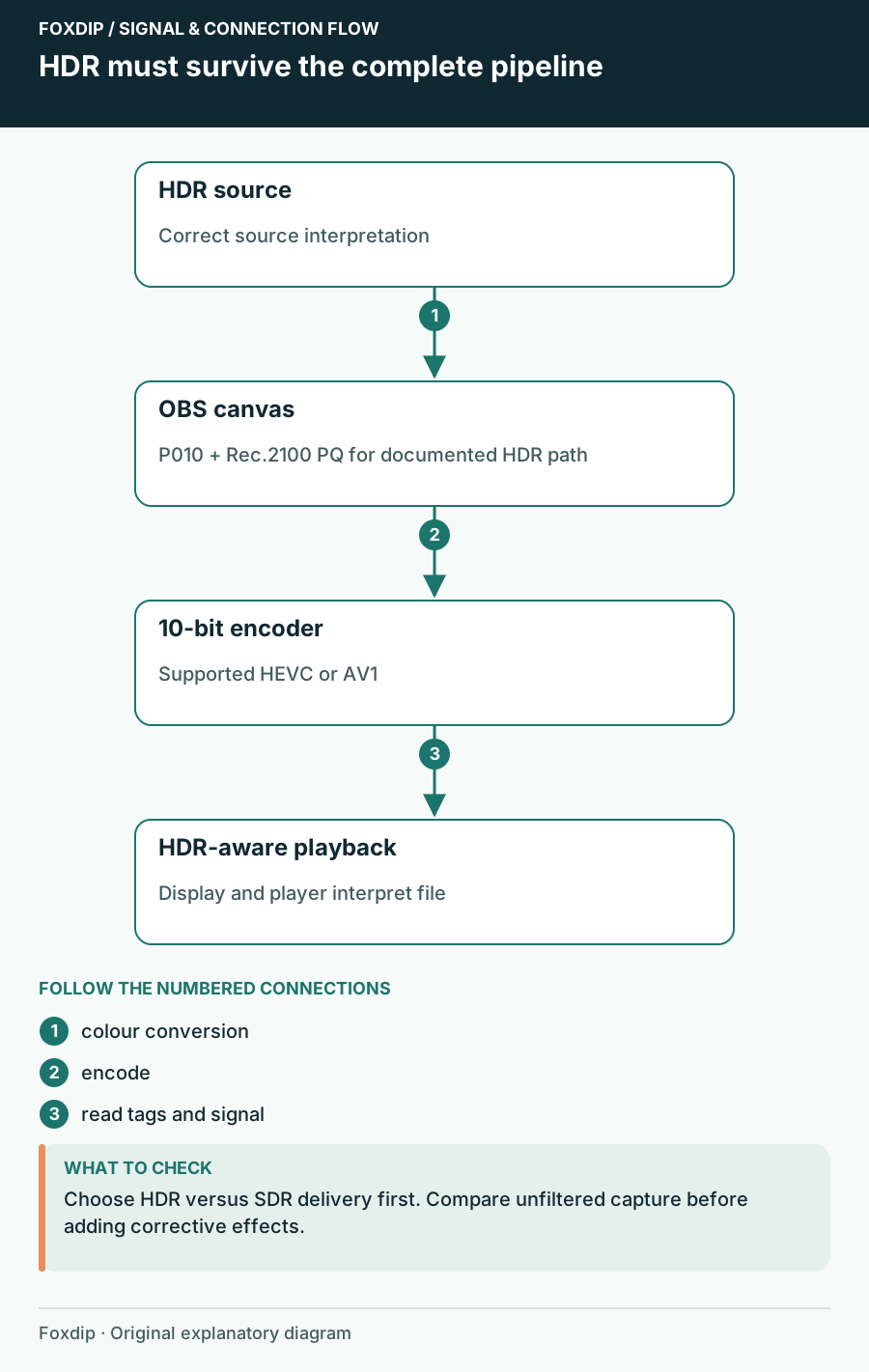
HDR must survive the complete pipeline. Labels show the relationships described in the guide.
Tutorial

OBS HDR Recording Looks Washed Out? Here's Why

Grey, faded colours in your OBS recording usually mean HDR and SDR got mixed up. Here's how to fix it.

4 min read ·Nov 13, 2026
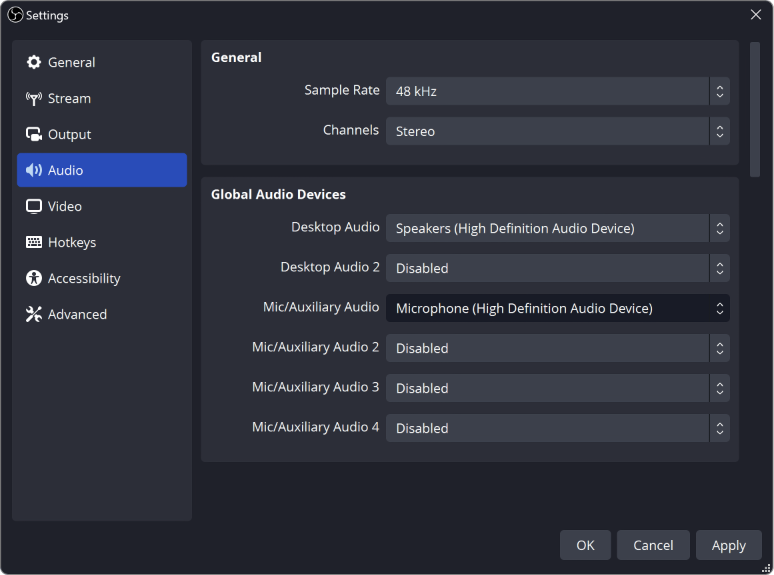
OBS Settings Audio panel showing the global Desktop Audio and Mic/Auxiliary Audio device selectors.
Tutorial

OBS Not Picking Up Your Mic? Here's How to Fix It

Your mic works everywhere except OBS? Check these in order: your computer's sound settings, mic permission, the device OBS uses, and the audio mixer.

7 min read ·Nov 13, 2026
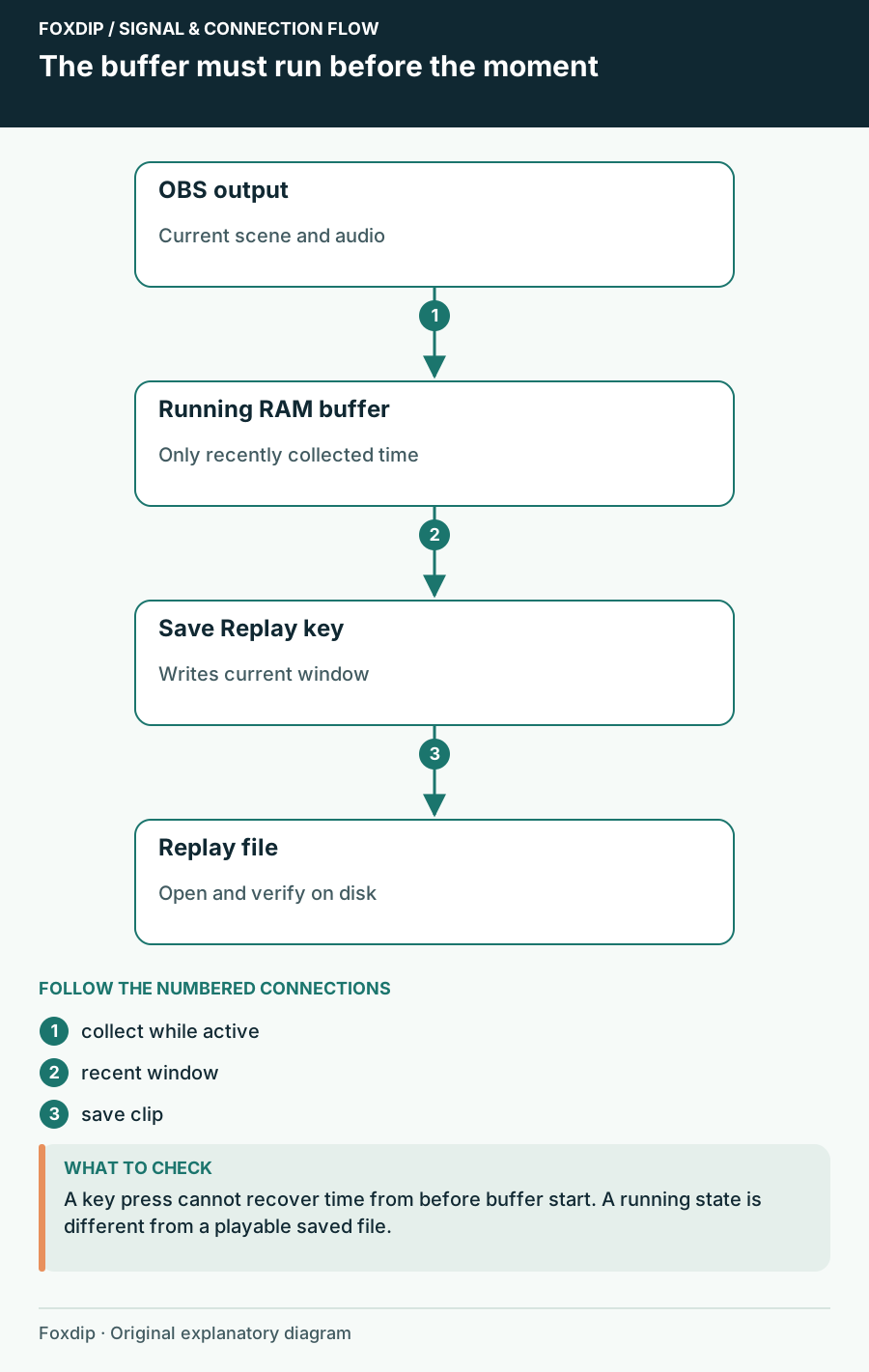
The buffer must run before the moment. Labels show the relationships described in the guide.
Tutorial

OBS Replay Buffer: Save Your Best Moments with One Key

Set up the OBS Replay Buffer, give it a hotkey and save the last 30 seconds whenever something good happens.

4 min read ·Nov 13, 2026
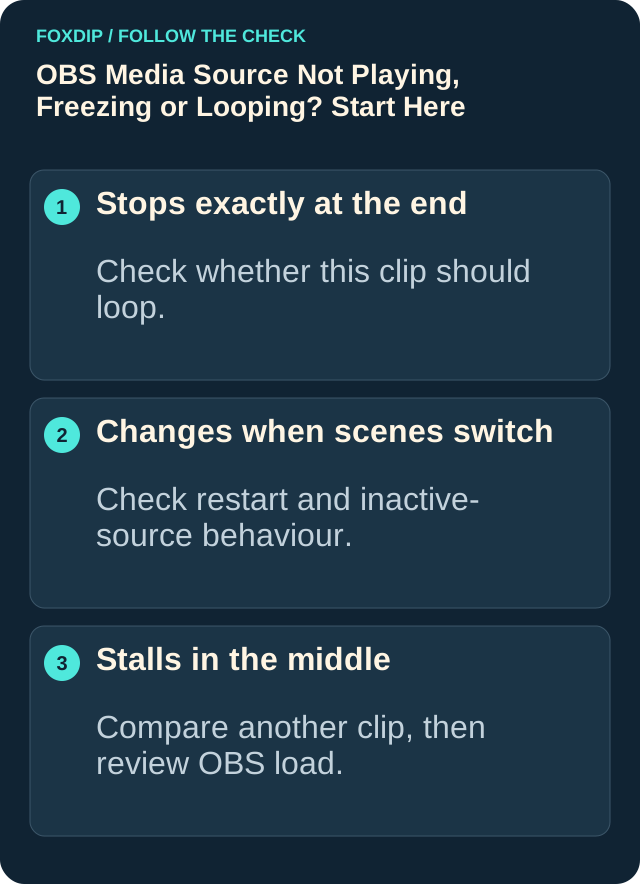
Stops exactly at the end: Check whether this clip should loop.. Changes when scenes switch: Check restart and inactive-source behaviour.. Stalls in the middle: Compare another clip, then review OBS load.
Tutorial

OBS Says "Media Source Is Not Playable"? Here's the Fix

Seeing "media source is not playable" in OBS? It usually means OBS can't open that file. Here's how to find out why and get your video playing.

5 min read ·Nov 13, 2026
OBS Settings Audio panel showing the global Desktop Audio and Mic/Auxiliary Audio device selectors.
Tutorial

Why Is My Audio Doubled in OBS? (Easy Fix)

Hearing your voice or game twice in OBS? Usually the same sound is being picked up two times. Here's how to find the extra one and turn it off.

5 min read ·Nov 13, 2026
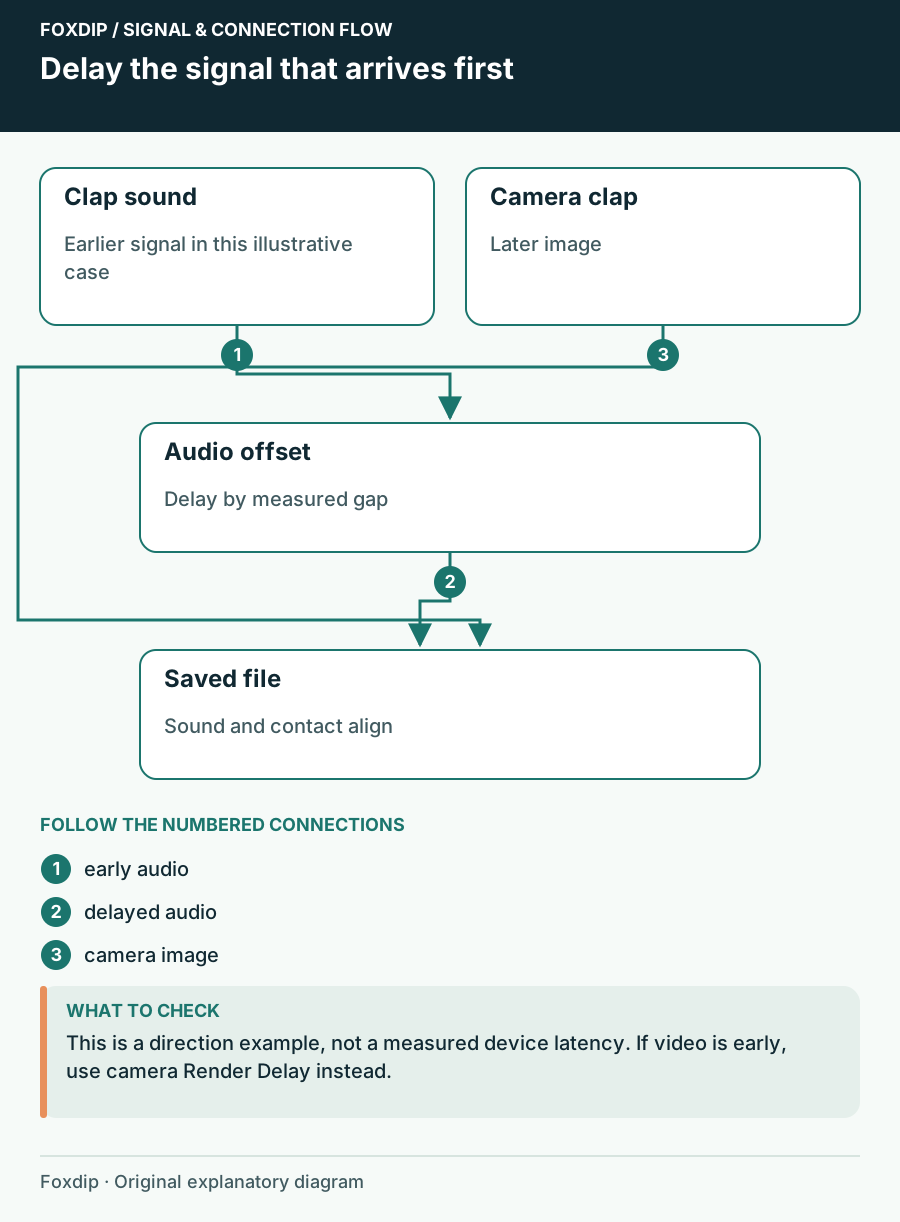
Delay the signal that arrives first. Labels show the relationships described in the guide.
Tutorial

Fix a Constant Camera and Microphone Delay in OBS

Measure which signal arrives first, delay that signal and check the saved result.

4 min read ·Nov 3, 2026
Illustration of an OBS scene and its capture controls.
Tutorial

A Quiet OBS Microphone: Check Input Gain Before Adding Boost

Find where a microphone becomes quiet, separate input gain from mix balance, and raise level without hiding distortion in a louder result.

3 min read ·Nov 3, 2026
Illustration of an OBS scene and its capture controls.
Tutorial

Build an OBS Image Slideshow That Resumes the Way You Expect

Choose slide order, timing and hidden-scene behavior, then rehearse leaving and returning to the slideshow before using it on stream.

3 min read ·Nov 3, 2026
Illustration of an OBS scene and its capture controls.
Tutorial

Capture CS2 or Destiny 2 in OBS with the Documented Window Route

Use a borderless or windowed game and a targeted Window Capture when OBS documents that Game Capture cannot hook the title.

3 min read ·Nov 3, 2026
Illustration of an OBS scene and its capture controls.
Tutorial

Capture Mac Desktop or App Audio in OBS Without an Extra Driver

Use the native macOS audio source on supported versions, choose all desktop sound or one application, and verify what the recording includes.

3 min read ·Nov 3, 2026
Illustration of an OBS scene and its capture controls.
Tutorial

Capture the League of Legends Lobby and Match in Separate OBS Scenes

Use the correct source for the League client and the active game, then rehearse manual or automatic scene switching through a full practice cycle.

3 min read ·Nov 3, 2026
Illustration of an OBS scene and its capture controls.
Tutorial

Choose the Right OBS Game Capture Mode on Windows

Match fullscreen, specific-window or hotkey capture to the way you launch games, then test focus changes without exposing the desktop.

3 min read ·Nov 3, 2026
Illustration of an OBS scene and its capture controls.
Tutorial

Dim One OBS Source While Keeping Text and Camera Clear

Use Color Correction on the intended visual source, keep explanatory text outside that treatment, and check the result over light and dark content.

3 min read ·Nov 3, 2026
Illustration of an OBS scene and its capture controls.
Tutorial

Launch OBS with the Right Profile, Collection and Scene

Create a clearly named OBS launcher that selects a known profile, scene collection and opening scene without starting an output unexpectedly.

3 min read ·Nov 3, 2026
Illustration of an OBS scene and its capture controls.
Tutorial

Make a Readable OBS Scrolling Text Ticker

Build a short text ticker, control its visible area and loop behavior, and choose a speed that can be read at the final output size.

3 min read ·Nov 3, 2026
Illustration of an OBS scene and its capture controls.
Tutorial

Make OBS Audio Scene-Specific for a BRB or Presentation Scene

Plan which sounds belong in each scene, choose global or scene-specific device capture, and verify the transitions in a saved recording.

3 min read ·Nov 3, 2026
Illustration of an OBS scene and its capture controls.
Tutorial

OBS 30 vs 60 FPS: Choose from a Motion and Workload Test

Compare the same passage at two output frame rates and decide whether the extra motion detail is worth the system workload.

3 min read ·Nov 3, 2026
Illustration of an OBS scene and its capture controls.
Tutorial

OBS Add Existing vs Duplicate: Keep Source Changes Predictable

Reuse a camera or capture source across scenes, distinguish placement from shared properties, and test independent visual treatments safely.

3 min read ·Nov 3, 2026
Illustration of an OBS scene and its capture controls.
Tutorial

OBS Browser Source Is Cut Off: Check Viewport Before Scaling

Distinguish a web page rendered in the wrong viewport from an OBS transform crop, then test long labels and full alert animations.

3 min read ·Nov 3, 2026
Illustration of an OBS scene and its capture controls.
Tutorial

OBS Cannot Capture Minecraft Java on a Laptop: Check the Java GPU

Find the Java executable used by the running game, select its high-performance GPU, and retest the matching OBS capture.

3 min read ·Nov 3, 2026
Illustration of an OBS scene and its capture controls.
Tutorial

OBS Canvas vs Output Resolution: Change the Right Setting

Keep layout dimensions separate from delivery dimensions, test small text after scaling, and avoid moving every source for an output-only change.

3 min read ·Nov 3, 2026
Illustration of an OBS scene and its capture controls.
Tutorial

OBS CQP and CRF Recording Quality: Compare Files Before Choosing

Choose an encoder-appropriate quality control, compare the same difficult footage, and balance recording detail against file size.

3 min read ·Nov 3, 2026
Illustration of an OBS scene and its capture controls.
Tutorial

OBS Log Analyzer: Capture the Session That Actually Failed

Produce a useful OBS log by reproducing the fault, choosing the right session, and turning analyzer findings into one controlled next check.

3 min read ·Nov 3, 2026
Illustration of an OBS scene and its capture controls.
Tutorial

OBS Luma Key: Remove a Black or White Background Carefully

Test brightness-based keying on a graphic, preserve intentional dark or light details, and decide when an original transparent export is the better fix.

3 min read ·Nov 3, 2026
Illustration of an OBS scene and its capture controls.
Tutorial

OBS macOS Screen Capture: Choose a Display, Window or App

Select the appropriate ScreenCaptureKit scope on a Mac, review permissions, and test which windows appear in the recorded picture.

3 min read ·Nov 3, 2026
Illustration of an OBS scene and its capture controls.
Tutorial

OBS Multiview: Monitor Several Scenes Without Losing Program

Arrange a multiview that helps an operator check cameras and upcoming scenes while keeping the current output unmistakable.

3 min read ·Nov 3, 2026
Illustration of an OBS scene and its capture controls.
Tutorial

OBS Opens Only in Safe Mode: Isolate a Plugin Crash

Compare normal and safe-mode launches, preserve your setup, and narrow a startup failure to a reproducible extension or scene.

3 min read ·Nov 3, 2026
Illustration of an OBS scene and its capture controls.
Tutorial

OBS Portable Mode on Windows: Make an Isolated Test Setup

Use a separate Windows ZIP installation to compare a clean OBS configuration without overwriting the setup used for your stream.

3 min read ·Nov 3, 2026
Illustration of an OBS scene and its capture controls.
Tutorial

OBS Projector Output: Send a Clean Picture to a Second Screen

Choose a source, scene or Program projector, route it to the intended monitor, and confirm what an audience-facing screen actually shows.

3 min read ·Nov 3, 2026
Illustration of an OBS scene and its capture controls.
Tutorial

OBS Recording Filenames: Build a Pattern You Can Find Later

Choose a useful recording filename pattern, keep timestamps unique, and verify the resulting names with consecutive test recordings.

3 min read ·Nov 3, 2026
Illustration of an OBS scene and its capture controls.
Tutorial

OBS Studio Mode: Rehearse Preview and Program Before Going Live
Practice staging the next scene, checking what viewers currently see, and making a deliberate transition with OBS Studio Mode.
3 min read ·Nov 3, 2026
Illustration of an OBS scene and its capture controls.
Tutorial

OBS Virtual Camera Missing on macOS 13–15: Check the Extension

Approve the OBS camera extension in the documented macOS 13, 14 or 15 settings location, then verify it with a harmless test scene.

3 min read ·Nov 3, 2026
Illustration of an OBS scene and its capture controls.
Tutorial

OBS Window Capture Selects the Wrong Window: Check Matching Rules

Choose a window-matching rule deliberately and test document changes, relaunches and other windows from the same application.

3 min read ·Nov 3, 2026
Illustration of an OBS scene and its capture controls.
Tutorial

Play a Video Playlist in OBS with VLC Video Source

Make an ordered video playlist, select its loop and hidden-scene behavior, and verify audio and the transition between files.
3 min read ·Nov 3, 2026
Illustration of an OBS scene and its capture controls.
Tutorial

Set Up OBS Push-to-Talk or Push-to-Mute and Test the Output

Choose the microphone behavior you need, assign an unambiguous key, and verify held, released and application-focused states in a recording.

3 min read ·Nov 3, 2026
Illustration of an OBS scene and its capture controls.
Tutorial

Stream and Record in OBS at the Same Time: Check Both Outputs

Decide whether the local recording should share stream settings or use independent quality, then verify the combined workload and saved file.

3 min read ·Nov 3, 2026
Illustration of an OBS scene and its capture controls.
Tutorial

Tune an OBS Expander for Natural Pauses Between Words

Reduce low-level room sound with a gentle expander while checking quiet speech, sentence endings and the transition back into conversation.

3 min read ·Nov 3, 2026
Illustration of an OBS scene and its capture controls.
Tutorial

Update an OBS Text Label from a Local File

Connect a text source to a plain-text file, verify saved changes, and keep long labels inside a readable layout.

3 min read ·Nov 3, 2026
Illustration of an OBS scene and its capture controls.
Tutorial

Use Nested OBS Scenes for a Shared Overlay

Build one reusable overlay scene, place it inside two output scenes, and check which changes should propagate across the show.

3 min read ·Nov 3, 2026
Illustration of an OBS scene and its capture controls.
Tutorial

Use the OBS Auto-Configuration Wizard as a Starting Baseline

Run the wizard for the job you actually need, preserve your current settings, and test its recommendations with a realistic scene.

3 min read ·Nov 3, 2026
Illustration of an OBS scene and its capture controls.
Tutorial

VST Plugin Missing in OBS: Check Format Before Reinstalling

Distinguish VST2 from unsupported plugin formats, check the documented search location, and test one audio plugin without rebuilding the whole chain.
3 min read ·Nov 3, 2026
Illustration of an OBS scene and its capture controls.
Tutorial

Where Did OBS Save the Recording? Check the Path and Write Access

Locate a finished recording, verify the active recording folder, and test a new destination before trusting it with a long session.

3 min read ·Nov 3, 2026
OBS Settings Audio panel showing the global Desktop Audio and Mic/Auxiliary Audio device selectors.
Tutorial

How to Test Your Mic in OBS Before Going Live

Record a short rehearsal with your mic, game and alerts, then play it back. Catch missing sound, a doubled voice or loud game audio before viewers do.

6 min read ·Nov 4, 2026
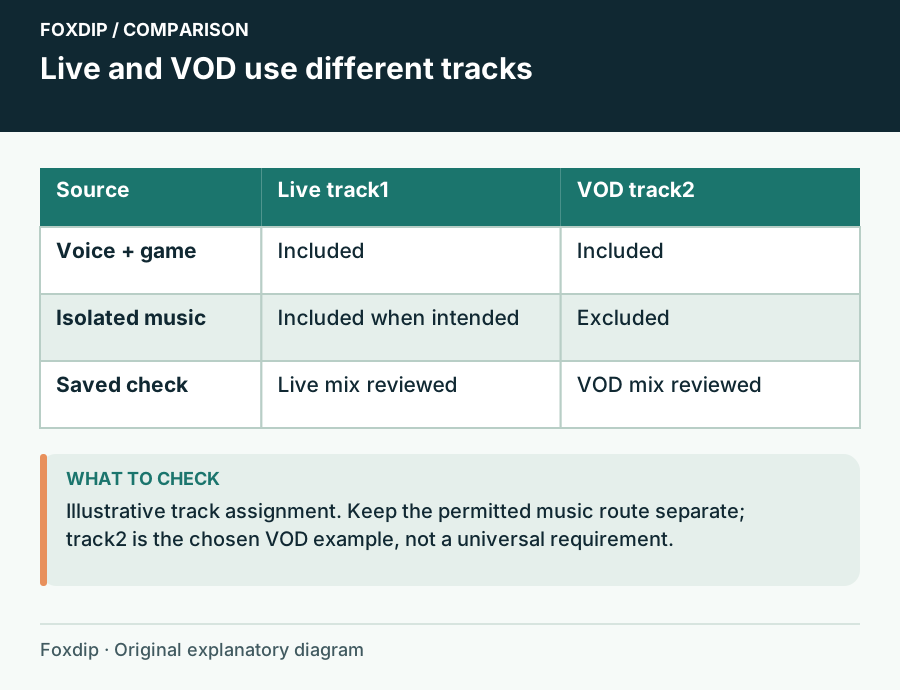
Live and VOD use different tracks. Comparison columns: Source, Live track1, VOD track2.
Tutorial

Keep Music Out of a Twitch VOD with OBS Audio Tracks

Send music to the live mix and exclude it from the VOD track while preserving voice and game audio.

4 min read ·Nov 4, 2026
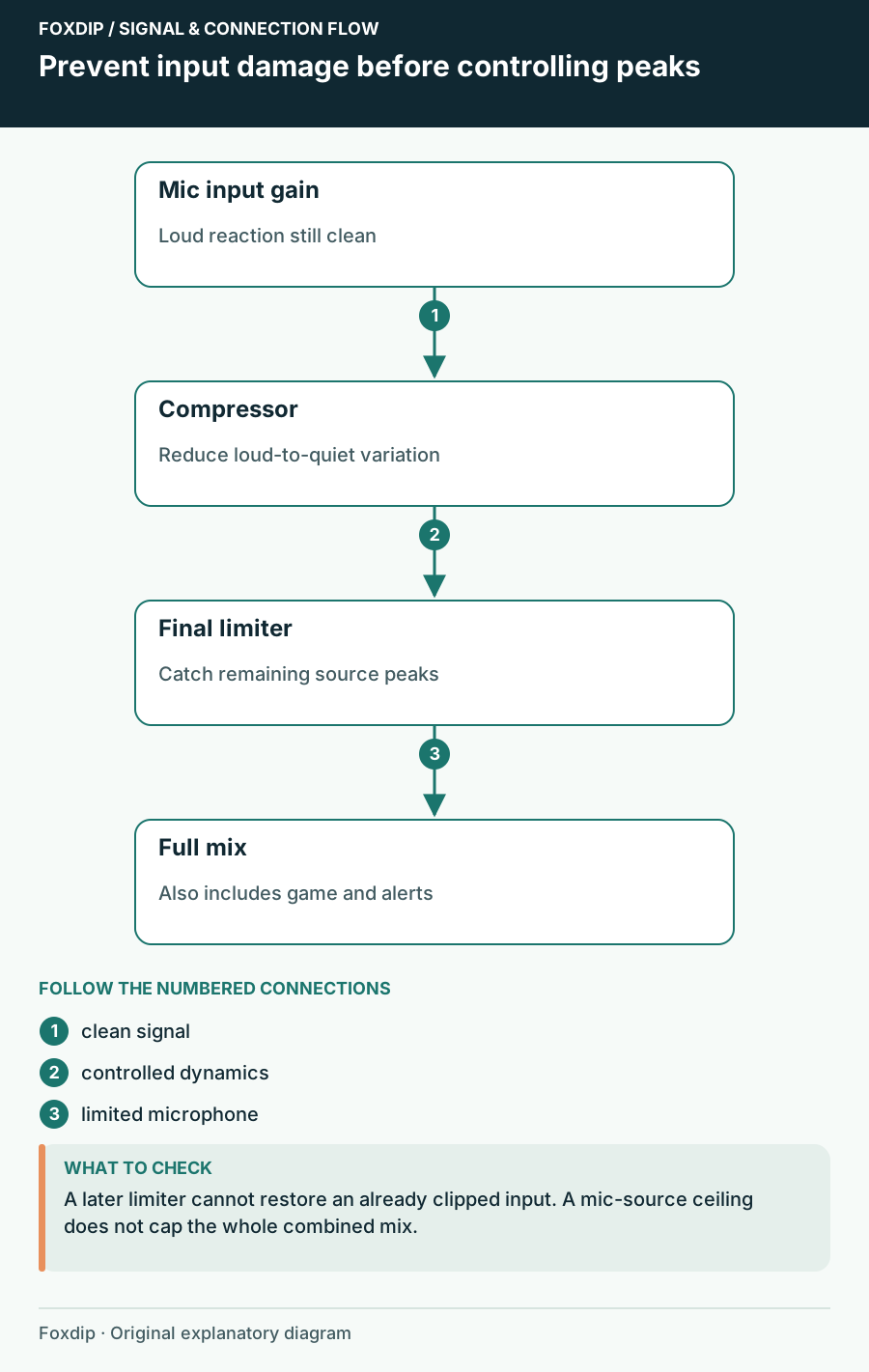
Prevent input damage before controlling peaks. Labels show the relationships described in the guide.
Tutorial

OBS Compressor Settings: Keep Loud Reactions From Clipping

Set your mic gain first, then add a compressor and a limiter in OBS, in that order. A quick shout test shows if loud moments stay clean on stream.

4 min read ·Nov 4, 2026
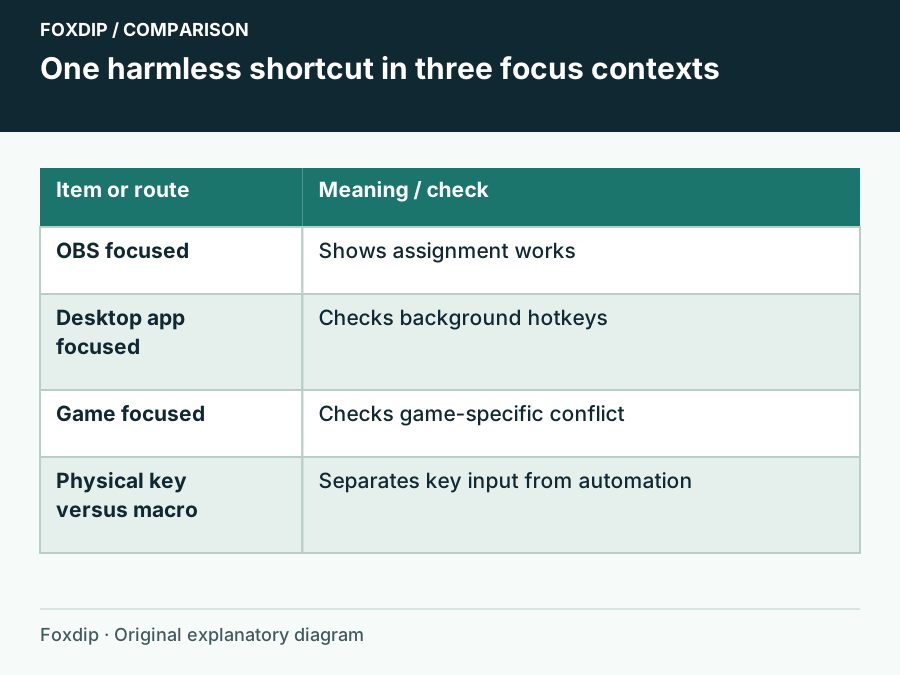
One harmless shortcut in three focus contexts. Comparison columns: Item or route, Meaning / check.
Tutorial

OBS Hotkeys Stop Working in Games: Check Focus and Conflicts

Compare the same shortcut in OBS, on the desktop and in the game before changing permissions.

4 min read ·Nov 4, 2026
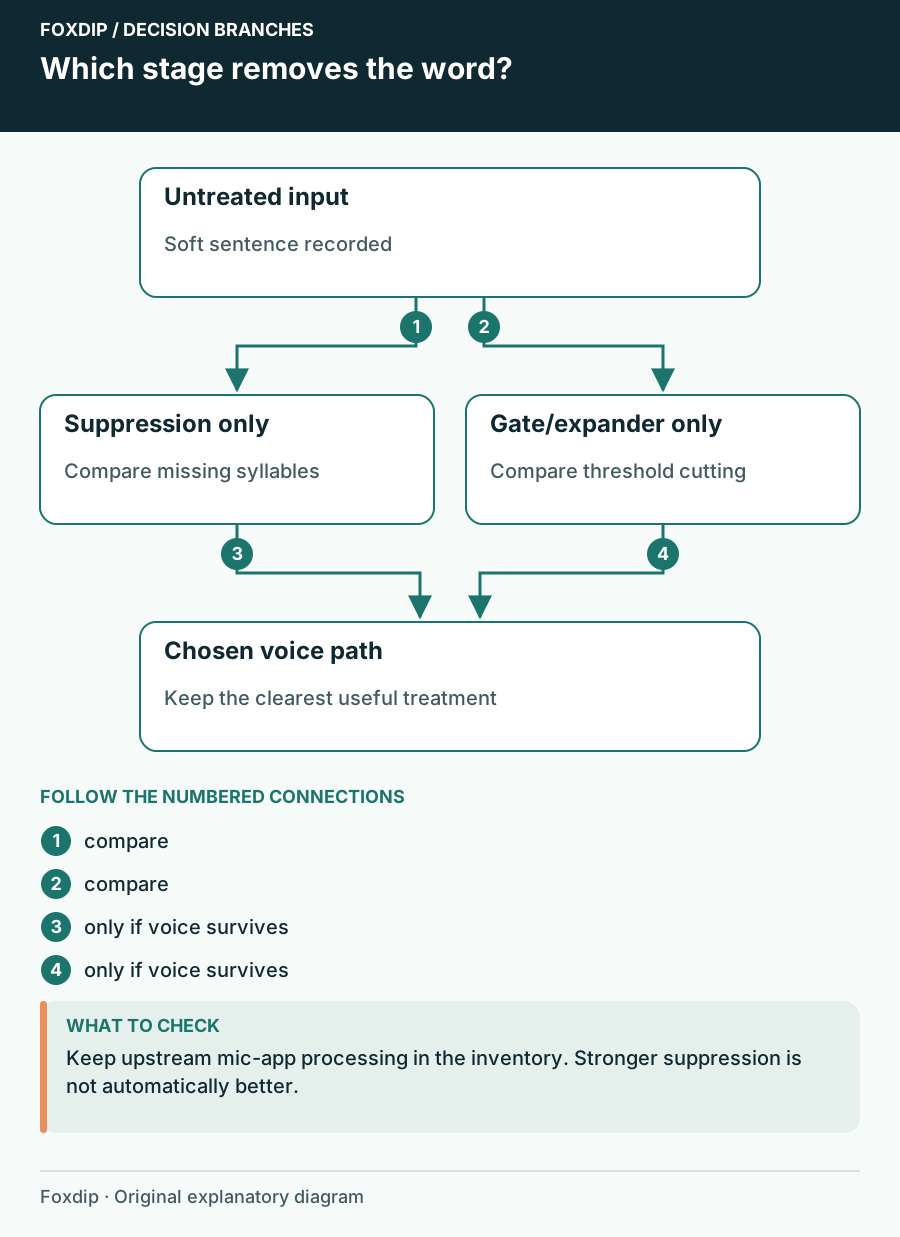
Which stage removes the word?. Branches connect the checks and possible next steps.
Tutorial

OBS Noise Suppression Cuts Off Words: Recover Your Voice

Find the processing stage removing syllables and choose a less destructive noise treatment.

4 min read ·Nov 4, 2026
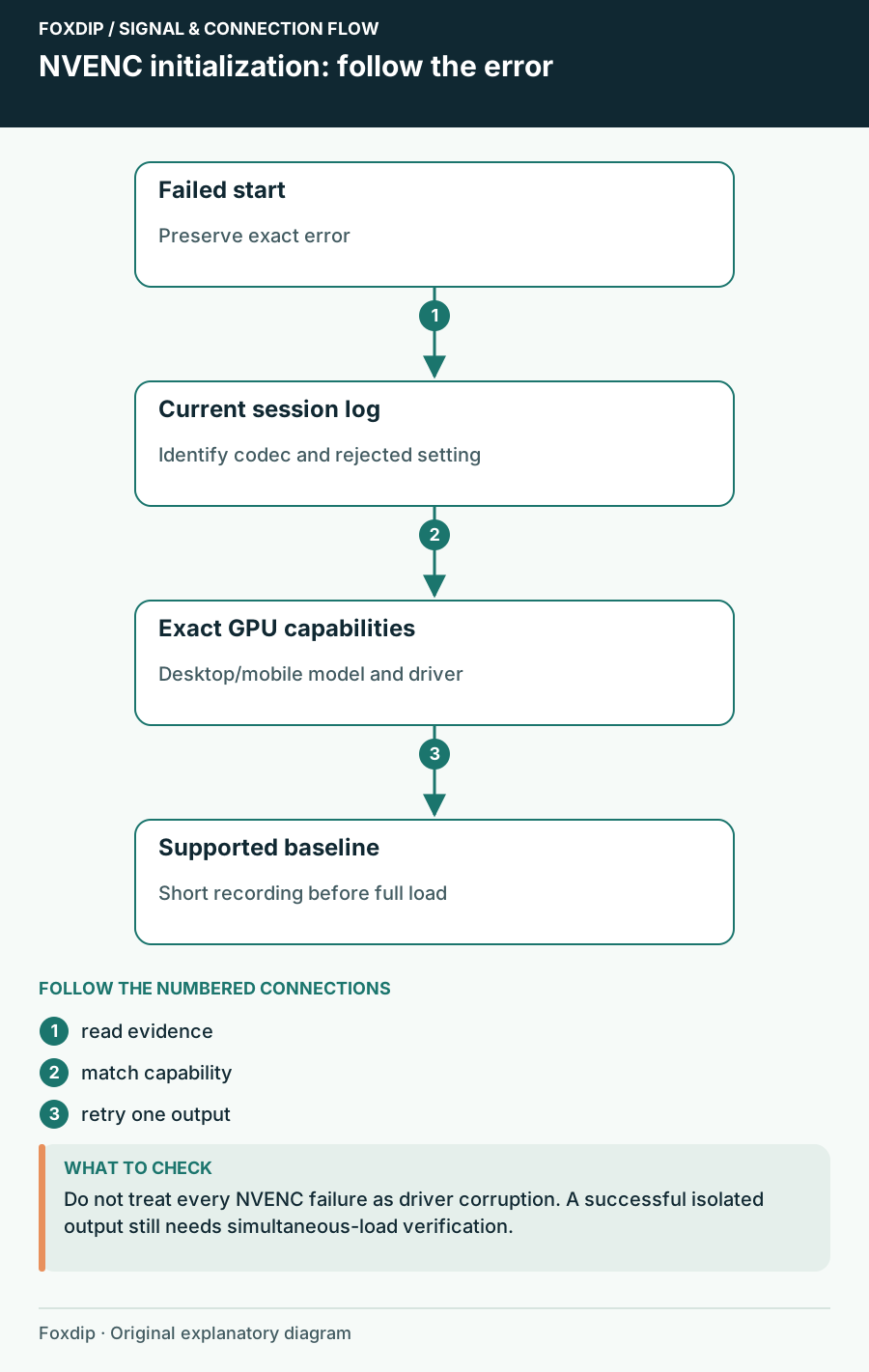
NVENC initialization: follow the error. Labels show the relationships described in the guide.
Tutorial

OBS NVENC Fails to Start Recording: Read the Specific Error

Match the failed codec and GPU capability before reinstalling software.

4 min read ·Nov 4, 2026
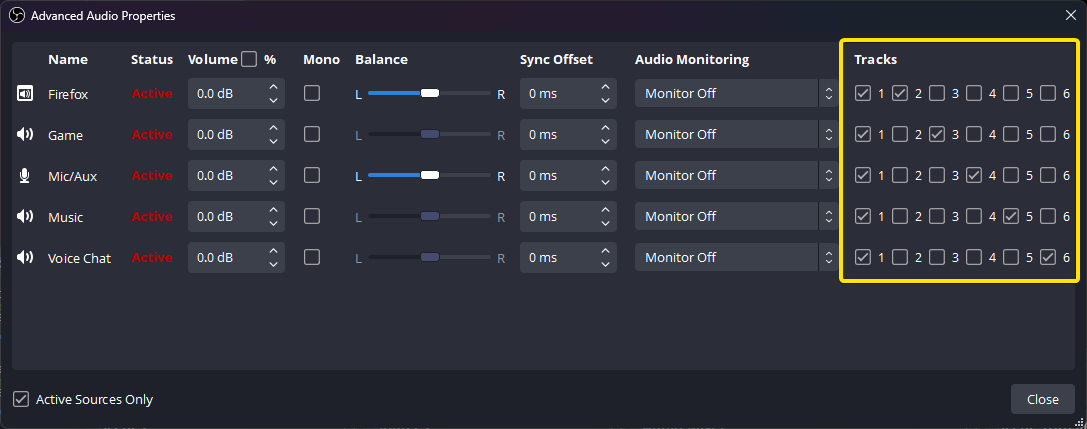
OBS Advanced Audio Properties with per-source recording track checkboxes.
Tutorial

OBS Recording Has No Sound? Check Your Audio Tracks

The meters move but your OBS recording is silent? Follow the sound from your mic and desktop to the recorded track, then play the right track back.

5 min read ·Nov 4, 2026
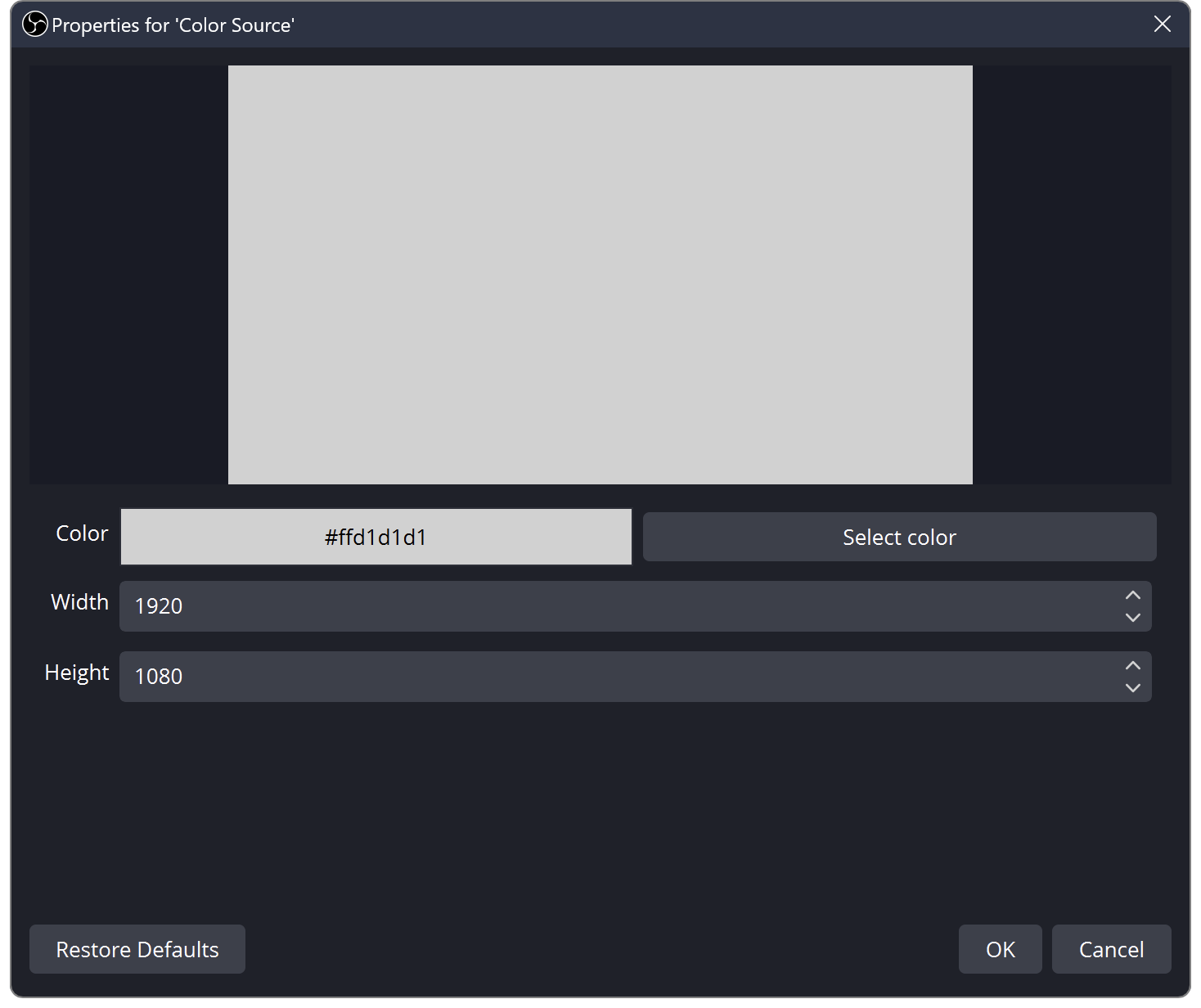
OBS Color Source properties showing the colour, width and height controls.
Tutorial

OBS Source Order: Learn Layers with Three Colour Blocks

Find out why sources cover each other in OBS. Build a three-layer scene and practise order, visibility and scene changes.

5 min read ·Nov 4, 2026
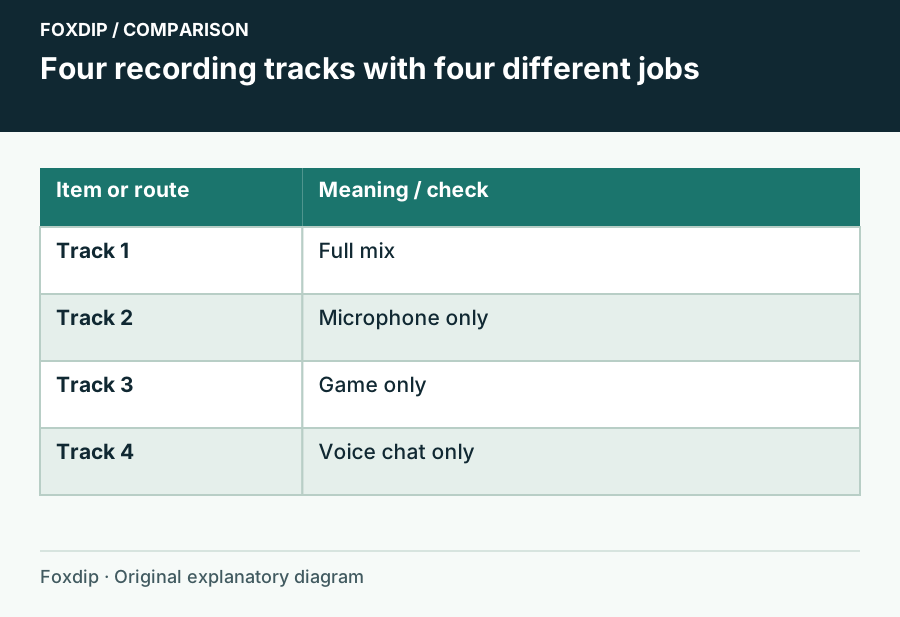
Four recording tracks with four different jobs. Comparison columns: Item or route, Meaning / check.
Tutorial

Record Mic, Game and Voice Chat on Separate OBS Tracks

Create a playable full mix and isolated editing tracks without confusing tracks with audio channels.

4 min read ·Nov 4, 2026
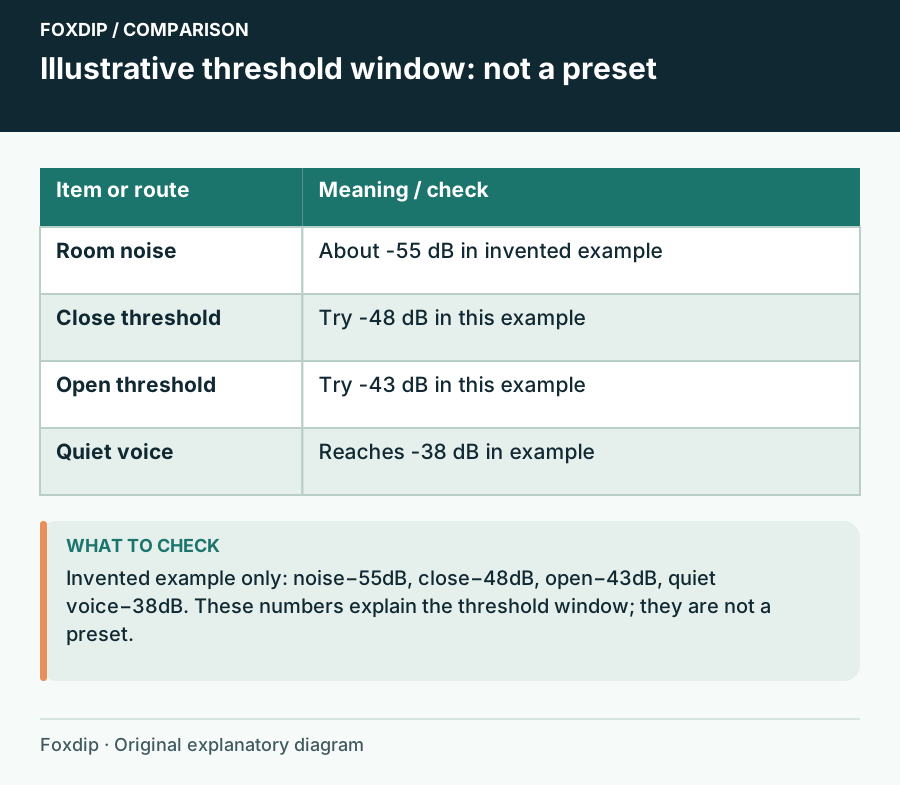
Illustrative threshold window: not a preset. Comparison columns: Item or route, Meaning / check.
Tutorial

Your OBS Noise Gate Swallows Quiet Speech: Tune Both Thresholds

Use room noise and soft speech to set the gate instead of copying another streamer’s numbers.

4 min read ·Nov 4, 2026
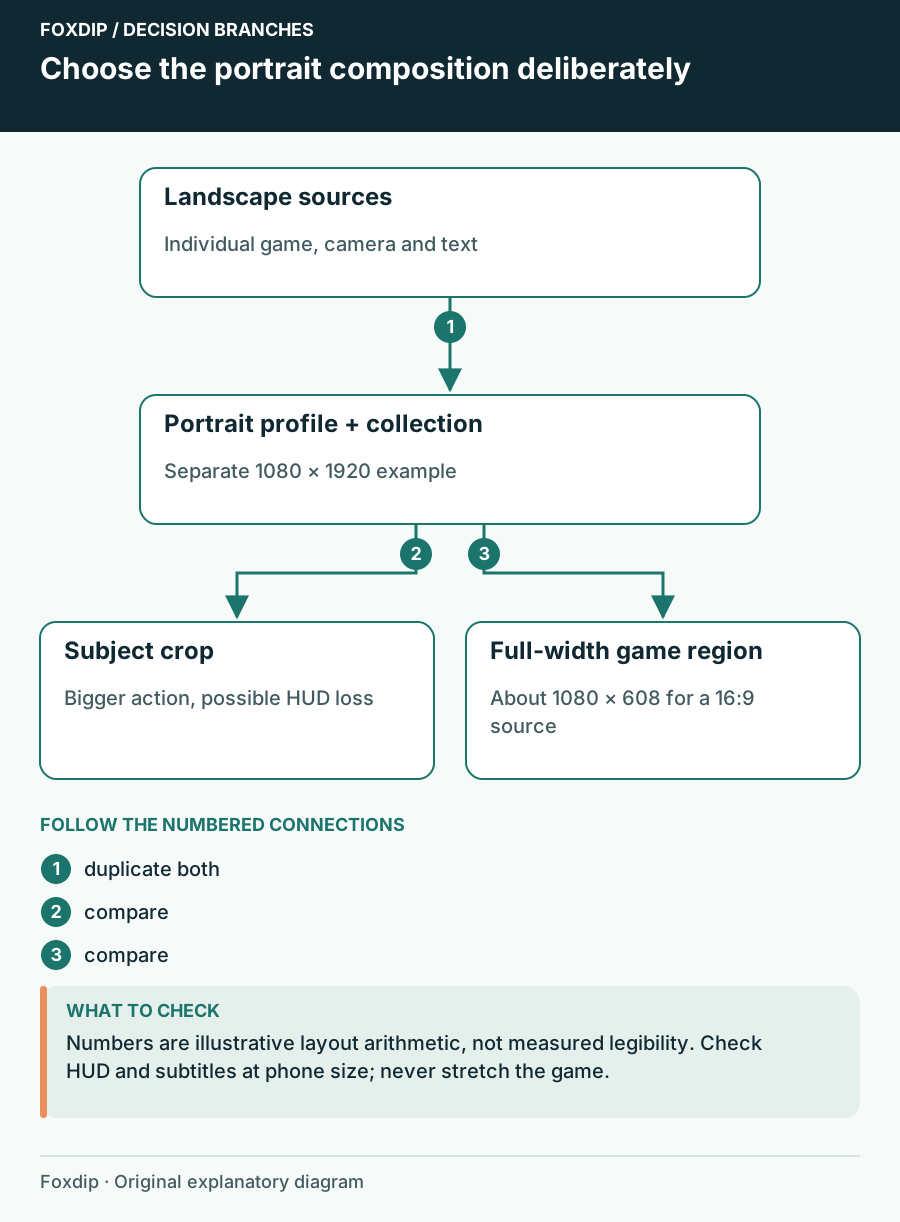
Choose the portrait composition deliberately. Branches connect the checks and possible next steps.
Tutorial

How to Make OBS Portrait: A Vertical Layout That Fits

Make OBS portrait the clean way: duplicate your setup, switch to a vertical canvas, then move your game, camera and text so nothing important gets cut.

4 min read ·Oct 27, 2026
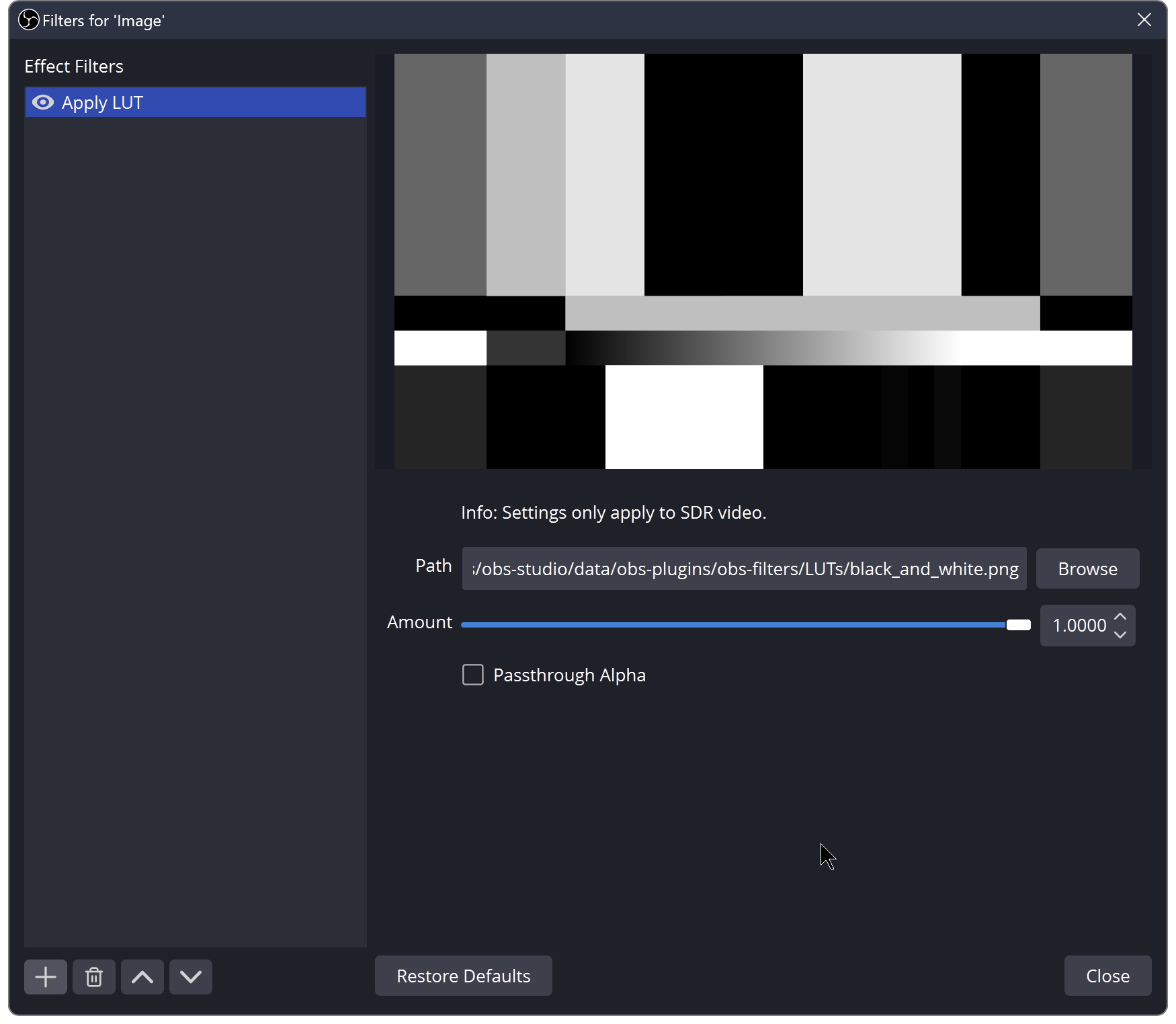
OBS Apply LUT effect filter with Path and Amount controls.
Tutorial

Install a Webcam LUT in OBS and Keep an Honest Before/After

Load a PNG or CUBE look, compare it at a fixed camera setup, and avoid using a LUT to hide exposure or colour-space problems.

4 min read ·Oct 27, 2026
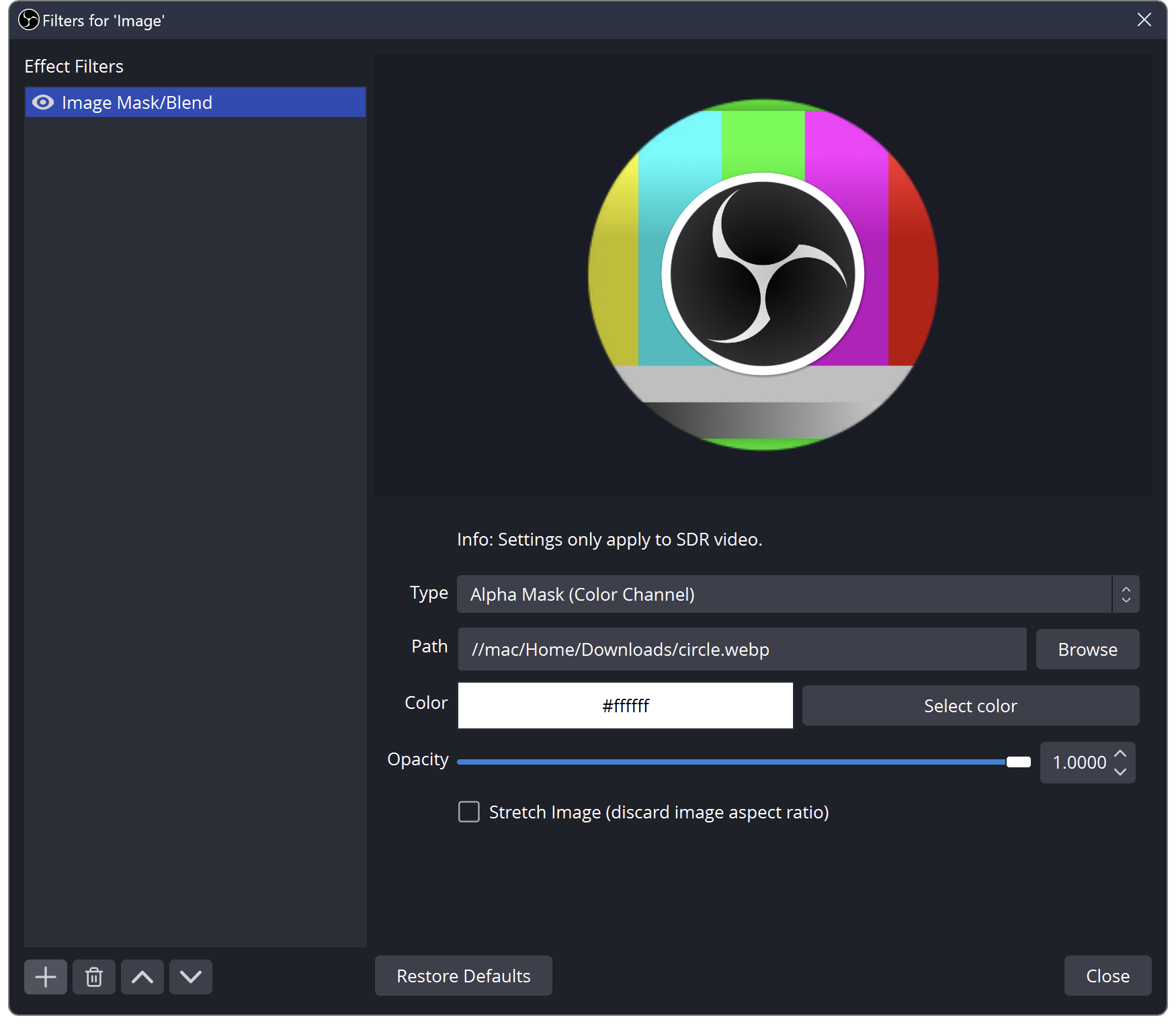
OBS Image Mask/Blend filter showing Type, Path, Opacity and Stretch Image.
Tutorial

Make a Circle Webcam in OBS Without Squashing Your Face

Use an alpha mask for the shape, keep your camera proportions, and distinguish the mask from a decorative frame.

4 min read ·Oct 27, 2026
OBS documentation test image with a bright green area still visible.
Tutorial

Set Up a Green Screen in OBS Without Eating the Edges

Light the backdrop, choose the camera source and adjust the key while watching hair, clothing and motion.

4 min read ·Oct 27, 2026
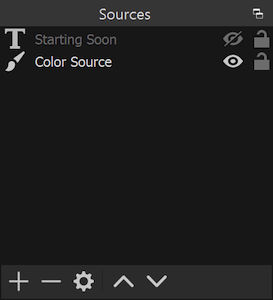
OBS documentation Sources dock with visibility controls and source ordering.
Tutorial

Stream Alerts Play Twice? Separate Events, Sources and Sound

Work out whether the duplicate is in the event feed, the visible overlay or only the audio before removing anything.

4 min read ·Oct 27, 2026
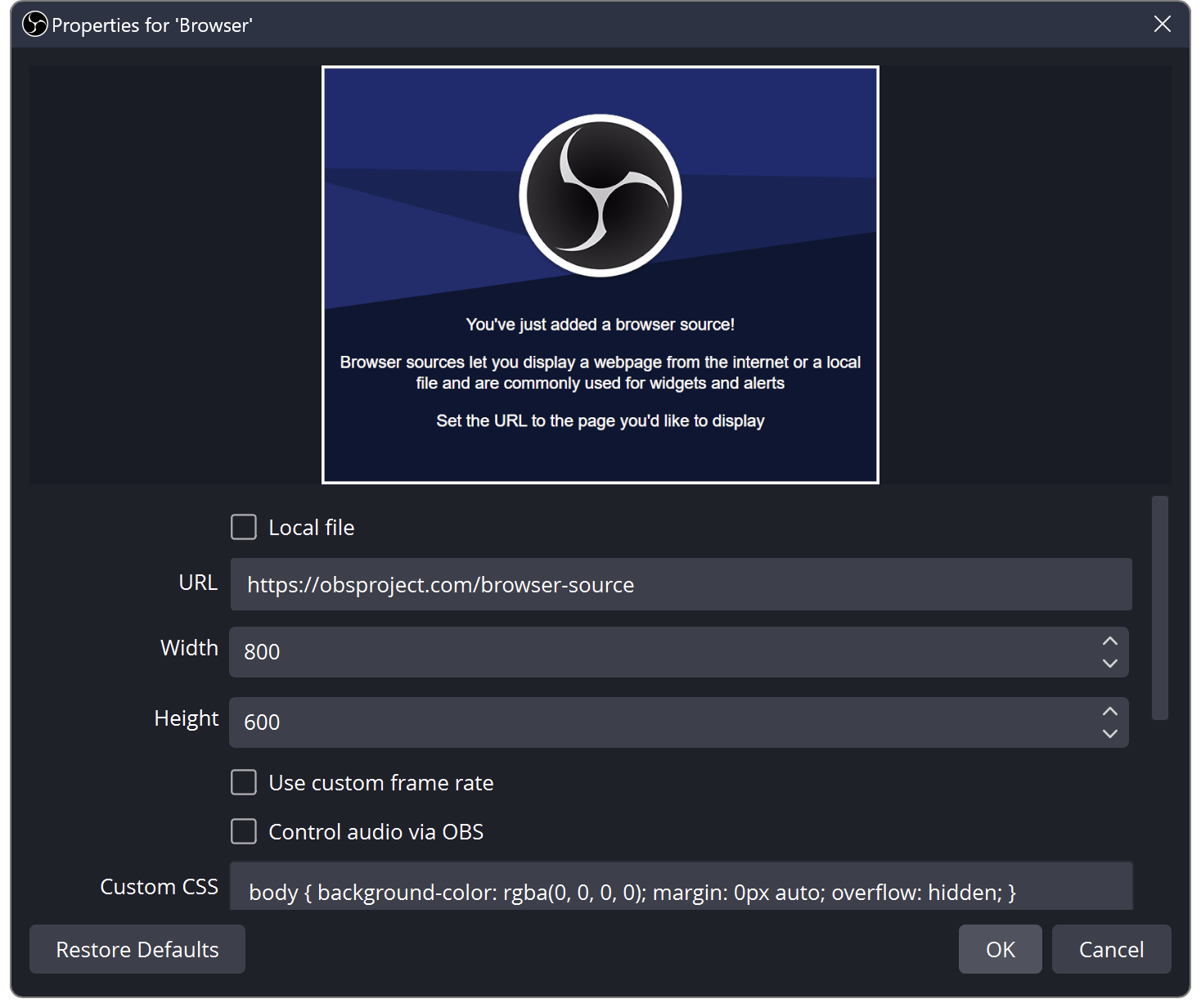
OBS Browser Source properties showing Local file, URL, Width and Height.
Tutorial

StreamElements Overlay Blank in OBS? Check the Browser Source

Compare the overlay editor with OBS, then check the copied URL, viewport and visible source order.

4 min read ·Oct 27, 2026
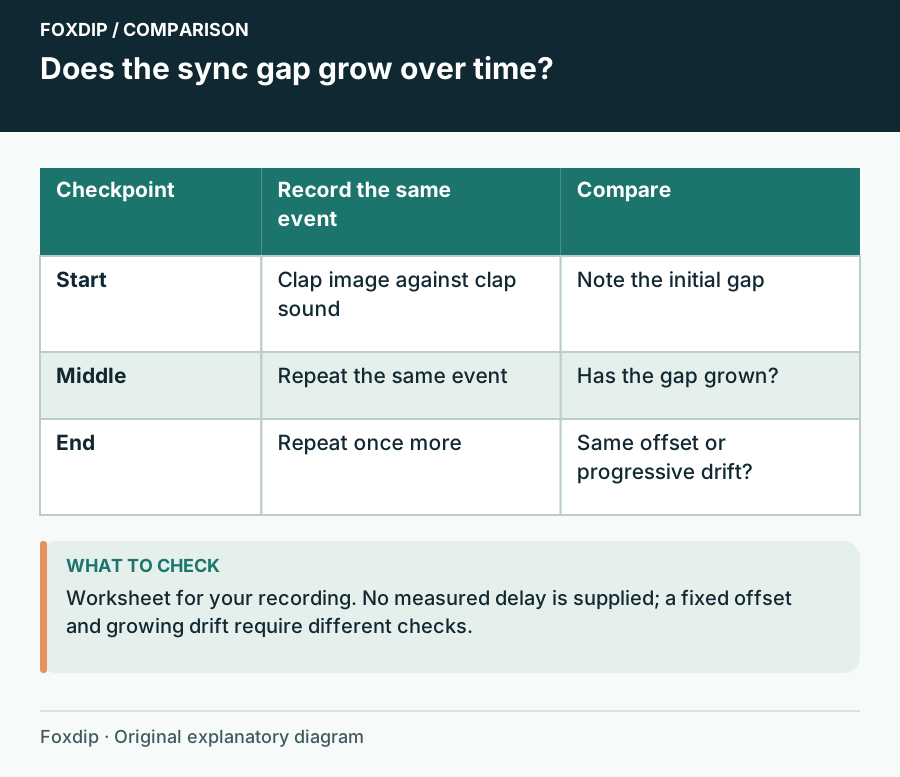
Does the sync gap grow over time?. Comparison columns: Checkpoint, Record the same event, Compare.
Tutorial

Audio Drifts During Long OBS Recordings: Find the Changing Gap

Compare timing at several points and isolate the capture path that changes over time.

4 min read ·Oct 26, 2026
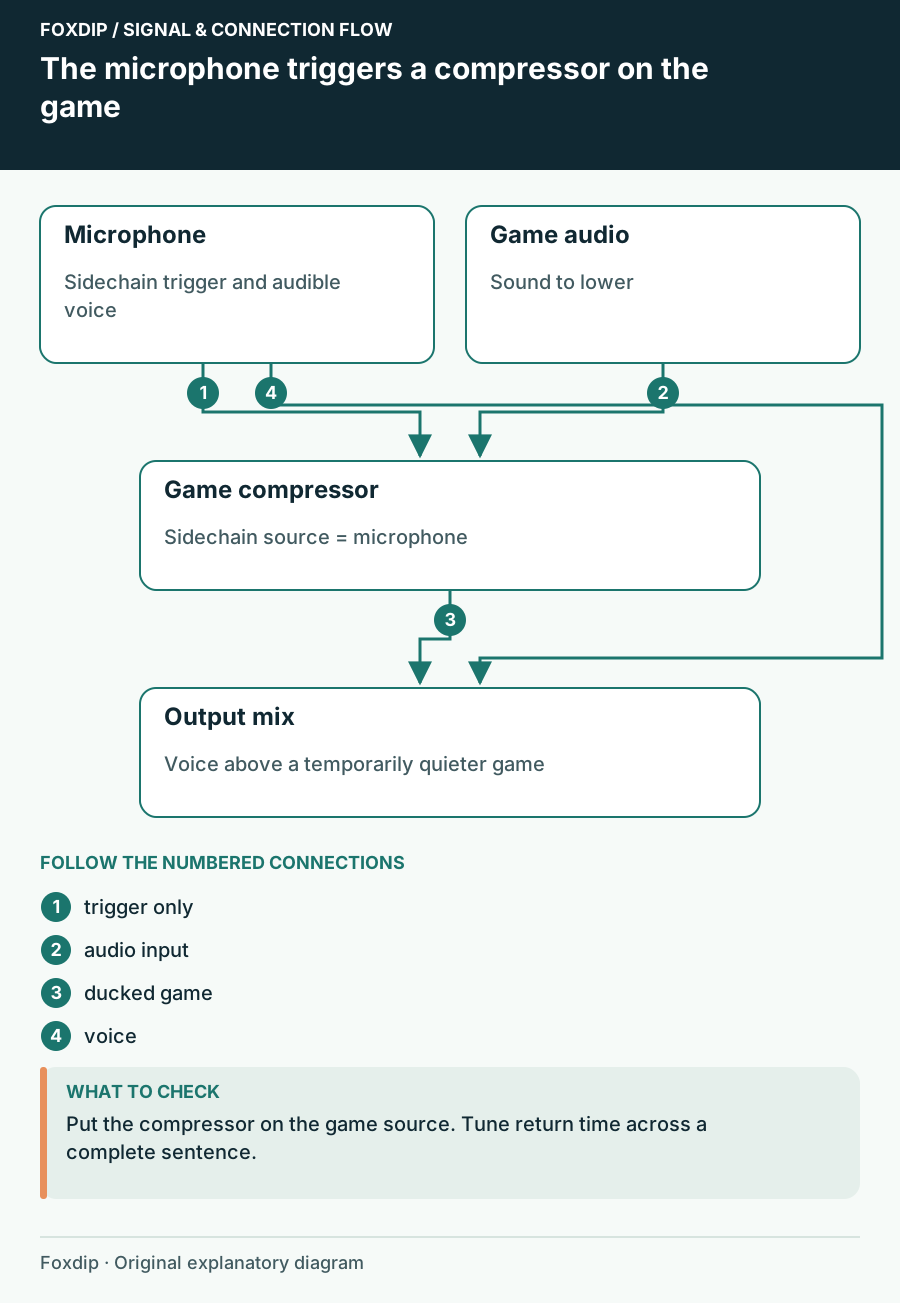
The microphone triggers a compressor on the game. Labels show the relationships described in the guide.
Tutorial

Make Game Audio Duck When You Speak in OBS

Use the microphone as a sidechain trigger and keep the game audible between phrases.

4 min read ·Oct 26, 2026
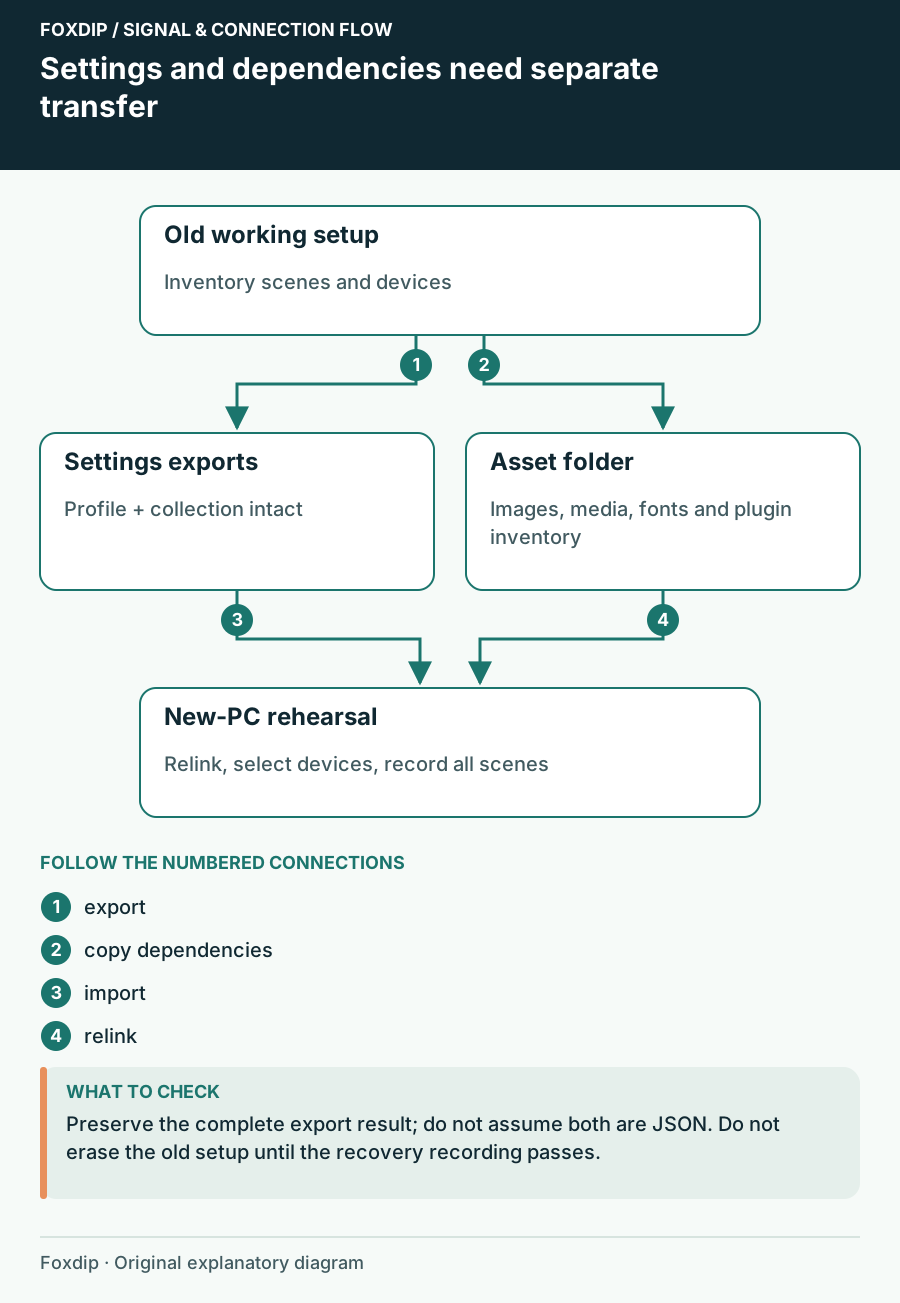
Settings and dependencies need separate transfer. Labels show the relationships described in the guide.
Tutorial

Move OBS to a New PC or Drive Without Losing Anything

Export your OBS profile and scene collection, copy the images and videos they use, then relink them on the new PC so no source shows up missing.

4 min read ·Oct 26, 2026
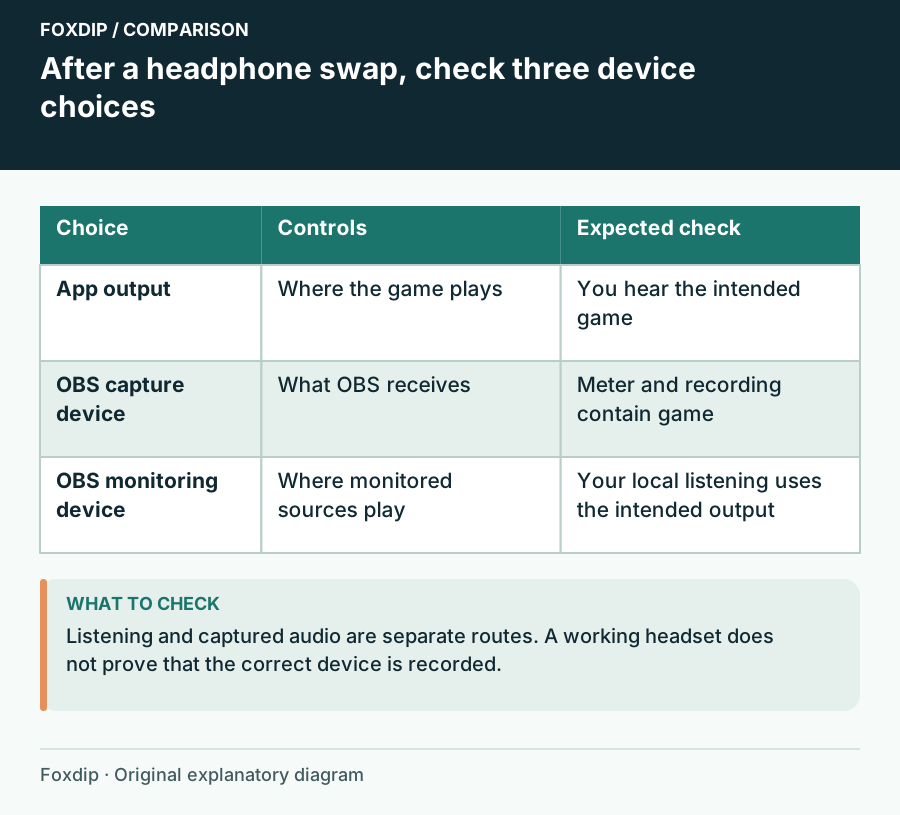
After a headphone swap,check three device choices. Comparison columns: Choice, Controls, Expected check.
Tutorial

OBS Audio Disappears After You Change Headphones

Follow Windows playback, device capture and OBS monitoring as three separate choices.

4 min read ·Oct 26, 2026
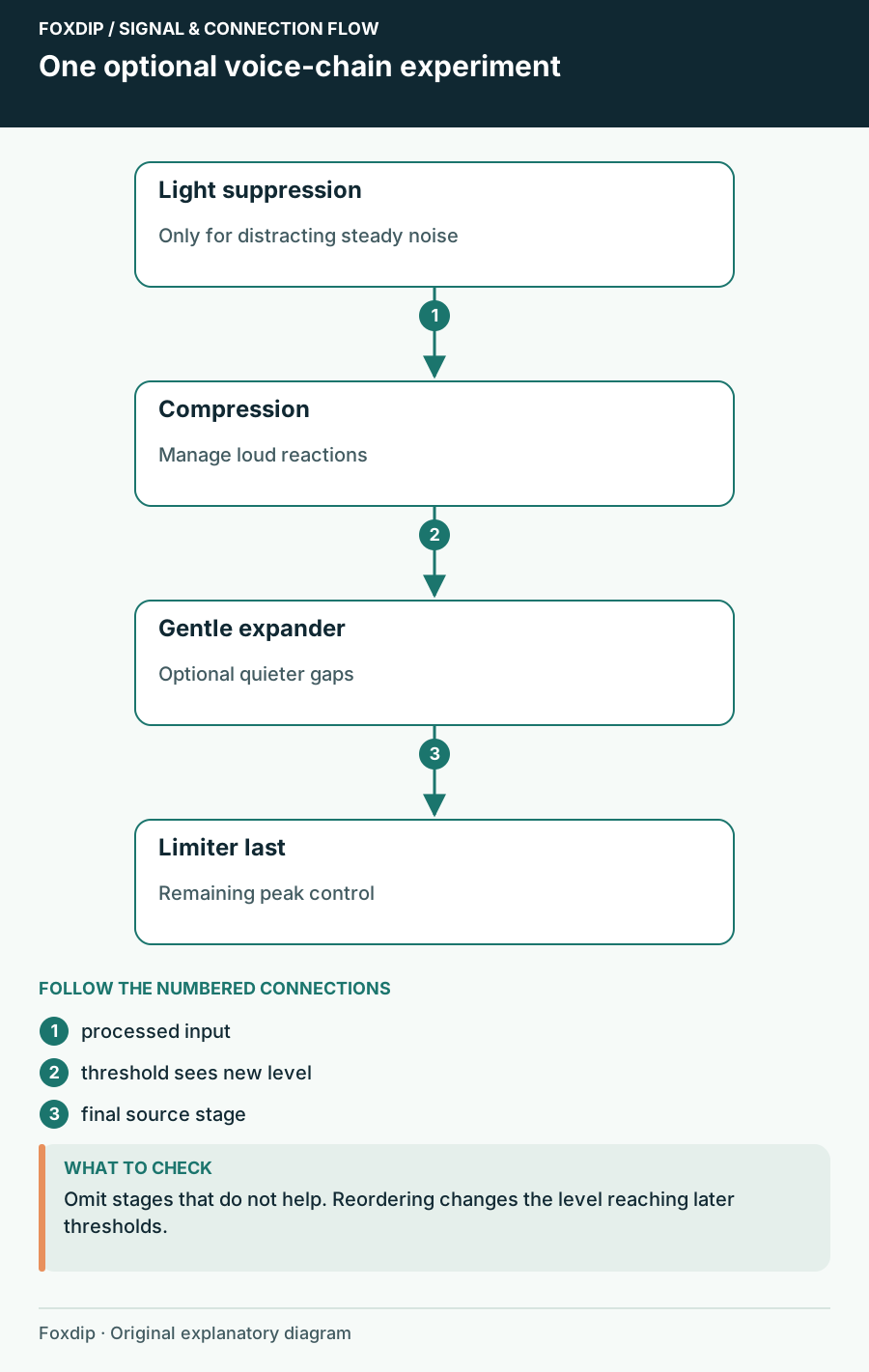
One optional voice-chain experiment. Labels show the relationships described in the guide.
Tutorial

OBS Audio Filter Order: Hear What Each Stage Changes

Build a microphone chain around specific problems and retune thresholds after moving filters.

4 min read ·Oct 26, 2026
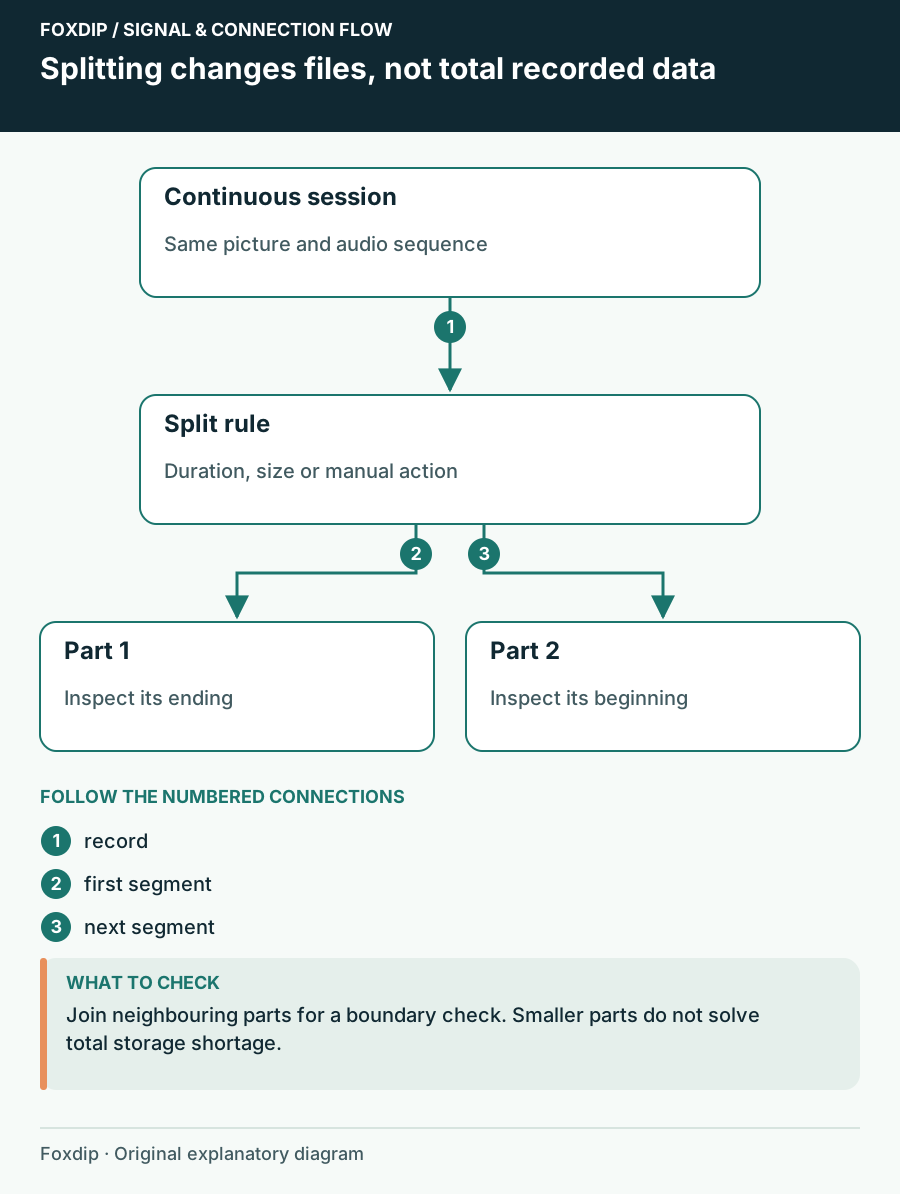
Splitting changes files, not total recorded data. Labels show the relationships described in the guide.
Tutorial

OBS Automatic File Splitting: Cut Long Recordings Safely

Turn on Automatic File Splitting in OBS advanced output, split by time or by size, then check two files side by side so nothing goes missing at the cut.

4 min read ·Oct 26, 2026
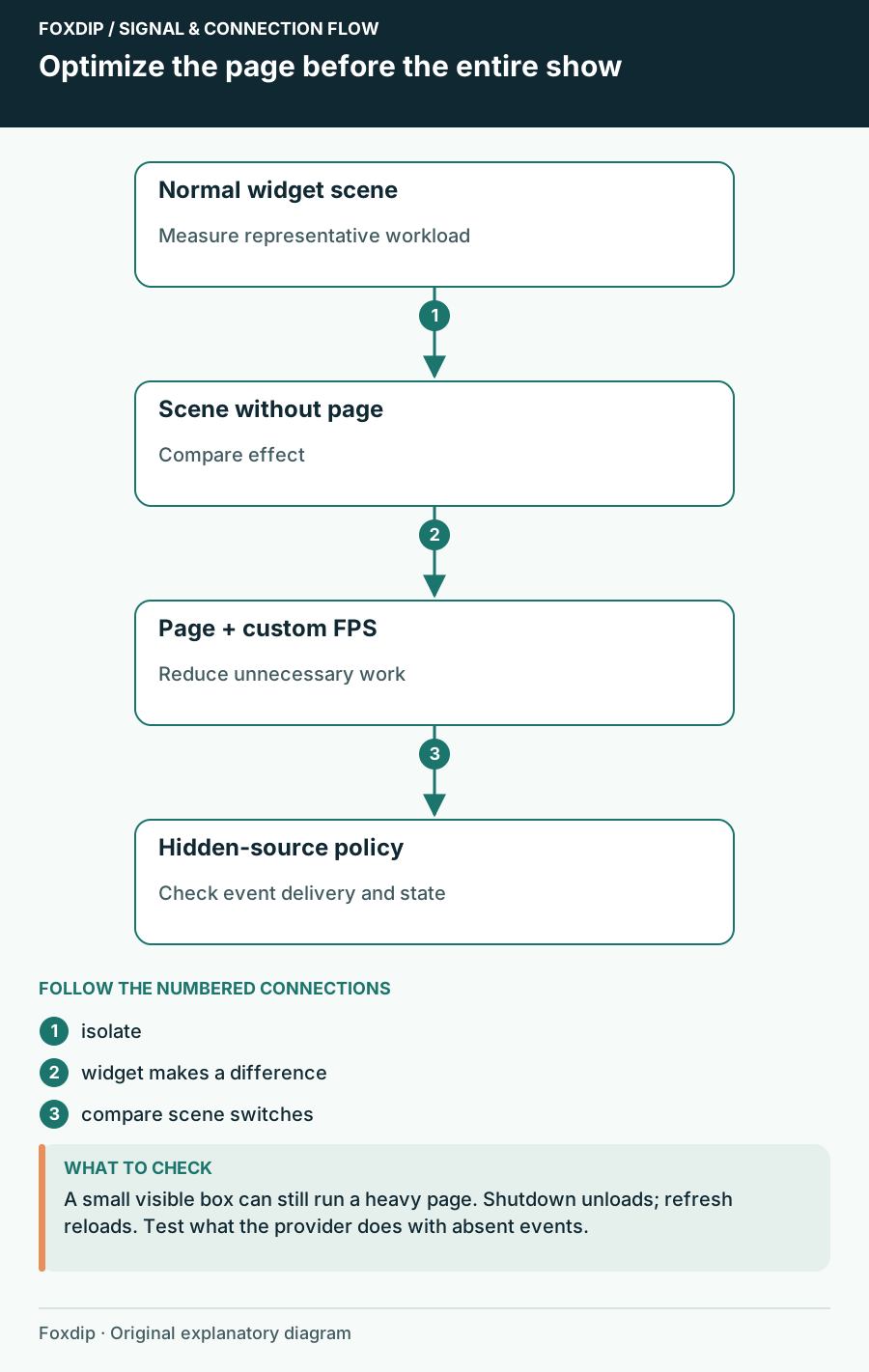
Optimize the page before the entire show. Labels show the relationships described in the guide.
Tutorial

OBS Browser Source Uses Too Much CPU: Isolate the Widget

Compare the page, browser frame rate and hidden-source behaviour without losing alerts unexpectedly.

4 min read ·Oct 26, 2026
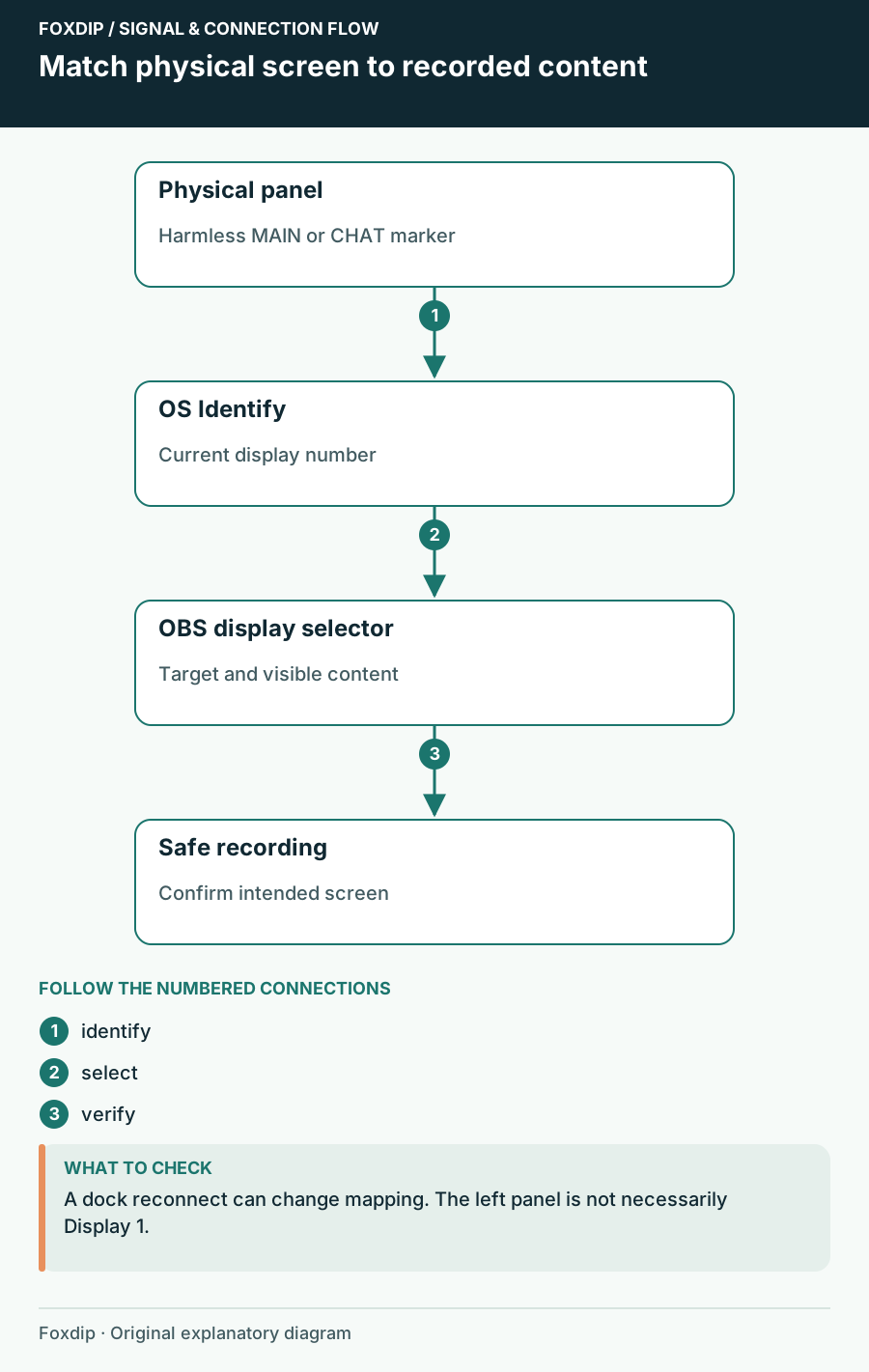
Match physical screen to recorded content. Labels show the relationships described in the guide.
Tutorial

OBS Capturing the Wrong Monitor? Pick the Right Screen

Use your system's Identify displays to match each number to a screen, then pick that display in your OBS capture source. Check again after a cable change.

4 min read ·Oct 26, 2026
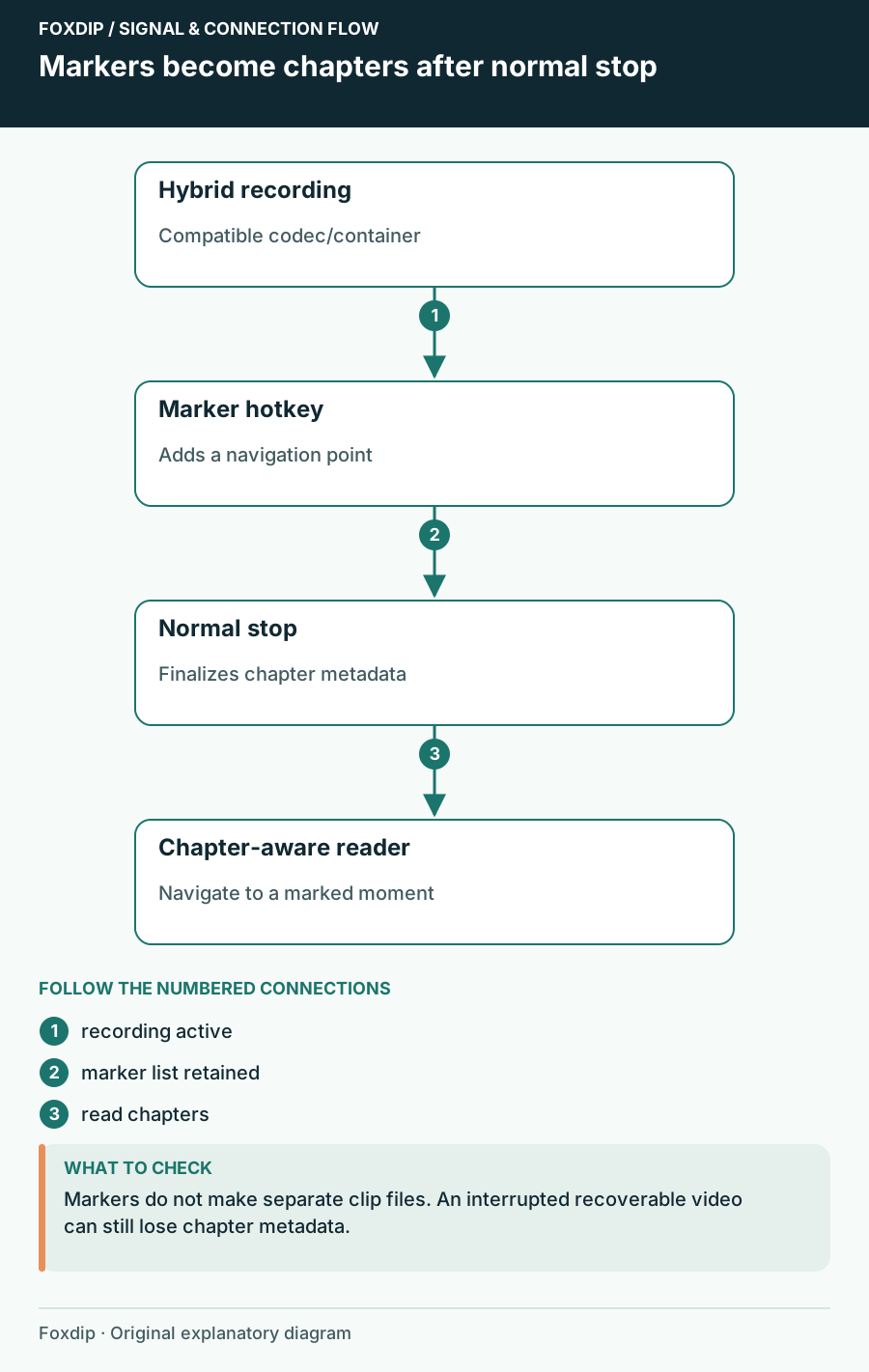
Markers become chapters after normal stop. Labels show the relationships described in the guide.
Tutorial

OBS Chapter Markers: Find Your Best Moments Later

Add a chapter marker hotkey in OBS, record in Hybrid MP4 or MOV and stop normally. Then jump straight to your highlights in your player or editor.

4 min read ·Oct 26, 2026
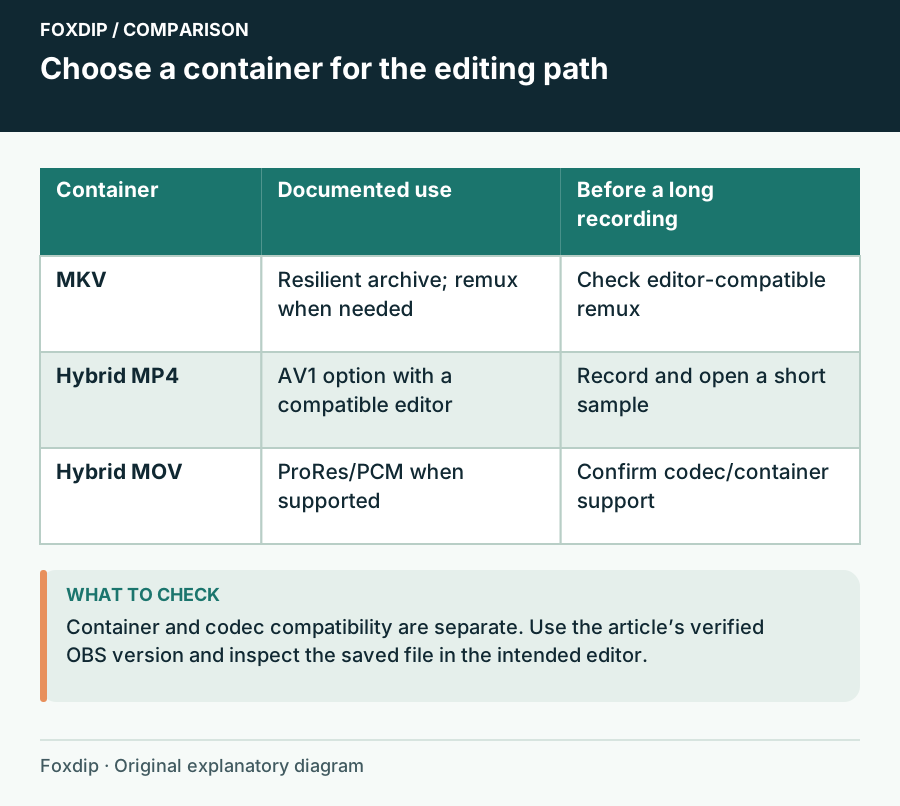
Choose a container for the editing path. Comparison columns: Container, Documented use, Before a long recording.
Tutorial

OBS Hybrid MP4 vs MKV: Which Recording Format to Pick

Hybrid MP4 survives a crash like MKV and opens in more editors. See when to keep MKV, when to switch, and the short test to run before a long recording.

4 min read ·Oct 26, 2026
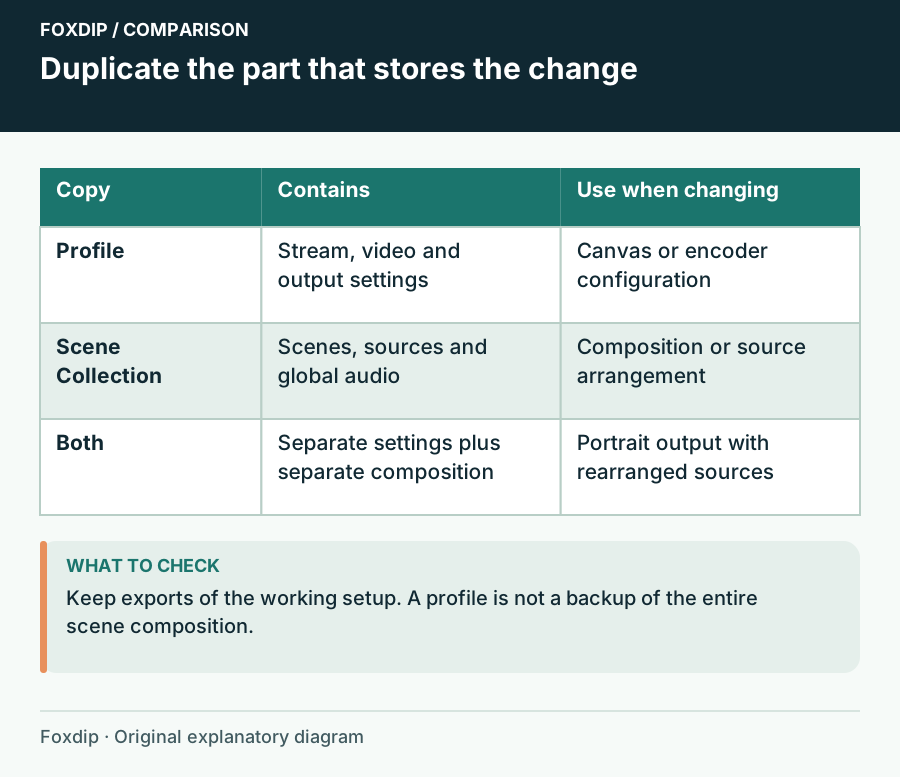
Duplicate the part that stores the change. Comparison columns: Copy, Contains, Use when changing.
Tutorial

OBS Profile vs Scene Collection: What's the Difference?

Profiles hold your stream and recording settings, scene collections hold your scenes and sources. Know which one to duplicate before you test something.

4 min read ·Oct 26, 2026
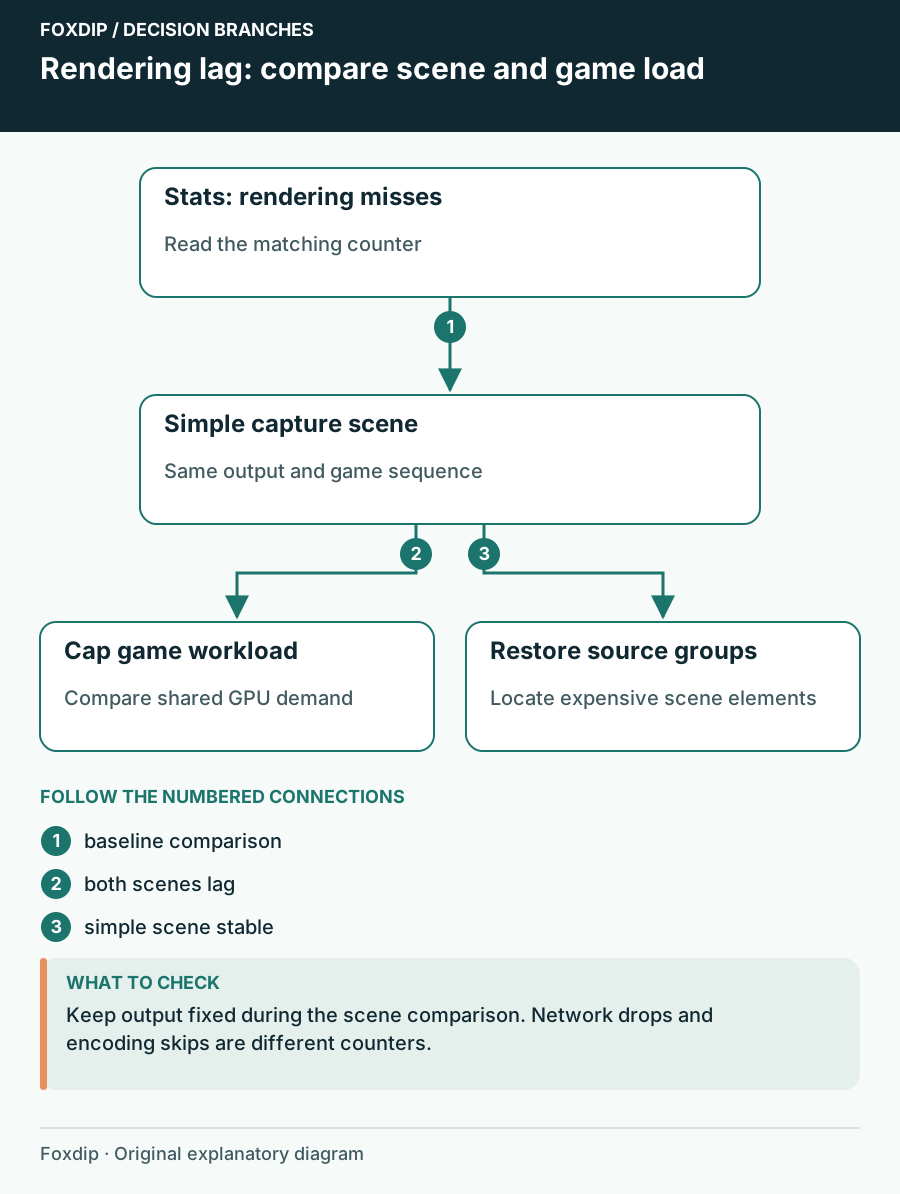
Rendering lag: compare scene and game load. Branches connect the checks and possible next steps.
Tutorial

OBS Rendering Lag: Find the Scene That Uses Too Much GPU Time

Compare scenes and game workload while watching rendering lag instead of changing bitrate blindly.

4 min read ·Oct 26, 2026
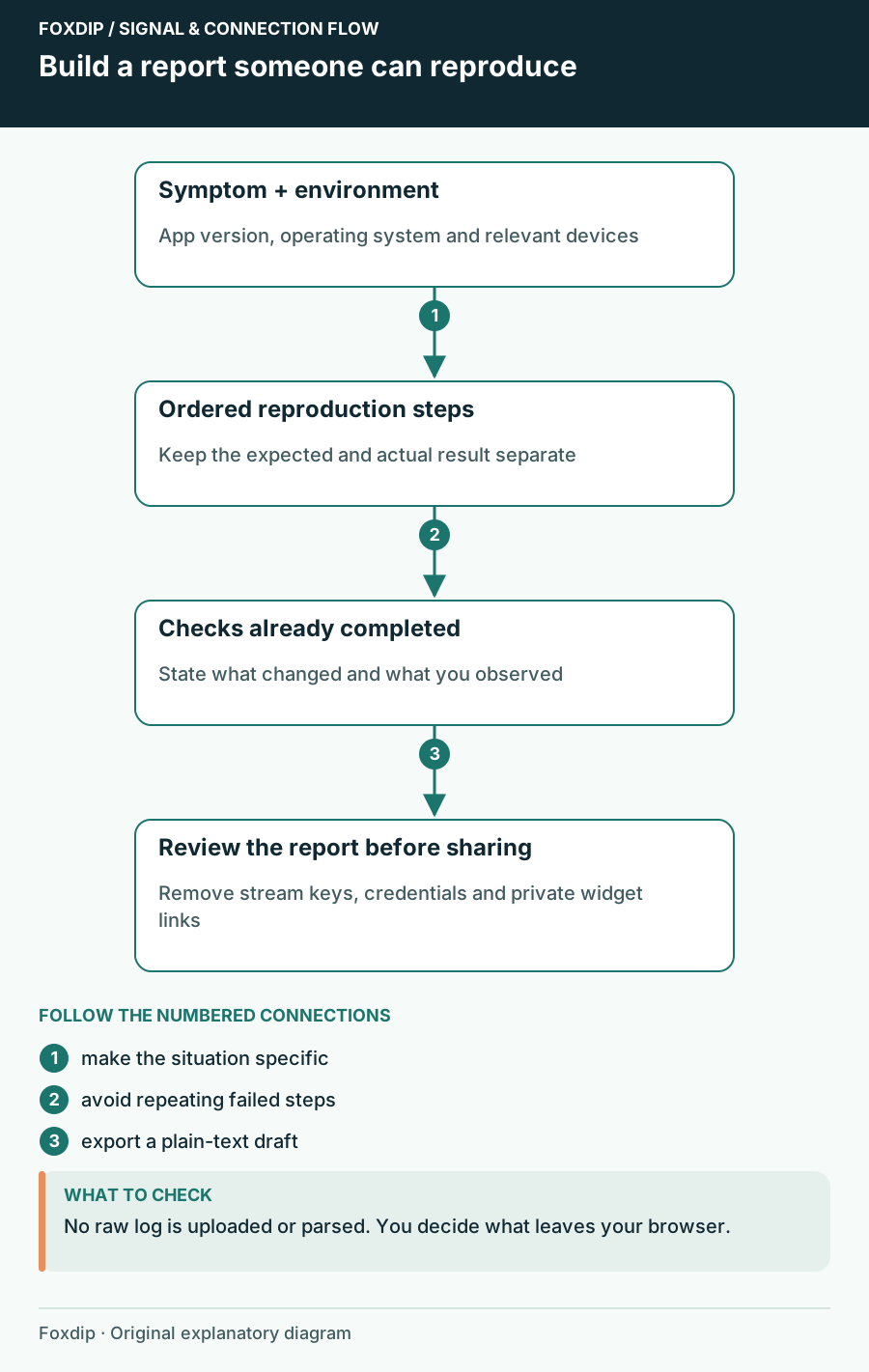
Build a report someone can reproduce. Original worked example for the local worksheet.
Free tools & worksheets

OBS Support Report Builder: Explain the Failure Before Sharing the Log

Draft a focused OBS help request with your setup, reproduction steps, expected result and checks already tried. Export it before sharing.

4 min read ·Oct 26, 2026
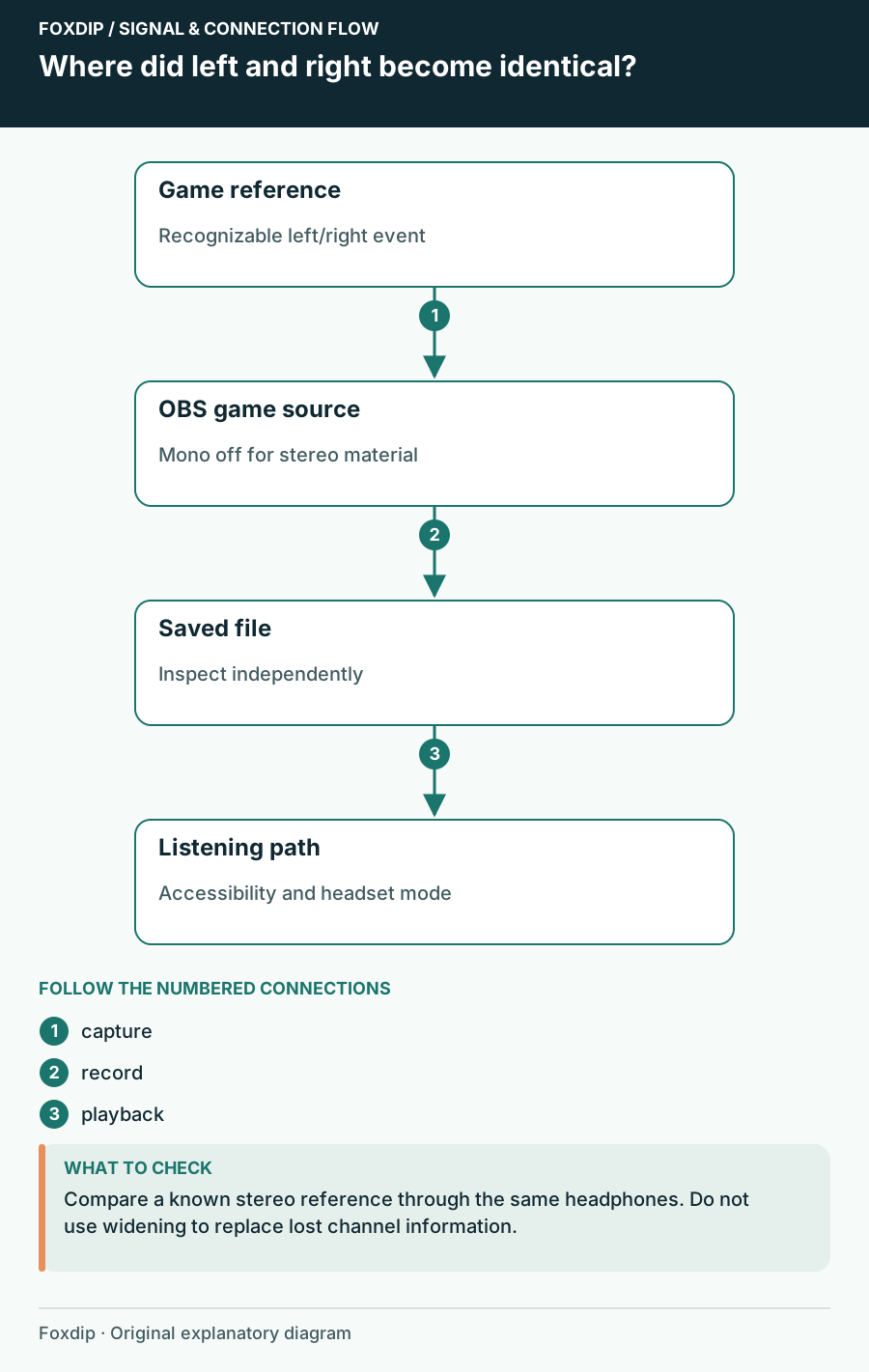
Where did left and right become identical?. Labels show the relationships described in the guide.
Tutorial

Stereo Game Audio Sounds Narrow in OBS: Trace the Channels

Find the point where left and right become identical before trying a widening effect.

4 min read ·Oct 26, 2026
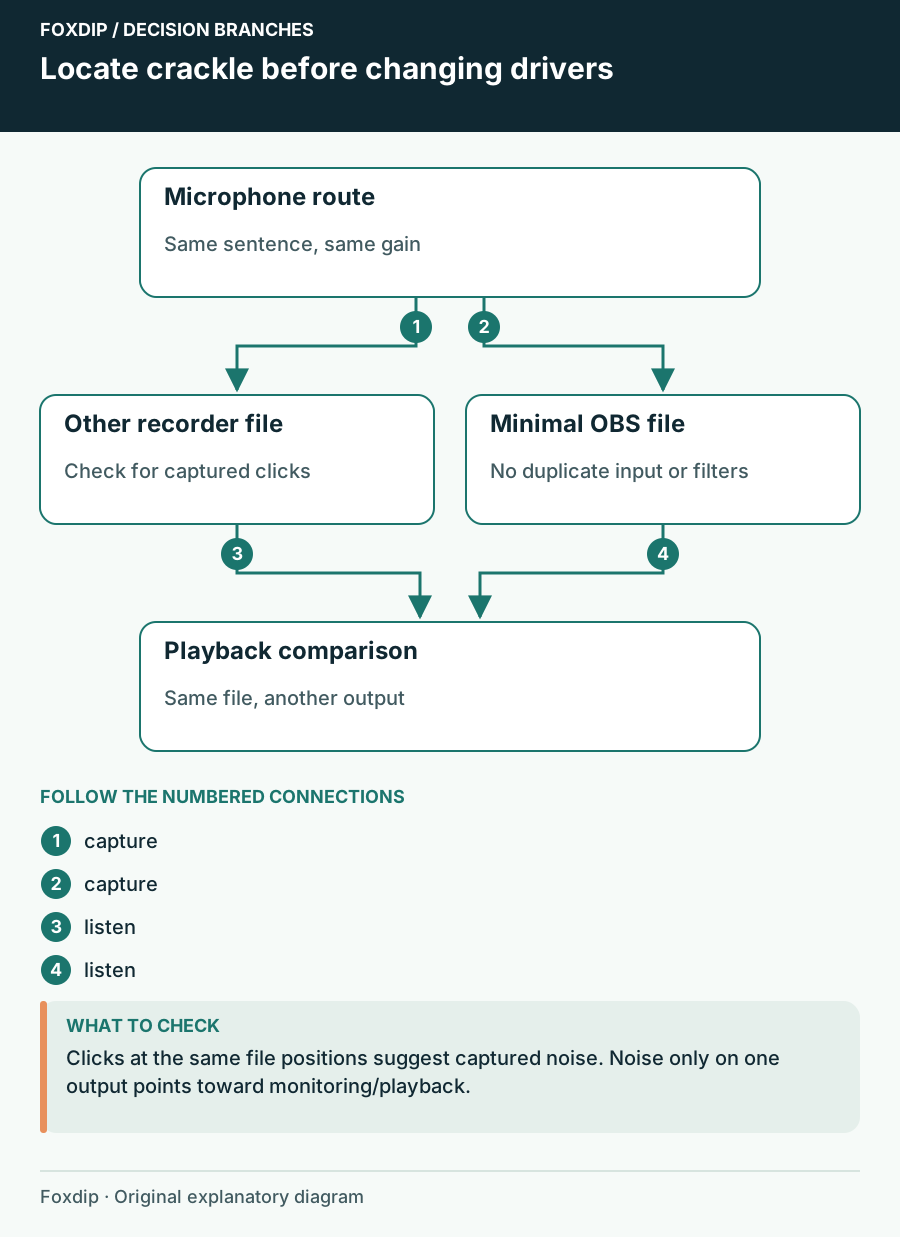
Locate crackle before changing drivers. Branches connect the checks and possible next steps.
Tutorial

USB Microphone Crackles in OBS: Find Where the Noise Starts

Compare the saved input, USB route and headphone playback before changing drivers.

4 min read ·Oct 26, 2026
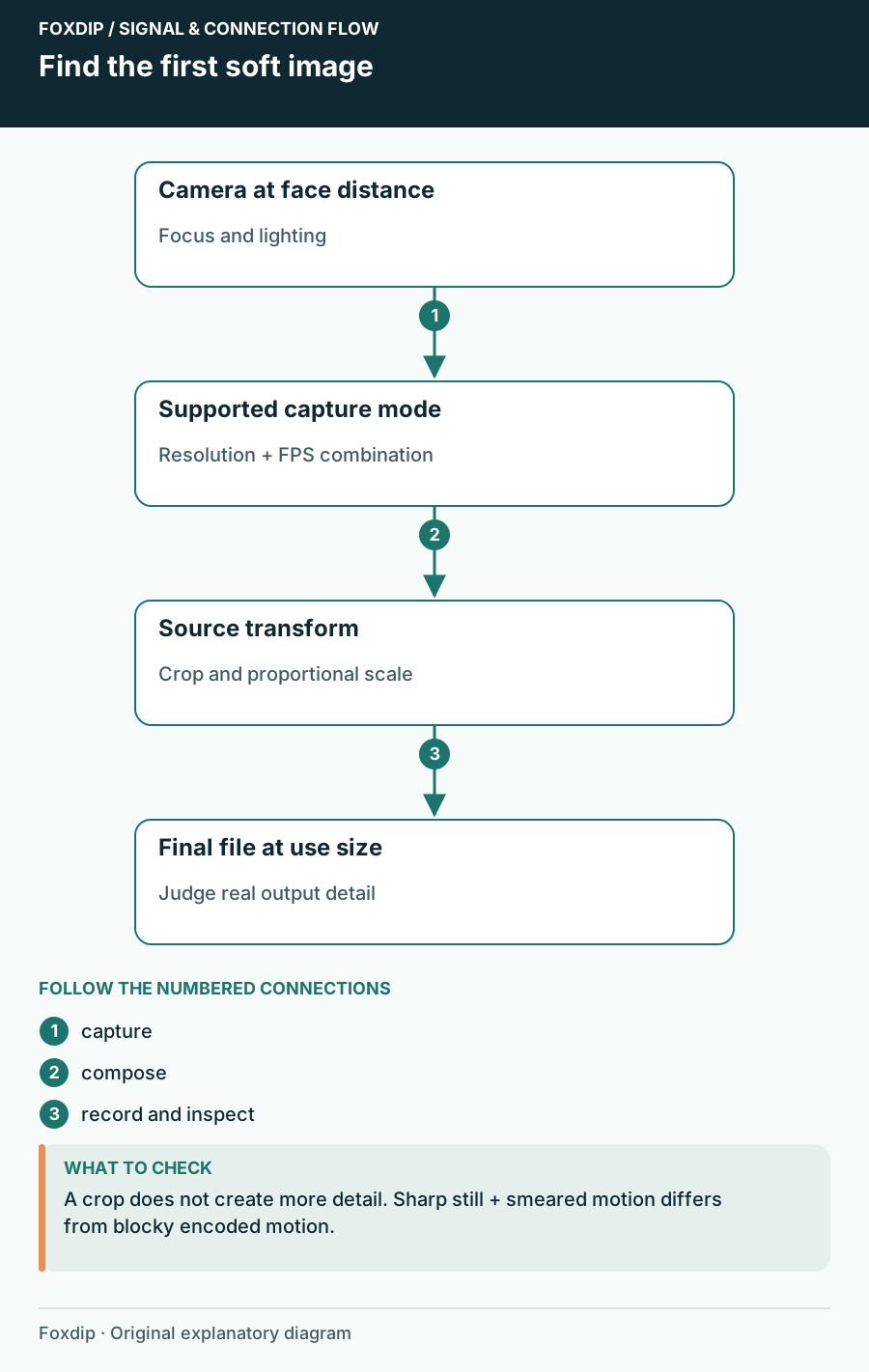
Find the first soft image. Labels show the relationships described in the guide.
Tutorial

Webcam Blurry in OBS? 3 Checks That Find the Cause

Check the resolution and FPS your camera really sends, then its focus, then how the scene scales it. You'll see exactly where the detail gets lost.

4 min read ·Oct 26, 2026
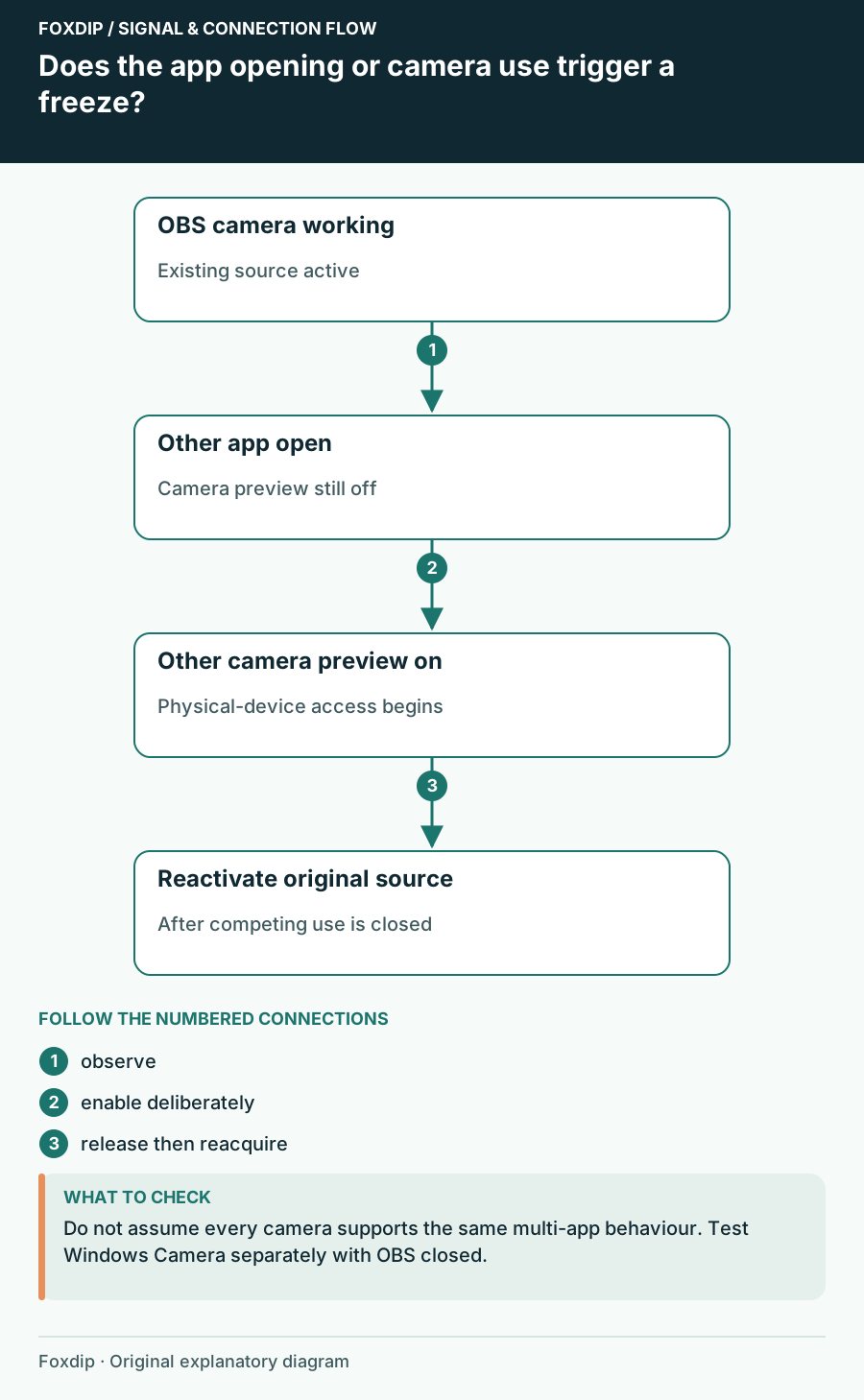
Does the app opening or camera use trigger a freeze?. Labels show the relationships described in the guide.
Tutorial

Webcam Freezes in OBS When Another App Opens

Check camera ownership and reconnect the existing source before rebuilding the scene.

4 min read ·Oct 26, 2026