
Keep MKV if its remux workflow suits you. Choose Hybrid MP4 or Hybrid MOV when its supported codecs and your editor work together, then verify a short file before switching.
Compare interruption resilience, codecs and normal-stop compatibility before a long recording.
In this guide
Before you start
- OBS Studio 32.2.2 and the editor or upload destination you actually use.
- A duplicated profile, free recording space and a copy of an existing known-good file.
Separate a container from its contents
An MP4 extension identifies a container, not a guarantee that the video inside is H.264 or that every editor can decode it. Codec, audio format and bit depth still matter. Changing MKV to MP4 through remuxing repackages the streams; it does not convert an unsupported codec.
Start with the result you need: easy editor import, a resilient long archive, a specific audio format or chapter navigation. If your current MKV recordings remux quickly and import correctly, you may have no reason to change the recording format.
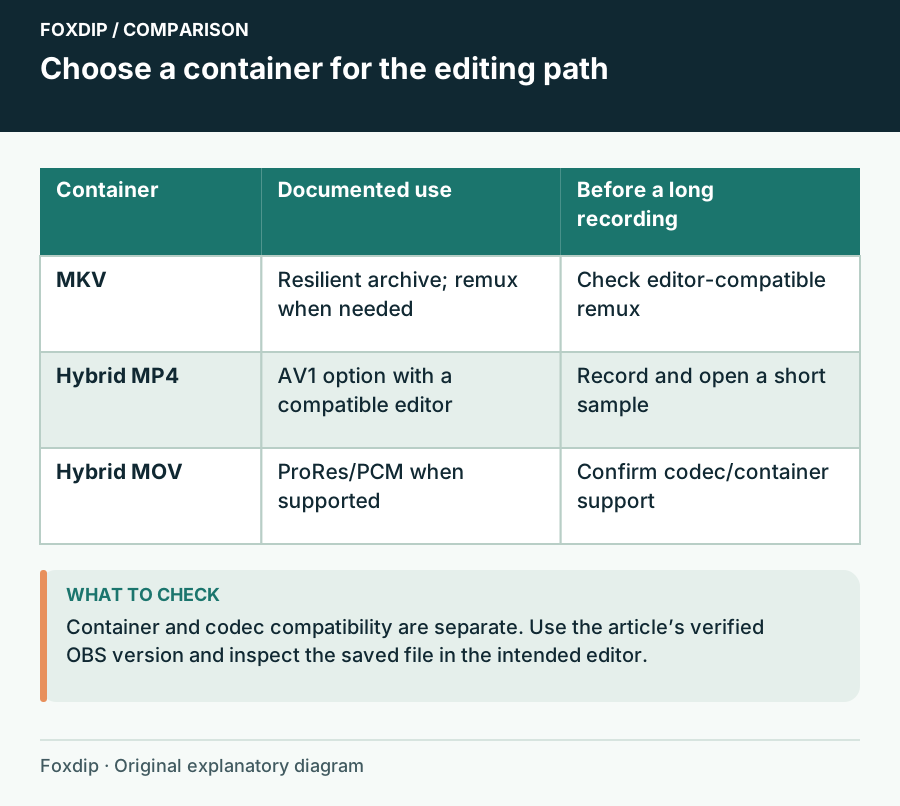
Original Foxdip schematic. Follow the labelled checks alongside the guide.
Know what the hybrid option changes
OBS introduced Hybrid MP4 in 30.2 and Hybrid MOV in 32.0. They write recoverable fragmented data while recording and finalize it to behave like a regular file after a normal stop. This differs from choosing traditional MP4 or MOV, which depends on finalization for normal recovery.
Recoverable does not mean every byte survives a disk failure. It also does not guarantee every player will open an interrupted file directly. Keep an untouched copy before attempting any recovery or remux operation.
Match the codec before the extension
Use the current hybrid documentation for the codec comparison. Hybrid MP4 supports AV1 where Hybrid MOV does not; Hybrid MOV supports ProRes where Hybrid MP4 does not. PCM compatibility can also favour MOV in some applications. Do not treat these as visual-quality rankings.
For a familiar editing pipeline, compare the same supported codec in both candidate containers first. That isolates the container choice. If you change format, codec, quality and colour settings at once, an import failure will be much harder to explain.
| Need | Starting choice | Check before a session |
|---|---|---|
| Existing resilient archive workflow | MKV plus remux when needed | Editor accepts the remuxed streams |
| AV1 with a compatible editor | Hybrid MP4 | GPU encode and editor decode support |
| ProRes or compatible PCM workflow | Hybrid MOV | Storage rate and editor interpretation |
Make an editor-focused comparison
Record the actual material
In a duplicated profile, select the candidate format and record motion, speech and your intended separate audio tracks. Stop normally.
Look for: A short file is created in the chosen folder.
If recording fails, solve codec or output compatibility before comparing editors.
Inspect the edit
Import the file into your actual editor. Scrub, seek to the end, reveal all audio tracks and export a small section.
Look for: Picture, timing and tracks survive the workflow you need.
If only one editor fails, retain the source file and compare its supported codecs before changing OBS again.
Keep a rollback that costs very little
Keep the previous recording profile and its working sample. After the new format passes a short check, try a representative session length and keep both until the project is delivered. Do not deliberately cut power to test recoverability on valuable recordings.
If a file was interrupted, copy it before attempting repair and distinguish its incomplete state from a normally stopped sample. Chapter metadata in hybrid files has a separate finalization limitation. Choose the format for your real editing path, and keep the MKV-to-MP4 remux workflow when that already meets your editor’s needs.
Sources & references
Based on official product documentation reviewed on 27 October 2026. Follow the recording checks below on your own setup.
- OBS — Hybrid MP4 & Hybrid MOV Formats ↗Checked 2026-10-27
- OBS developer — Writing an MP4 Muxer for Fun and Profit ↗Checked 2026-10-27
- OBS — Audio/Video Formats Guide ↗Checked 2026-10-27
Spotted something out of date? Let Alex know.
How we put our guides together ↗