
Bypass suppression and other voice filters one at a time. If suppression removes words, reduce its strength or use a different supported method after improving microphone placement.
Find the processing stage removing syllables and choose a less destructive noise treatment.
In this guide
Before you start
- A quiet reference recording and headphones for playback.
- Access to any microphone vendor app or virtual mixer that also processes your voice.
Listen for the type of damage
Watery vowels, missing breaths and clipped first syllables can sound similar in a busy mix. Make a short reference containing ordinary speech, a soft sentence and a louder reaction. Keep your speaking position steady. Judge the saved file, because direct microphone monitoring may bypass OBS filters entirely.
Before changing anything, write down the filter list and current values. Include processing outside OBS: a microphone app, a virtual mixer and an operating-system voice feature may already be reducing noise. Two individually reasonable treatments can make the combined result hard to understand.
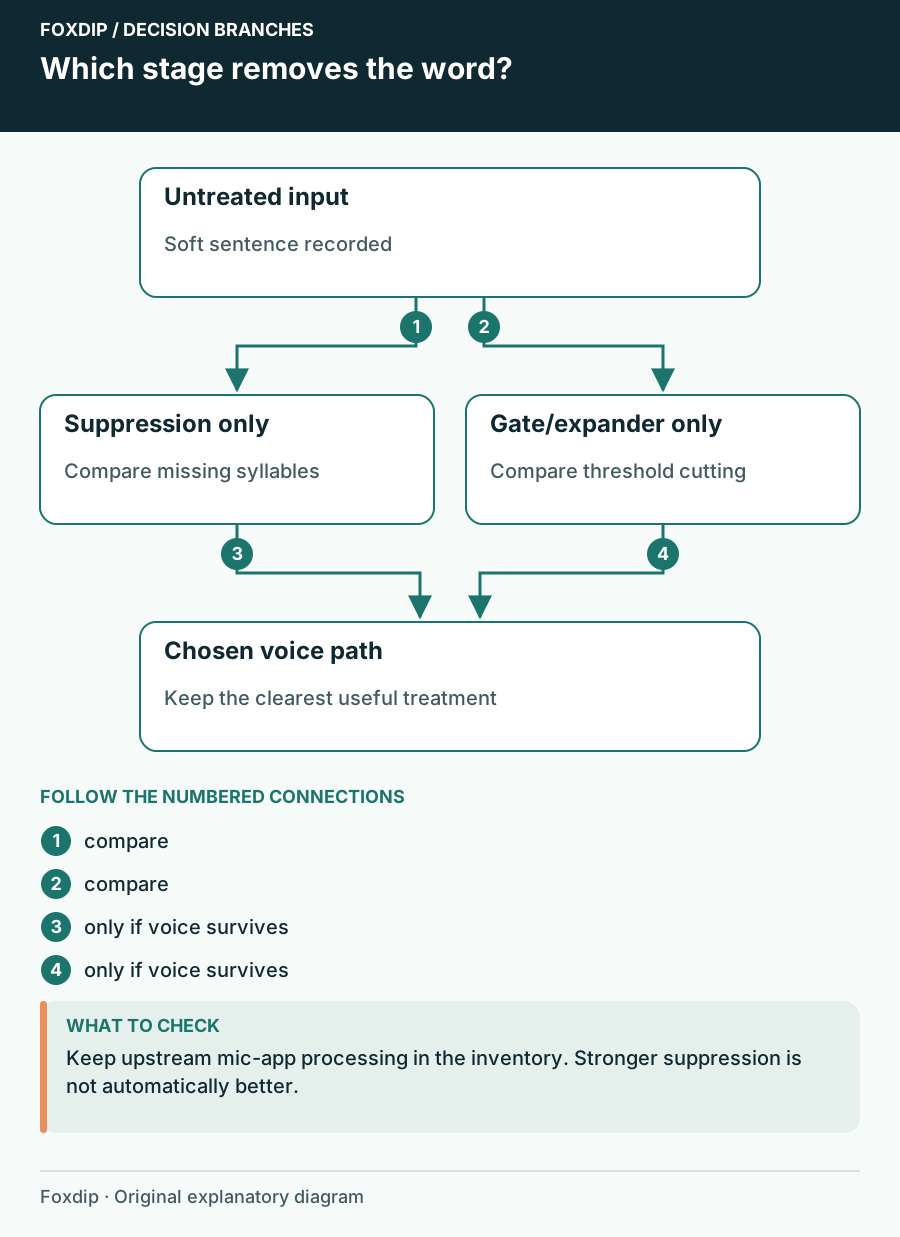
Original Foxdip schematic. Follow the labelled checks alongside the guide.
Find the stage that removes the word
Bypass OBS voice processing
Use the enable control beside the mic filters to bypass suppression, gate and expander for a comparison recording. Do not delete their settings.
Look for: You can tell whether the untouched incoming voice contains complete words.
If words are missing before OBS processing, inspect the microphone app or input route first.
Restore one filter at a time
Enable suppression alone and repeat the same soft sentence. Then compare any gate or expander separately.
Look for: You identify which individual stage causes the unwanted change.
If only the combination fails, keep one treatment off while tuning the other.
Choose a method with a specific job
OBS describes suppression as a way to reduce mild background noise, not repair every sound in a loud room. Speex exposes a suppression level; moving it toward stronger reduction can also distort speech. RNNoise offers a different method with a different processing cost. Compare them with your own quiet voice before deciding.
NVIDIA Noise Removal is only an option on supported hardware with the required Broadcast SDK. Installing another processor is not the first fix for missing words. Start with the methods already available, and leave the clearer one active at the least aggressive setting that addresses the actual distraction.
Make the room easier for the microphone
Move the microphone nearer to a comfortable speaking position and reduce the fan or speaker noise reaching it. Check that you are speaking into the correct side. Record again at a level that leaves headroom for a laugh. Better voice-to-room balance gives you more freedom to use gentle processing.
Do not chase complete digital silence between sentences at the expense of intelligibility. For conversational streaming, a faint steady background can be less distracting than a voice that breaks apart whenever you lower it. If a threshold filter is the culprit, tune that threshold rather than making suppression stronger.
Use placement to improve the voice before asking a filter to do more. Find a repeatable speaking position ↗
Check the words you tend to lose
Build a repeatable passage with a soft opening, a final consonant, a short pause and a laugh. Include the actual way you speak while looking at the game. Listen to the processed and bypassed versions at comparable playback levels so a louder version does not win automatically.
Stop tuning when the intended background is less distracting and the whole sentence remains understandable. Save the chosen method and note any external processing left active. Recheck after a microphone software update, especially if its defaults enable a second noise-removal stage.
Compare processing with a quiet consonant sequence
Use a repeatable phrase with soft beginnings and endings, such as “seven small things”, at your normal distance. Record it once with suppression bypassed and once with only the candidate suppression method active. Keep the hardware gain and playback volume fixed. The phrase is a practical comparison tool, not a calibrated speech test.
If bypass restores the missing sounds, reduce the processing or compare another supported method before touching compression. If both clips lose the same sounds, inspect processing upstream of OBS and the original input. This avoids tuning a filter that is not responsible for the damage.
| Observation | Next change | Expected result |
|---|---|---|
| Only the processed clip loses soft consonants | Back off suppression or compare its method | Recover complete words while assessing remaining noise |
| Both clips are damaged | Check microphone software, virtual mixers and input quality | Find the first stage where the voice changes |
| Speech is clear but quiet gaps remain audible | Judge the full conversation before adding more treatment | Do not trade intelligibility for silent pauses |
Use the threshold branch when only phrase starts or endings disappear. Your OBS Noise Gate Swallows Quiet Speech: Tune Both Thresholds ↗
Sources & references
Based on official product documentation reviewed on 27 October 2026. Follow the recording checks below on your own setup. November 2026 addition: documentation-based diagnostic examples; no new hands-on hardware result or platform upload test is claimed.
- OBS — Noise Suppression Filter ↗Checked 2026-11-04
Spotted something out of date? Let Alex know.
How we put our guides together ↗