
Add a Compressor filter to the game audio source and choose your microphone as its Sidechain/Ducking Source. Tune the reduction using a spoken recording.
Use the microphone as a sidechain trigger and keep the game audible between phrases.
In this guide
Before you start
- Separate microphone and game sources.
- A game section with steady sound and a short passage you can repeat.
Put the control on the sound being lowered
To make room for commentary, the game is the source that needs to change. Adding a normal compressor only to the microphone will control your voice level but will not turn the game down when you speak. The sidechain connection tells the game compressor which other source should trigger its response.
Set a comfortable static game level before adding ducking. If the game buries your voice all the time, a lower base game level may solve the problem with less movement. Ducking is most helpful when you want a fuller game sound during quiet stretches and space for speech during commentary.
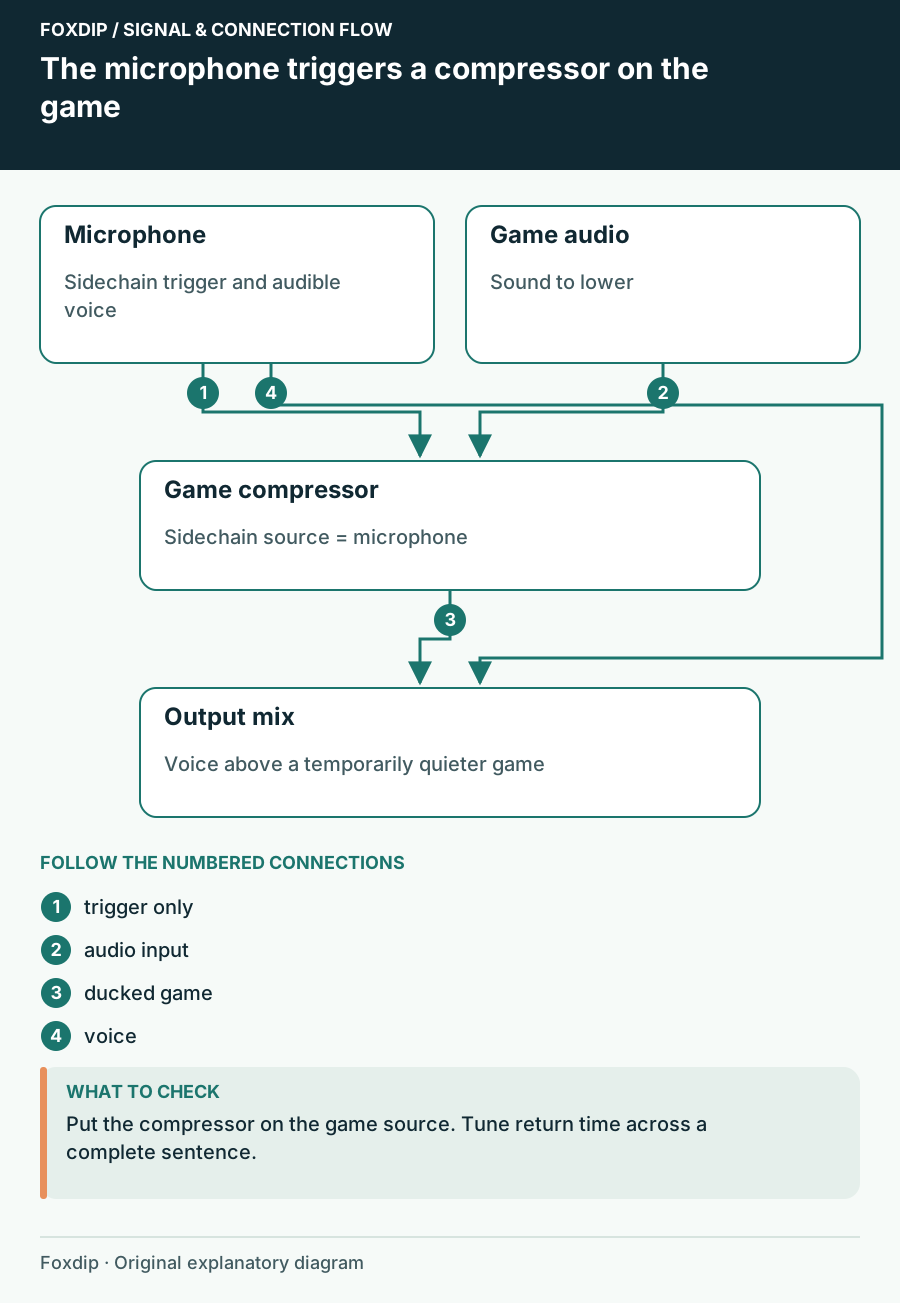
Original Foxdip schematic. Follow the labelled checks alongside the guide.
Connect the sidechain
Open Filters for the game audio source and add Compressor. Choose the actual microphone source in Sidechain/Ducking Source. Leave output gain at zero for this use. OBS publishes an assertive starting example, but the right threshold still depends on the microphone level reaching the trigger.
Prove the trigger
Record game sound while you remain quiet, then speak a few words without changing the game. Bypass and enable the compressor for comparison.
Look for: Game sound falls during speech only when the sidechain compressor is active.
If game explosions cause the reduction instead, recheck the selected sidechain source.
Set the amount
Adjust threshold and ratio while repeating the same phrase. Start with a clearly audible reduction, then ease it back.
Look for: Every word is understandable and the game remains recognizable.
If breaths keep lowering the game, inspect the microphone trigger and reduce sensitivity.
Shape the handover around a sentence
A fast handover can make the first word easier to hear but can sound abrupt. A longer release can keep game sound from bouncing up between words, but may leave the game quiet after you finish. Tune while saying a whole sentence, including a short pause.
Use the same game sequence for each comparison. A changing soundtrack makes it difficult to tell whether a setting helped. Keep an unprocessed reference and check the saved files at the same headphone volume. You are choosing a movement that supports conversation, not aiming for the greatest possible reduction.
Keep chat and music intentional
If game, music and Discord enter one combined source, the compressor will lower them together. That may be exactly what you want, but it can also make a friend fade while you answer. Put a separate sidechain compressor on only the sources that should yield to you.
Check microphone muting too. A muted broadcast voice and its trigger behaviour can depend on where processing and routing occur. Perform a local check using your real mute button; do not assume silence in your headphones proves the sidechain has stopped. If it continues ducking while you are meant to be absent, simplify the trigger route.
Listen from the viewer’s position
Record thirty seconds with commentary, a quiet pause and a louder reaction. Ask whether a viewer can follow the sentence without straining and whether the return of game sound feels natural. Include a quiet game moment as well as combat: one threshold may feel different over each.
If you dislike the pumping even after modest adjustments, keep a lower static game level and remove the filter. The purpose is easier listening. Save the final base fader and sidechain settings together, because moving the microphone level later can change when ducking starts.
Listen to commentary and game together after the ducking movement feels right. Check the complete stream mix ↗
Sources & references
Based on official product documentation reviewed on 27 October 2026. Follow the recording checks below on your own setup.
- OBS — Compressor Filter ↗Checked 2026-10-27
Spotted something out of date? Let Alex know.
How we put our guides together ↗