
Set the open threshold below your quiet intentional speech and the close threshold above room noise but lower than the open threshold. Adjust timing only after those levels work.
Use room noise and soft speech to set the gate instead of copying another streamer’s numbers.
In this guide
Before you start
- One microphone source and a steady speaking position.
- A note of existing gate values, plus a recording with all other filters unchanged.
A gate decides when the route is open
The gate does not recognize words. It reacts to signal level. A whispered first word can fall below the opening point even when the louder middle of the sentence passes. A closing point that sits too high can remove the tail of a sentence.
Do a bypass recording first. If the missing word is absent even with the gate disabled, this guide is not the right adjustment yet. If the whole phrase returns when you bypass it, keep the microphone gain and distance steady while you work on the gate.
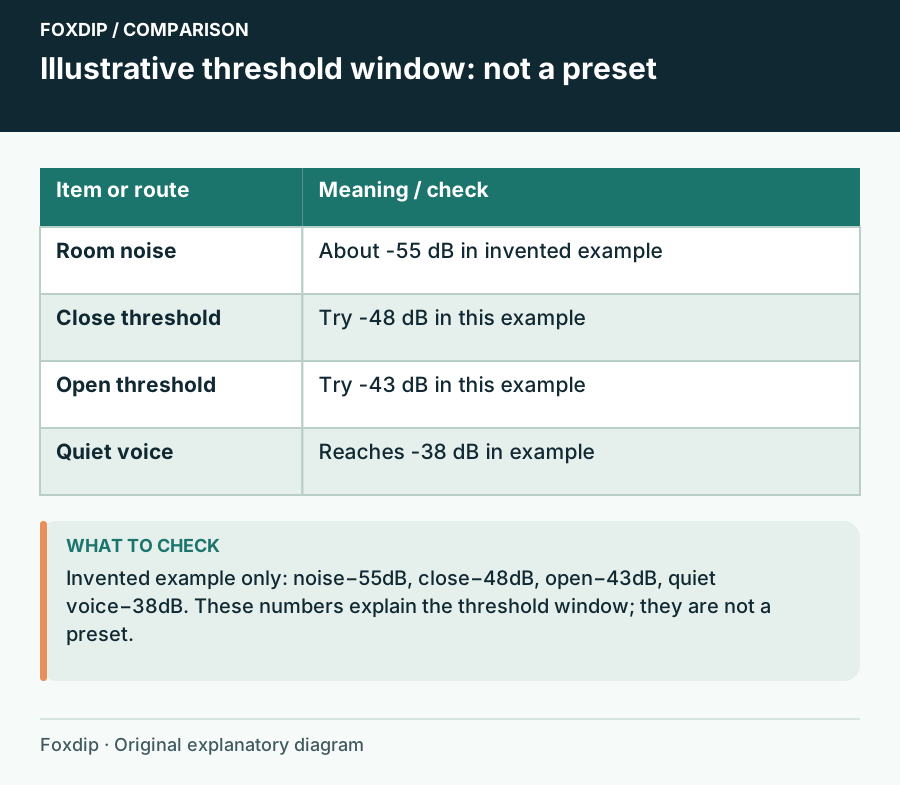
Original Foxdip schematic. Follow the labelled checks alongside the guide.
Find room noise and your quiet voice
Sit in your real position with the PC doing its usual work. Observe the microphone meter during silence, typing and quiet speech. Note ranges rather than one peak. Then speak a sentence softly enough to resemble a calm late-night stream. The goal is to find whether there is usable space between room noise and the soft voice you want to keep.
For an invented example, a room around -55 dB and soft speech reaching -38 dB leaves room for experimentation. An open threshold around -43 dB and close threshold around -48 dB would be a starting experiment, not a preset for every microphone. If noise and speech overlap, placement or a gentler approach is needed.
Tune opening before closing
OBS exposes separate open and close thresholds. Keep the close threshold more negative than the open threshold, so a voice that has opened the gate can decay naturally before it closes.
Preserve quiet entrances
Lower the open threshold in small steps and record a soft phrase after two seconds of silence.
Look for: The first word opens the gate without a shout.
If keyboard noise also opens it, improve placement instead of raising the threshold until speech fails.
Preserve the end of the sentence
Set the close threshold above the steady noise while remaining below the opening point. Speak a phrase that ends softly.
Look for: The end of the word survives and the gate eventually closes between phrases.
If no setting separates them, compare an expander or leave the gate bypassed.
Use time controls for the remaining edge
Attack controls how the gate opens; hold keeps it open briefly; release shapes the fade after it closes. Record the current timing before making one change. If the gate chatters through a sentence, a longer hold or release may help, but a bad opening threshold still needs fixing.
Use small changes and listen for the particular defect. Longer timing can preserve a trailing syllable while also leaving more room noise audible. That trade-off is often acceptable. Avoid a long release simply to hide a gate that opens unpredictably.
Choose a softer ending if the gate keeps fighting you
An expander lowers below-threshold audio by a ratio instead of imposing the same hard cut. It can be a better fit for a conversational voice with soft starts, although it still needs tuning. Do not stack a harsh gate and a harsh expander to solve the same gap.
Finish with an ordinary passage, a quiet aside, typing and several pauses. Save the result that keeps the words intact. Revisit the thresholds after changing mic gain, distance or earlier filters: the gate is responding to the level it receives, so its old numbers may no longer describe the same voice.
A threshold cannot separate overlapping noise and speech
Listen to a quiet sentence while the normal fan or keyboard is present. If the quiet words and unwanted sound occupy the same practical level range, no single opening threshold can reliably select only the voice. Bring the voice closer or reduce the noise reaching the microphone before seeking a more aggressive gate.
Compare a phrase beginning softly, a short pause inside the sentence and its final consonant. Each checks a different part of the gate’s action. Keep a note of the last usable settings so a threshold experiment does not erase the original voice.
| Observation | Next change | Expected result |
|---|---|---|
| First syllable never opens the gate | Lower the opening threshold and compare | Soft speech enters before fine-tuning timing |
| Middle pauses close the voice abruptly | Inspect hold/release with a complete sentence | Natural phrase gaps do not sound chopped |
| Noise keeps the gate open while soft speech is still lost | Improve the physical voice-to-noise balance | Do not expect one threshold to distinguish overlapping material |
Improve the input balance when thresholds cannot separate voice from noise. Microphone Distance and Placement: Find Your Speaking Position ↗
Sources & references
Based on official product documentation reviewed on 27 October 2026. Follow the recording checks below on your own setup. November 2026 addition: documentation-based diagnostic examples; no new hands-on hardware result or platform upload test is claimed.
- OBS — Noise Gate Filter ↗Checked 2026-11-04
- OBS — Expander Filter ↗Checked 2026-10-27
Spotted something out of date? Let Alex know.
How we put our guides together ↗