
Enter a dated start with Z or a numeric UTC offset, then choose the home and viewer IANA time zones. Convert each dated session rather than reusing one fixed clock difference all year.
Try it with your setup.
Change the example, update the preview, then keep the notes you want to use. Everything stays in this browser unless you download or print it.
Discord shows the dated instant in each reader’s own time zone.
Worked example
Start: 27 Oct 2026, 20:00 Europe/Paris; 27 Oct 2026, 15:00 America/New_York; 19:00 UTC. End is two hours later. Browser timezone database applies date-specific offset.
In this guide
Start with one unambiguous moment
The start field accepts an ISO 8601 date and time with an explicit offset. For example, 2026-10-27T19:00:00Z means 19:00 UTC on 27 October. A timestamp ending in +01:00 identifies a different local offset explicitly. A date and clock time without either is rejected because it leaves the intended time zone open to interpretation.
If you know only “eight in the evening at home,” first confirm the UTC or offset timestamp for that date in your calendar. Do not add Z to the end of a local time merely to satisfy the field; that changes what the value means.
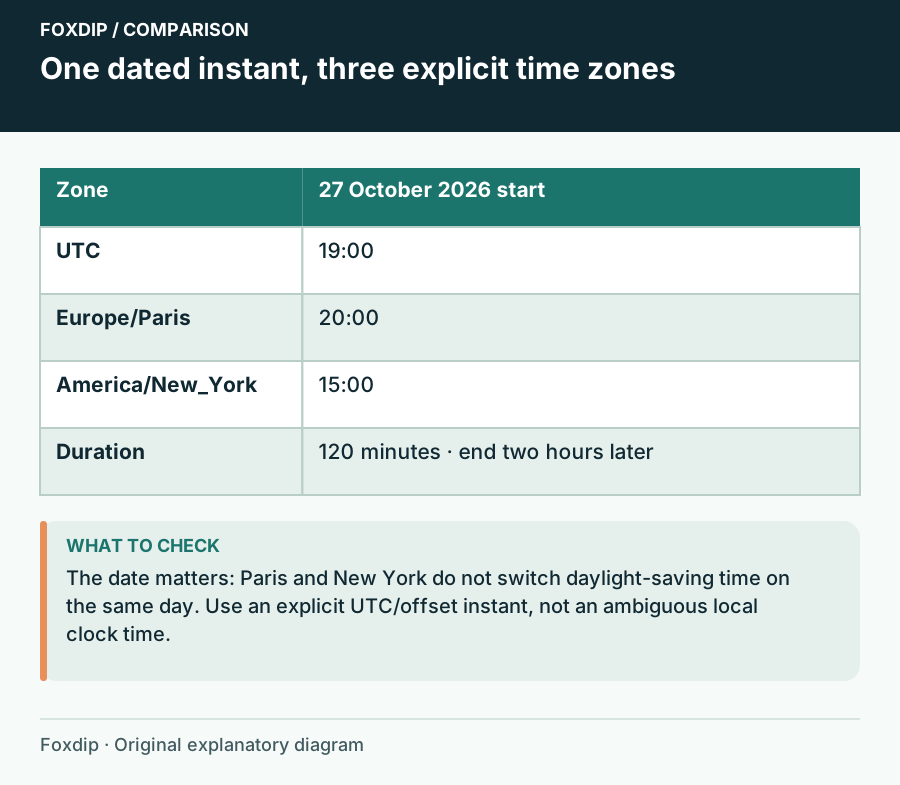
Foxdip worksheet example. Change the inputs above to make your own plan.
Use place-based zones for the displayed times
Enter IANA names such as Europe/Paris and America/New_York. The browser applies its time-zone rules to the dated instant and formats the result for those places. UTC stays visible as a common reference.
The date matters because places do not always change their clocks on the same weekend. A fixed note saying “Paris is six hours ahead” can be wrong for part of the year. IANA maintains time-zone data as governments change offsets and daylight-saving rules; browsers and operating systems deliver those updates.
Check the default session before replacing it
The default starts at 19:00 UTC on 27 October 2026. It displays 20:00 in Europe/Paris and 15:00 in America/New_York. With a duration of 120 minutes, the end is two hours later in each display. Those clock readings are a worked example for this date, not a year-round conversion rule.
Choose a session title that will still make sense when copied into a panel or announcement. Keep the date beside the time, especially when a viewer’s local date differs from yours. An explicit end gives viewers a planning estimate; it does not require you to stop at that exact minute.
Treat recurring streams as separate dated sessions
Change the date and run the conversion for the next session rather than copying last week’s local times. If your audience spans a clock-change weekend, compare the two dates. That small check is easier than explaining a missed start after the announcement has circulated.
This tool converts one session. It does not create a recurrence, update Twitch or send calendar invitations. A recently changed government rule may also reach one device later than another. Keep your browser current and confirm the published session when a local rule has changed.
Copy the result into the surfaces you actually maintain
Choose Update preview, review both displayed dates and times, then Download notes for a plain-text reference. Put the relevant local reading and a time-zone label in an announcement; point viewers to the channel’s maintained schedule for later changes.
Save in this browser retains your working fields locally. It is not a cloud schedule or reminder service. After a cancellation or change, update the public surfaces themselves: a correct conversion in this worksheet cannot fix an old panel, social post or channel schedule.
Share a dated instant in Discord
After updating the schedule, choose Copy Discord start timestamp. The code contains the start instant in Unix seconds; Discord formats that same instant in the reader’s time zone and locale.
Use the full-date style for a public announcement, then paste it into your own message when ready. The tool does not send a message or create a recurring event. Recheck the next session’s date when daylight saving time changes.
If you need the next part of this task. Open the related tool ↗
Sources & references
Original Foxdip worksheet guidance. Platform details follow the linked primary references.
- IANA — Time Zones ↗Checked 2026-10-27
Spotted something out of date? Let Alex know.
How we put our guides together ↗