
Enter source and target dimensions, then choose a whole-source fit or a cropped fill. Both keep the original proportions; they solve different layout problems.
A proportional placement plan with the unused or cropped area visible.
Try it with your setup.
Change the example, update the preview, then keep the notes you want to use. Everything stays in this browser unless you download or print it.
Worked example
Scale 0.5625; displayed size 1080 × 607.5 px; unused height 1312.5 px (656.25 per edge when centered). Ratios 16:9 → 9:16. Position: x 0, y 656.25 px. Fill mode also reports source-pixel crop amounts.
In this guide
Before you start
- The pixel dimensions of the source you will place.
- The dimensions of the intended canvas or frame area.
- A decision about which information can be cropped.
Use the source dimensions, then the destination
A landscape game, a portrait canvas and a small camera frame can all have different proportions. Enter the dimensions of the particular source and the area it must occupy. The target does not have to be the entire stream; it can be the box reserved for one source.
OBS distinguishes the base canvas from the scaled output. Decide which space you are planning before copying numbers. A neat fit inside a scene does not set the stream's encoding resolution, and this calculator does not change either setting.
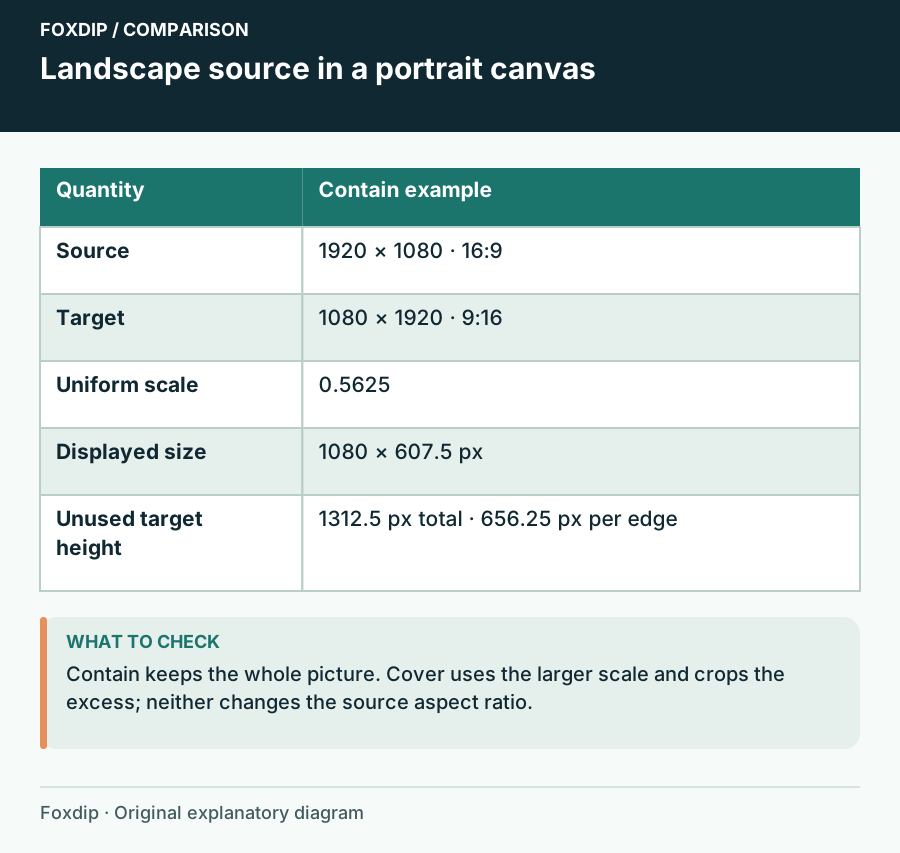
Foxdip worksheet example. Change the inputs above to make your own plan.
Fit preserves everything; fill uses the whole target
Choose Fit whole source when all of the source must remain visible. Empty space may remain above, below or beside it. That space can be intentional: it can hold a camera, readable captions or a short label rather than being treated as a mistake.
Choose Fill target and crop only when you can lose the outside edges. A centred crop may remove a minimap, score or subtitles even when the subject remains beautifully centred. Make that decision with the actual game states, not just a quiet menu screen.
Turn a landscape source into a portrait plan
For a 1920 × 1080 source inside a 1080 × 1920 target, a whole-source fit uses a scale of 0.5625. The displayed source becomes 1080 × 607.5 pixels. The remaining height is 1312.5 pixels, or 656.25 above and below if you centre it.
The fractional values are the geometric calculation. Your final scene may need whole-pixel positioning or dimensions. Round deliberately and inspect thin edges afterwards; do not stretch only the height to make the gap disappear. Filling the portrait target instead will require substantial horizontal cropping.
Apply the plan to a duplicate scene
Use Update preview to compare the choices, then keep a copy of the values with Download notes or Print. In OBS, work on a duplicate scene while trying the placement. The Sources Guide documents Edit Transform and cropping controls for precise placement.
Check what disappears
Apply the proportional placement and inspect menus, subtitles and both screen edges.
Look for: Important information remains visible at the final viewing size.
If a required element is cut off, choose the whole-source fit or redesign the surrounding scene rather than distorting the image.
Verify the delivered picture
Watch a short recording on a phone as well as the full desktop preview. A game can remain technically uncropped while its text becomes too small to read. If that happens, reconsider what portion needs to be shown and whether a separate scene would serve the moment better.
Save in this browser can keep a local working plan, and Reset starts another comparison. Keep the source, target and fit choice together when exporting. A result labelled only '1080p' is not enough to reconstruct how the scene was composed.
Keep the subject when the crop is off-centre
Use horizontal and vertical position to choose which edge stays visible. Zero pins the source to the left or top, 50 centres it, and 100 pins it to the right or bottom.
For a 1920 × 1080 source filling a 1080 × 1920 target, a left-aligned placement keeps the left 607.5 source pixels and crops 1312.5 pixels from the right. The displayed source is scaled to the target height.
The result distinguishes canvas placement from source-pixel crop. They are two descriptions of the same geometry; applying both blindly would crop twice. Verify the subject, captions and game HUD in a test scene.
Sources & references
An original Foxdip worksheet or calculation, with linked platform references reviewed on 27 October 2026.
- OBS Project — Overview Guide ↗Checked 2026-10-27
- OBS Project — Sources Guide ↗Checked 2026-10-27
Spotted something out of date? Let Alex know.
How we put our guides together ↗