
Enter the upload allowance you want to plan around, your own reserve, and the proposed traffic. A positive remainder is arithmetic headroom, not a promise of a stable stream.
An explicit comparison between your chosen upload budget and planned traffic.
Try it with your setup.
Change the example, update the preview, then keep the notes you want to use. Everything stays in this browser unless you download or print it.
Worked example
Available after your reserve: 9 Mbps. Planned payload: 7.16 Mbps. Remaining arithmetic budget: 1.84 Mbps. Add the second output only when this device uploads it separately; a cloud relay does not create another local output.
In this guide
Before you start
- An upload figure you have measured or deliberately chosen for this plan.
- Proposed video/audio bitrates and other simultaneous uploads.
- The destination, codec, resolution and frame rate you intend to use.
Choose a planning figure you can explain
A speed-test result is an observation from one test, not a permanent guarantee. Enter the upload amount you are prepared to plan around, and record how you obtained it. Keep a separate reserve if you want room beyond the traffic you have listed.
The tool does not test your connection or pick a supposedly safe percentage for every home. Your reserve is your own assumption. If several people share the connection, ask what else will upload during the session and add a realistic amount for that activity.
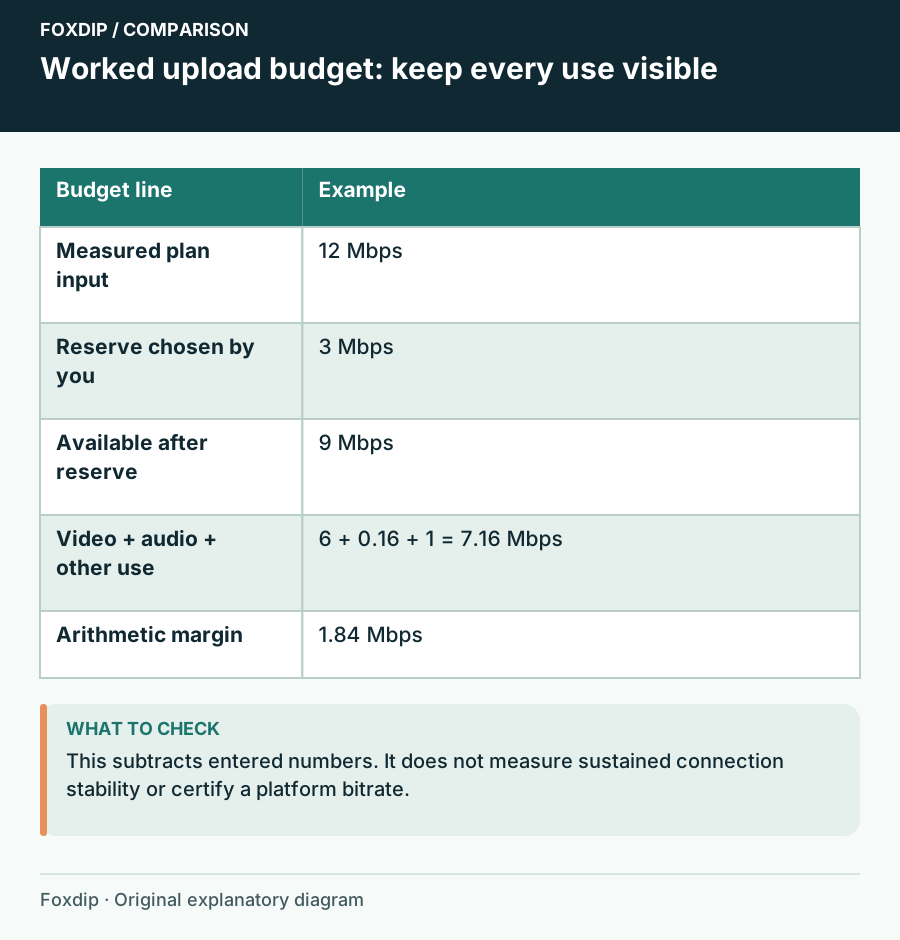
Foxdip worksheet example. Change the inputs above to make your own plan.
Include the parts that are easy to overlook
Enter video in Mbps and audio in Kbps. Add other simultaneous upload traffic in Mbps, such as an active backup or another outgoing feed. Keep the platform and codec in the notes so the number remains tied to an actual plan rather than an unexplained preset.
YouTube's current guidance distinguishes resolution, frame rate and ingestion codec. Its recommended figure is not automatically the right choice for another service or your available connection. Open the destination's guidance and compare the complete mode, including audio; this planner does not certify platform compliance.
Read a positive or negative remainder honestly
Suppose you enter 12 Mbps available, reserve 3 Mbps, and plan 6 Mbps video, 160 Kbps audio and 1 Mbps other traffic. Your allowance after reserve is 9 Mbps. Planned payload is 7.16 Mbps, leaving 1.84 Mbps in that arithmetic budget.
If the planned payload exceeds the allowance, the result should remain negative. That is a reason to revise the plan, not round the display into a pass. A positive result still excludes things the tool cannot measure, including protocol overhead, sudden traffic and the quality of the route to the platform.
Validate the session under its real conditions
Choose Update preview after each adjustment and change one assumption at a time. You might reduce another upload, change the video plan or choose a different reserve. Keep the version of the plan you mean to test rather than comparing a speed test from one day with an unrelated stream setup.
Run a representative broadcast test
Use the planned destination and settings while your normal game, audio and household traffic are present.
Look for: The platform and encoder report a usable session over the test period.
If the stream still drops frames, investigate connection and ingest behaviour; a positive calculator remainder cannot rule those problems out.
Save the plan, then revisit the assumptions
Download notes or Print keeps the inputs and remainder together. Add the date, connection type and test result in the platform notes. If you use Save in this browser, export an important plan too; a local draft is not a connection history shared across devices.
Return after a move, a router change or a different destination. Reset gives you a clean comparison without suggesting that the old plan has become a universal recommendation. The useful result is knowing what you budgeted and what you still need to test.
Budget a second local stream
Enter the second output video and audio rates only when your computer uploads another stream. Sending one feed to a cloud relay does not automatically double your local upload.
A 6 Mbps video + 160 Kbps audio output and a 4 Mbps video + 128 Kbps audio output total 10.288 Mbps. Add other household uploads and your chosen reserve before deciding whether the plan fits.
A positive arithmetic margin does not demonstrate a stable connection or platform eligibility. Run the platform’s appropriate test and inspect dropped frames before a public session.
Sources & references
An original Foxdip worksheet or calculation, with linked platform references reviewed on 27 October 2026.
- YouTube — Choose Live Encoder Settings ↗Checked 2026-10-27
Spotted something out of date? Let Alex know.
How we put our guides together ↗