
List the things a new viewer will see, give each one a status and write the next action. A launch date helps only when the unfinished rows tell you what to do next.
Try it with your setup.
Change the example, update the preview, then keep the notes you want to use. Everything stays in this browser unless you download or print it.
Worked example
1 done, 3 review, 1 todo; unfinished items remain listed with next actions.
In this guide
Start with one visitor’s journey
Imagine someone opening your channel for the first time while you are offline. They should be able to identify the channel, understand what you stream and find the next session. Write a separate check for each of those outcomes. “Finish branding” is too broad to tell you whether the avatar is uploaded, the public links work or the schedule has a date.
The starting rows cover identity, About and links, schedule, an OBS recording and graphics rights. Replace them with the surfaces you actually use. A channel without a camera does not need a camera check; a channel using an avatar needs a check for the avatar scene instead.
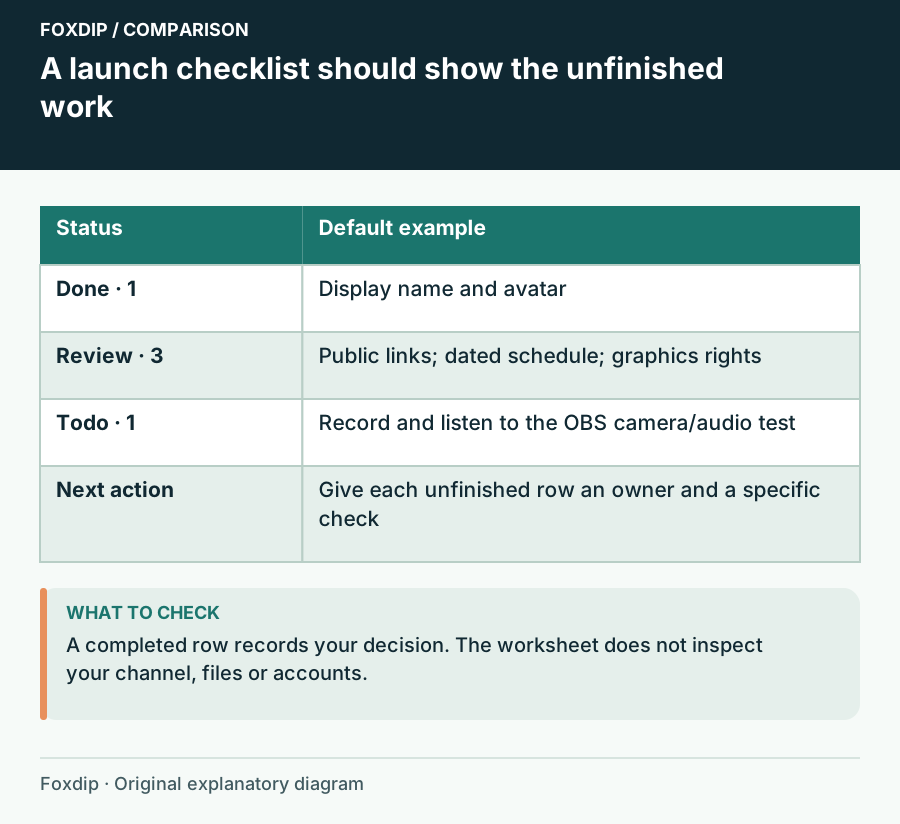
Foxdip worksheet example. Change the inputs above to make your own plan.
Give unfinished work a next action
Enter one row as check item | status | next action. Use todo when the work has not begun, review when something exists but still needs checking, and done after you have observed the result. An unfamiliar status is treated as needing review so a typo cannot quietly make the launch look complete.
Keep the next action small. For a broken About link, write “open the published URL and replace the old destination.” For an audio check, write “record game and speech, then listen to the saved file.” The person doing the work should be able to start from that sentence without reconstructing your plan.
Read the example as work remaining
The five default rows produce one done, three review and one todo. That does not mean the channel is ready because most rows contain text. The recording is still to do; the links, schedule and file rights still need a decision. The result keeps those four unfinished checks in view.
Use the target launch date to choose the order. Fix a wrong public link before adjusting a decorative divider. If an optional animation is the only unfinished item, you can decide to launch without it and record that choice. Do not mark it done merely to make the count look cleaner.
Make the last check an ordinary rehearsal
Open the actual scenes, change between them and make a short local recording containing the sounds you intend to broadcast. Watch the saved file at a size similar to the player your viewers use. Look for a covered game label, an unreadable name or a transition that reveals the wrong window.
Twitch’s channel setup guidance describes separate identity, information and schedule surfaces. Check the public result after saving changes in your account. This worksheet does not inspect the channel or publish anything, and a completed checklist is your record of those checks.
Keep a copy you can use on launch day
Choose Update preview after editing. Save in this browser keeps a local copy on this browser profile; Download notes gives you a plain-text copy you can retain with the launch assets. Print is handy when the setup screen is already busy. Reset returns the starting fields, so download anything you want to keep first.
The checklist works best when every unfinished item has an owner and a concrete next action. After launch, keep the useful checks for the next redesign rather than rebuilding the same list from memory.
Sources & references
Original Foxdip worksheet guidance. Platform details follow the linked primary references.
- Twitch — Channel Page Setup ↗Checked 2026-10-27
- OBS Project — Standard Recording Output Guide ↗Checked 2026-10-27
Spotted something out of date? Let Alex know.
How we put our guides together ↗