
Write the answer each panel should give, then preview the headings and links together. The worksheet prepares copy and does not publish to Twitch.
A concise panel-copy draft ready for a separate channel-page review.
Try it with your setup.
Change the example, update the preview, then keep the notes you want to use. Everything stays in this browser unless you download or print it.
The maker creates a heading image. You may need to shorten the second line; your longer copy stays in this worksheet.
Worked example
Draft headings and copy for About, Schedule, Rules and Contact, followed by labelled links. No platform publishing.
In this guide
Before you start
- A channel name and a short description of the streams you actually make.
- A current public schedule or a place where viewers can check changes.
- Public contact and social links you are comfortable sharing.
Give each panel one job
A first-time viewer may want to know what you stream, when to return, how to behave in chat and how to contact you appropriately. Start with those questions. Four useful answers can serve the channel better than a long panel menu whose sections repeat the same introduction.
Put the answer near the start of each field. 'Relaxed strategy games on weeknights' says more than several sentences about loving games. Use your own vocabulary and keep details you can maintain. If an activity is occasional, describe it as occasional rather than making a promise you will immediately outgrow.
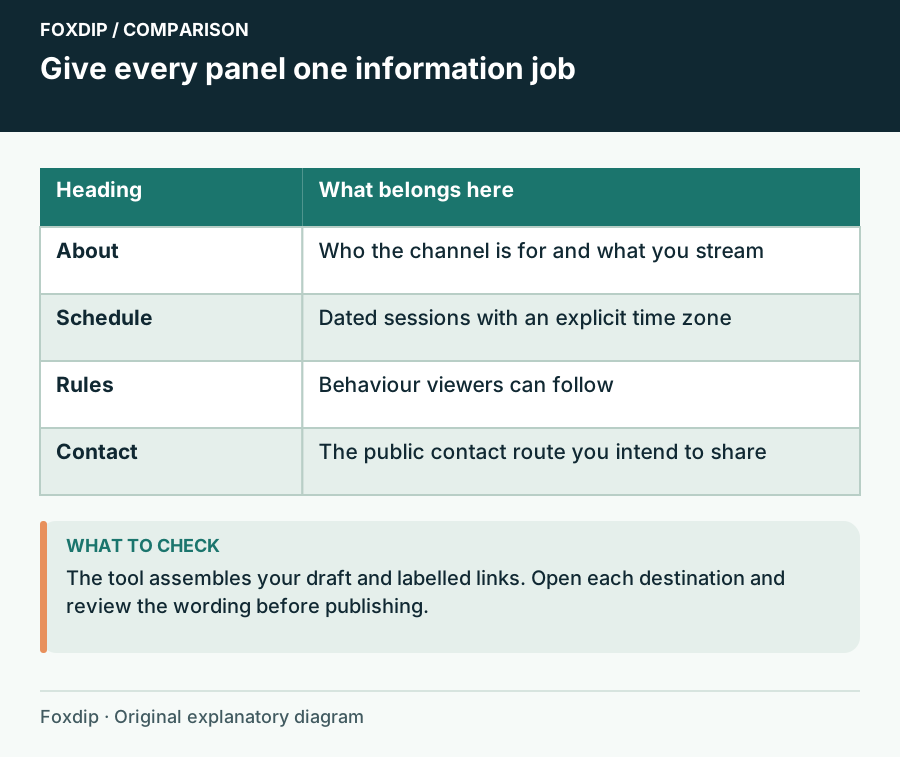
Foxdip worksheet example. Change the inputs above to make your own plan.
Draft the text before choosing panel artwork
Fill the About, Schedule, Rules and Contact fields. Add links as a clear label and a full public URL on each row. The form assembles what you write; it does not generate a biography or infer policies from your channel name.
Read the assembled draft
Choose Update preview and read the panel headings in order.
Look for: Each heading introduces distinct information and each link has an understandable label.
If a panel still needs an answer, leave it as a draft and add a concrete next action rather than filling space with generic copy.
Make requests someone can follow
For rules, name the behaviour you want: avoid unsolicited spoilers, respect other chatters, ask before posting a link. Keep the tone consistent with how you and moderators will actually handle conversation. A rule that requires unexplained inside knowledge is hard for a new viewer to follow.
For contact, use a public route meant for that purpose. You do not have to add a private email address to complete this worksheet. If you are not accepting sponsorship enquiries or collaboration requests, a short honest statement can be more helpful than an unattended contact route.
Check the destination’s actual panel fields
Twitch panels can contain a title, image, linked image and a description with Markdown links. This worksheet keeps your content organized for those decisions, but it does not reproduce Twitch's final rendering. Review the actual panel editor and your public page before calling the copy finished.
Open every destination link from the public view and check the display on a narrow screen. Keep the visible description useful even if the artwork is small. A schedule panel should lead to current dated information; a beautiful static image with an obsolete time is still an obsolete schedule.
Keep a reusable draft with an owner
Use Download notes or Print to keep the reviewed copy. Save in this browser is handy for a local revision, and Reset starts again without touching your channel. The exported text is a draft, so handle the actual publishing as a separate action in your own account.
Choose who will update each changing detail and when to check it again. For a solo channel, that can be as simple as a note beside the schedule link. Revisit the worksheet when your content, public links or moderation expectations change, and remove a panel whose job is no longer useful.
Take the heading to the panel maker
When your draft is ready, tick the box to use your channel name and About text, then choose Continue to panel maker. The transfer stays in this browser, expires after an hour and is removed from temporary storage when the maker reads it.
The maker creates a short heading image, so a long paragraph will need shortening before it fits. Keep the longer About copy in the channel’s editable text. No Twitch setting is changed by this transfer.
If you need the next part of this task. Open the related tool ↗
Want graphics that already fit? Browse Twitch panel sets ↗
Sources & references
An original Foxdip worksheet or calculation, with linked platform references reviewed on 27 October 2026.
- Twitch — How to Edit Info Panels ↗Checked 2026-10-27
Spotted something out of date? Let Alex know.
How we put our guides together ↗