
Set Xbox Party Chat Output to Headset & Speakers for the HDMI capture route, then record your own commentary microphone separately on the PC.
Party members remain audible in your headset and appear in the PC recording alongside one commentary mic.
In this guide
Before you start
- Xbox Series X or Series S with working HDMI gameplay capture.
- A headset connected in its supported Xbox mode.
- A party member available for a local recording test.
- MicrophoneCable & connection
- Operating systemInput & permission
- OBS mixerSource, meter & mute
- RecordingTrack & playback
Start with an Xbox party, not a game lobby
Confirm the missing conversation is Xbox Party Chat. Elgato's documented dual-output setting applies to that party service. It does not promise the same HDMI result for a game's own voice channel, lobby chat or a different chat service. Write down which service your group is actually using.
Test with one friend in a simple party before launching a noisy match. Ask them to speak a short phrase while you stay quiet. That makes it much easier to recognize whether the capture contains their voice, your microphone or only the game's ambient sound.
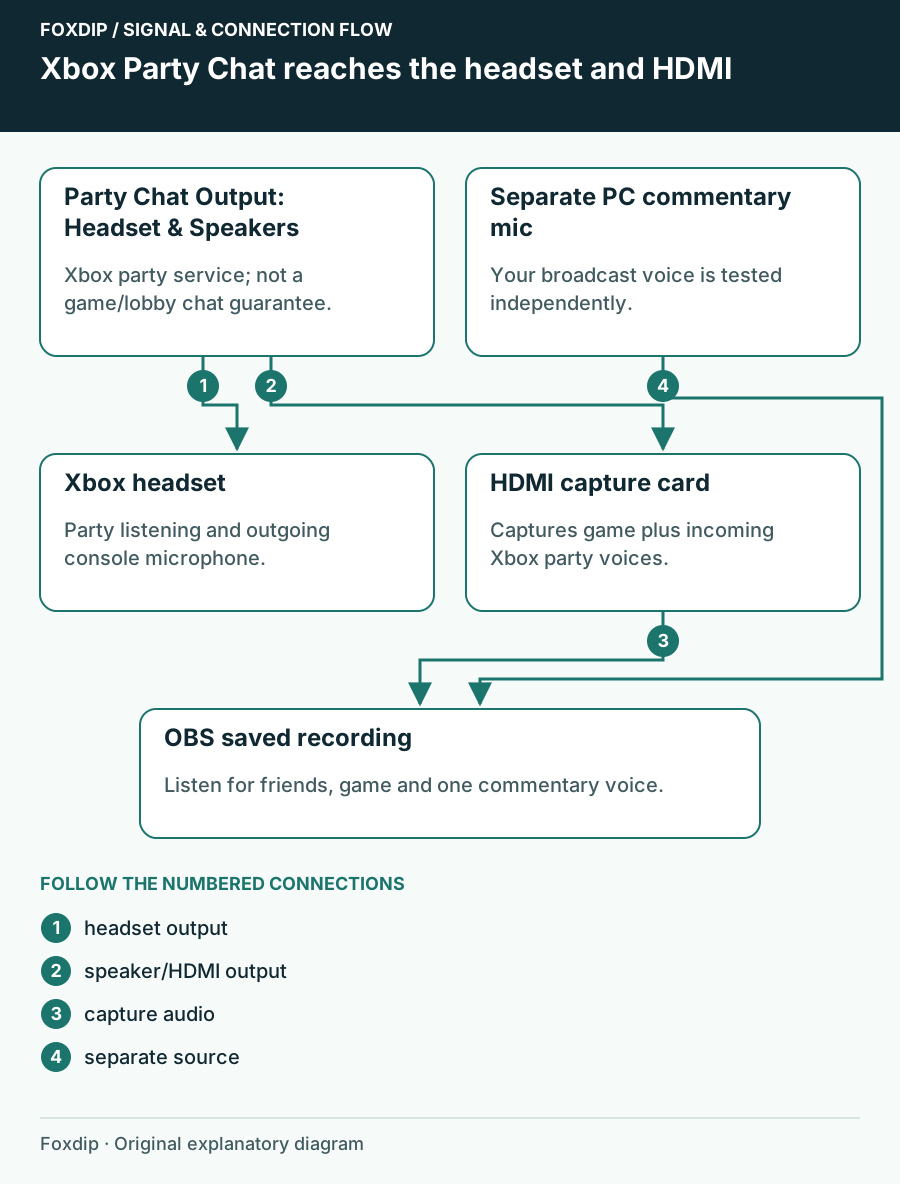
Original Foxdip schematic. Follow the labelled checks alongside the guide.
Send party sound to the capture path
On Xbox, open Settings → General → Volume & audio output and set Party Chat Output to Headset & Speakers. The documented result is party sound in the headset and on HDMI to the display/capture card. Keep the card on HDMI audio for this route; an empty analog input won't receive it.
Change and observe
Note the previous Party Chat Output setting, select Headset & Speakers, then have your friend repeat the phrase.
Look for: You still hear the friend in the headset and the capture audio meter responds.
If the headset works but the meter stays flat, check HDMI input selection and test ordinary game audio before changing OBS tracks.
Keep HDMI audio compatible
For an Elgato capture test, use stereo PCM rather than assuming a surround or bitstream mode is supported. A TV or sound system can play a format the card doesn't record. Preserve your preferred home-cinema settings before the check so you can restore them when you finish streaming.
Keep a single HDMI audio source in the capture scene. If you can hear the friend through the PC but the saved file is silent, that is a recording-route problem. If neither the meter nor the file receives game sound, solve the HDMI input first; party settings cannot repair a completely silent capture input.
Use the input diagnostic if game audio is missing too. HD60 X video but no audio ↗
Give your voice an independent input
Use your PC commentary microphone as an OBS audio source and test it separately. The party output setting concerns the voices coming back from the party; it is not a guarantee that your outgoing headset mic becomes an HDMI commentary channel. Keep the headset mic working for friends while the PC mic serves viewers.
Mute the PC commentary source and speak briefly into the headset. Then unmute it and repeat. Listen to the file, not the live headset sidetone. If your voice appears twice, find whether a monitored return or second PC input is adding another copy before adjusting delays.
Treat game chat as a separate routing decision
If your Xbox party test succeeds but an in-game lobby remains absent, keep the successful setup. Elgato explicitly distinguishes game/lobby chat from this party-output feature. A compatible wired analog capture arrangement or a documented headset base-station stream output may be needed for that other path.
Don't buy Chat Link solely because one conversation is silent: first confirm the headset has the required analog mode and the card or computer has a real line input. Finish with a two-minute local recording in the exact chat service and headset mode you plan to use. Restore the previous Party Chat Output setting if you no longer want voices on the TV speakers.
Sources & references
Based on the linked manufacturer and platform documentation reviewed on 27 October 2026. No hands-on hardware test is claimed.
- Elgato — Xbox Series X/S Party Chat Capture ↗Checked 2026-10-27
- Elgato — No Game Sound From Capture Device ↗Checked 2026-10-27
- Elgato — Chat Link Pro Technical Specifications ↗Checked 2026-10-27
Spotted something out of date? Let Alex know.
How we put our guides together ↗