
Read the requested mode as resolution + frame rate + video format, then compare it with 4K X’s 5Gbps/10Gbps table and the actual HDMI input.
A supported capture format appears and stays active without relying on passthrough specifications.
In this guide
Before you start
- Elgato 4K X and its supplied USB data cable.
- The computer port specification, including actual 5Gbps or 10Gbps capability.
- Access to source video settings and the capture-device properties.
- MicrophoneCable & connection
- Operating systemInput & permission
- OBS mixerSource, meter & mute
- RecordingTrack & playback
Write the whole mode down
A request for '4K' is incomplete. For example, 3840 × 2160 at 60 frames per second in NV12 is a different USB workload from the same dimensions and frame rate in MJPG. HDR adds another distinction. Write down resolution, frame rate, video format, HDR or SDR, operating system and detected input before you change anything.
Also separate the game display from capture. HDMI passthrough can work while a requested USB mode is unavailable. Changing the streaming encoder or output bitrate won't add a device mode that the USB capture path doesn't expose.
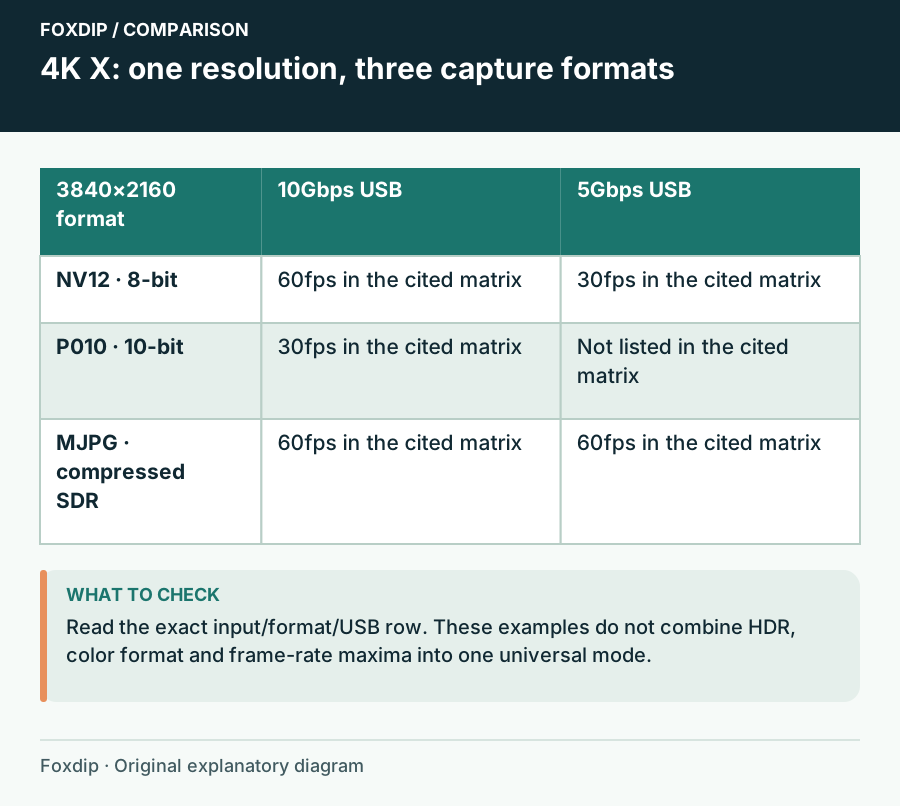
Original Foxdip schematic. Follow the labelled checks alongside the guide.
Use the current format table, not a blanket USB rule
Elgato's May 2026 table lists NV12 3840 × 2160 at 60 fps for 10Gbps, versus 30 fps at 5Gbps. It lists P010 4K30 at 10Gbps and no 4K P010 entry at 5Gbps. These are format-specific limits, not a statement that every kind of 4K capture requires 10Gbps.
The same table lists MJPG 4K60 at both speeds. That compressed format trades a different transport representation for bandwidth. If it solves your SDR requirement, try it deliberately, then inspect text, motion and the resulting file instead of assuming it is equivalent to every uncompressed option.
Prove the host connection
Connect directly to a computer port whose specification actually promises the required speed. USB-C describes the connector; a matching plug isn't proof of 10Gbps. Remove docks, extensions and adapters during this check and use the supplied data cable. Record which physical port you tested so you can return to it.
Repeat at a known port
Quit the capture app, move 4K X to a known suitable direct port, reopen it and inspect its available formats.
Look for: The required resolution/frame-rate/format combination becomes selectable.
If the list is unchanged, verify the cable specification and Mac mode requirements before blaming the encoder.
Use the documented Mac 10Gbps route
Elgato documents 10Gbps support with a suitable Mac port and macOS Sonoma 14.4 or later. In Studio, hold Command while clicking the sidebar view; the next sidebar opening exposes the setting under Video. Don't substitute the Option-key procedure from Capture Device Utility: that is a different application.
If your Mac or OS doesn't meet those requirements, select a format from the 5Gbps column instead. HDR passthrough to the display also doesn't establish HDR capture on a Mac. Keep SDR capture as your target unless the current software and platform documentation explicitly supports the complete HDR workflow.
Check input negotiation, then record
Select a modest supported source output and capture mode first. After that works, restore the intended source resolution and frame rate. If passthrough is fine but capture goes black at a very high display mode, check whether the display uses DSC; Elgato says 4K X cannot capture DSC signals and recommends lowering the mode.
Save a short motion clip and verify its dimensions, frame rate and colour in your intended player or editor. A selectable mode isn't yet a successful recording. If a documented combination is still missing, send support the exact format, OS, firmware shown by the app, direct USB port specification and whether the source uses DSC. Avoid forcing unsupported modes through custom lists.
Sources & references
Based on the linked manufacturer and platform documentation reviewed on 27 October 2026. No hands-on hardware test is claimed.
- Elgato — 4K X Supported Resolutions and Frame Rates ↗Checked 2026-10-27
- Elgato — Enable 10Gbps on Mac for Capture ↗Checked 2026-10-27
- Elgato — Capture Device Utility 10Gbps mode ↗Checked 2026-10-27
- Elgato — Studio 1.1 Release Notes ↗Checked 2026-10-27
- OBS Project — Download ↗Checked 2026-10-27
Spotted something out of date? Let Alex know.
How we put our guides together ↗