
Keep the known-working direct-TV dock setup, insert the card in the correct HDMI direction, then distinguish a failed passthrough from a failed USB preview.
The docked game appears on passthrough and in a local capture, with a documented audio route.
In this guide
Before you start
- Original Nintendo Switch or Nintendo Switch OLED with its compatible powered dock.
- The TV already shows a game with the dock connected directly.
- Two HDMI cables and the capture card’s specified USB data connection.
- MicrophoneCable & connection
- Operating systemInput & permission
- OBS mixerSource, meter & mute
- RecordingTrack & playback
Keep the console generation explicit
This workflow is for the original Nintendo Switch and Switch OLED in TV mode. Switch Lite has no TV mode. Switch 2 has its own dock, power and capture requirements, so don't use the original Switch's adapter checklist as a universal Nintendo checklist.
Because the TV already works directly, take a photo or note of that arrangement before changing it: dock model, AC adapter, HDMI cable and selected TV input. Keep that working reference available. You are trying to explain what fails when the card is inserted, not reconfigure every part of the setup.
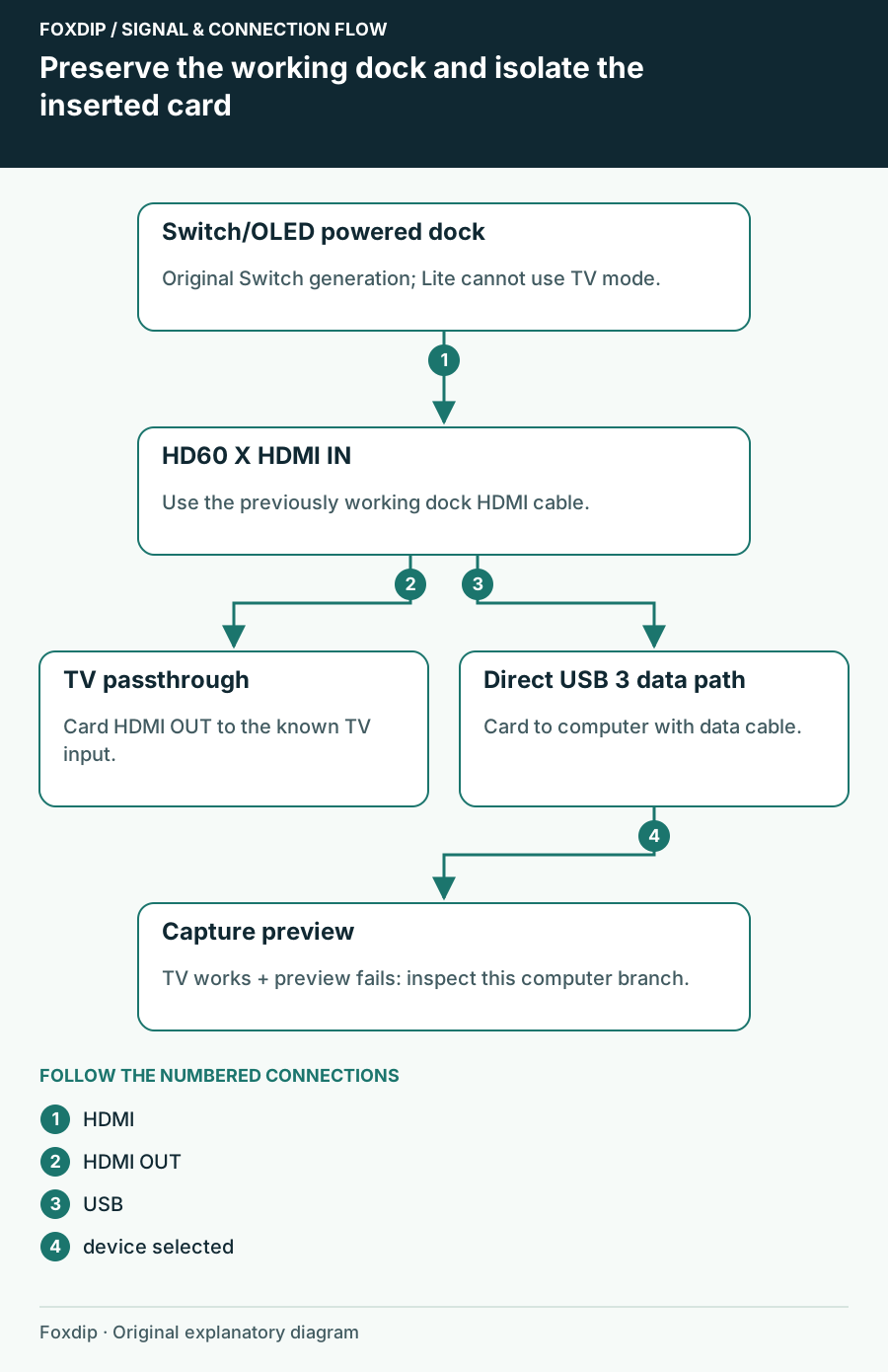
Original Foxdip schematic. Follow the labelled checks alongside the guide.
Preserve the powered dock baseline
Nintendo's TV-mode instructions connect AC power to the dock and HDMI from the dock to the display. The console screen turns off when it is seated correctly. A USB cable from a capture card isn't a replacement for dock power.
If the direct-TV picture has stopped working as well, remove the card again and use Nintendo's dock/power troubleshooting. For the original Switch/OLED, that guidance identifies the HAC-002 adapter and HAC-007 or HEG-007 docks. Resolve that changed baseline before examining OBS.
Add one HDMI link, then one computer link
Connect dock HDMI output to card HDMI IN and card HDMI OUT to the same TV input. Connect the card to a suitable computer USB port with its data cable. Use the cable that worked directly as the input cable first, so only one extra HDMI cable is introduced.
Read both screens
Launch a game and check the TV passthrough, then select the actual capture device in one capture application.
Look for: Both show the same gameplay.
If both fail, inspect HDMI direction and the added output cable. If the TV works and the app does not, keep HDMI unchanged and inspect USB detection/source properties.
Test a Switch-sized capture mode
For HD60 X, Elgato documents Switch TV Resolution at 1080p or 720p, TV Sound at Stereo and Match TV Power State disabled. Note existing settings before changing them. Start the capture source at a supported mode rather than importing a preset made for a different 4K console.
If 720p works and 1080p doesn't, repeat the cable and card-mode check with that exact distinction recorded. If neither appears in the app but passthrough is stable, inspect the direct USB connection and try one simple capture scene. Multiple camera/capture apps open together make this comparison harder to interpret.
Finish with sound and a repeatable reconnection
Unplug headphones from the Switch headphone socket for an HDMI-audio test. Elgato documents that plugging them into the console diverts game sound from HDMI. If you need headphones, a display headphone output is one documented option; software monitoring is another, with its own additional playback delay.
Record motion and a recognizable game sound, stop the recording and play it outside OBS. Then undock and redock once to confirm recovery. Save the working TV mode and port names. If you still need support, describe direct-TV, card-passthrough and software-preview results separately so a USB problem isn't mistaken for a failed dock.
Sources & references
Based on the linked manufacturer and platform documentation reviewed on 27 October 2026. No hands-on hardware test is claimed.
- Nintendo — TV Mode AC Adapter Error ↗Checked 2026-10-27
- Nintendo — Nintendo Switch TV Mode ↗Checked 2026-10-27
- Elgato — HD60 X Nintendo Switch Setup ↗Checked 2026-10-27
Spotted something out of date? Let Alex know.
How we put our guides together ↗