
For the original Facecam, use its supplied USB data cable on a direct USB 3 port, then check Windows camera access and quit competing camera applications.
Camera Hub lists the original Facecam and displays a stable preview before OBS is added.
In this guide
Before you start
- Original Elgato Facecam (MK.1), not Facecam Neo, Pro, MK.2 or 4K.
- Windows 11 and Elgato Camera Hub 2.3.
- The supplied camera cable and a computer port whose specification confirms USB 3 support.
- MicrophoneCable & connection
- Operating systemInput & permission
- OBS mixerSource, meter & mute
- RecordingTrack & playback
Separate “not listed” from “black picture”
Look at Camera Hub's device selection. A camera absent from the list is a different observation from a selected camera with a dark preview. Write down the exact message if you see one, especially USB3-REQUIRED-FOR-FACECAM, rather than reporting all three cases as 'not detected'.
This guide is deliberately for the original Facecam. Different Facecam generations have different USB modes and indicators. The original model is supported by Camera Hub; borrowing a Neo setup or a Pro LED interpretation can send you down the wrong branch.
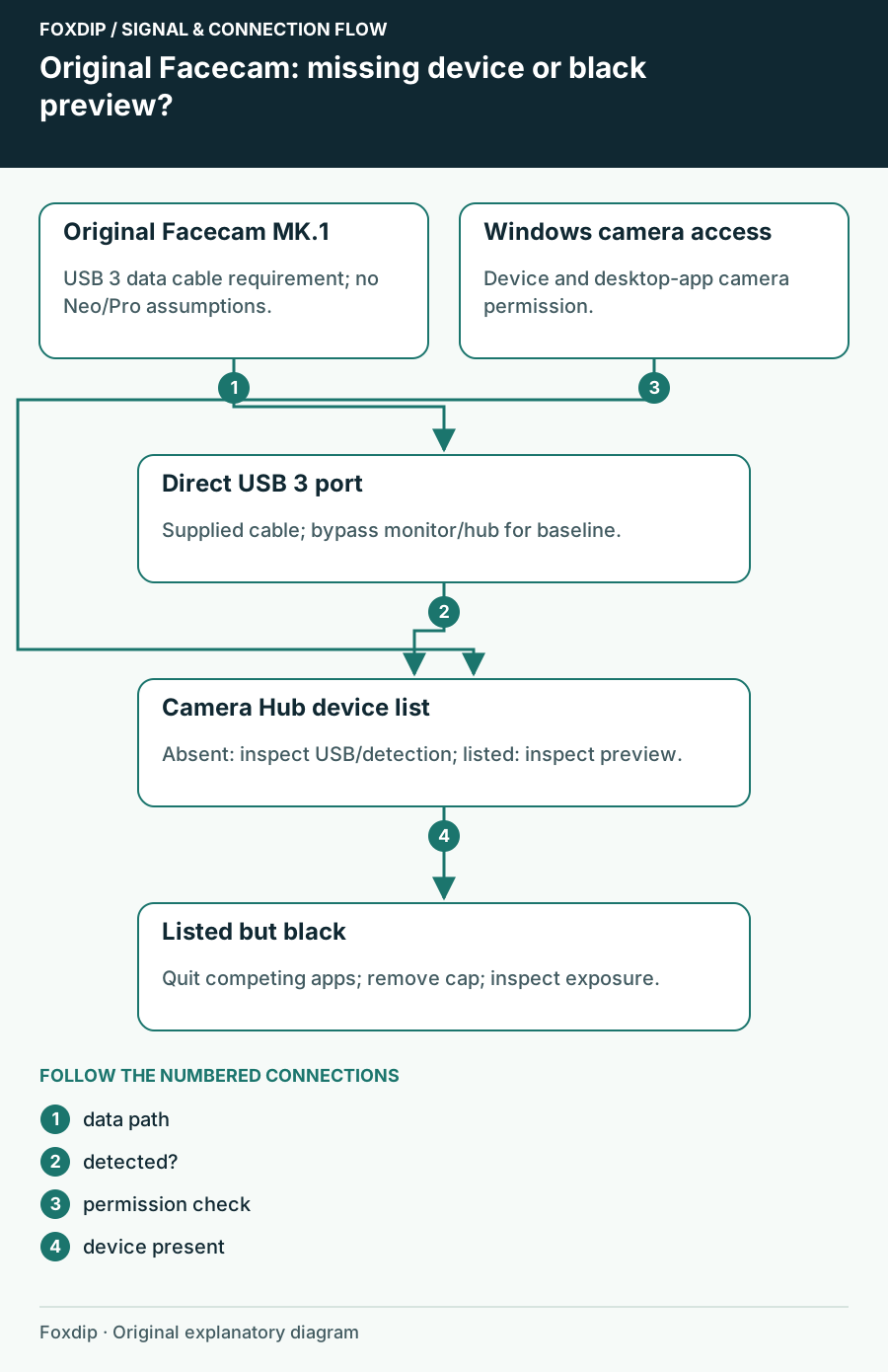
Original Foxdip schematic. Follow the labelled checks alongside the guide.
A fitting USB-C plug does not prove the data path
Use the cable supplied with the original camera and connect it directly to a confirmed USB 3 computer port. Bypass a monitor hub, dock or extension for this test. A charging cable can have the same connector while providing only USB 2 data capability.
Check the computer's port specifications instead of relying only on connector colour. Reseat both ends and reopen Camera Hub. If you try another cable, it must meet the original Facecam's data requirement. Keep the original cable/port combination noted so a change that works can be repeated later.
Test a direct connection
Quit camera applications, connect the original Facecam directly with its supplied data cable and reopen Camera Hub.
Look for: The camera appears in the device selector.
If it remains absent, try another known USB 3 port and check Windows detection/permissions. If it appears but is black, use the preview branch below.
Check Windows permission and actual app ownership
In Windows 11, open Settings → Privacy & security → Camera. Check device camera access and the setting allowing desktop applications to use the camera. A desktop program may not have its own individual switch in the Microsoft Store app list; absence from that list isn't proof that it has no camera access.
Fully quit apps that might still own a video feed, including tray-resident calling apps. Closing a meeting window may leave its application running. Then launch Camera Hub alone. This makes the next result easier to interpret than switching among several camera previews at once.
If the device is listed, inspect the image branch
Remove the lens cover and inspect exposure settings if the selected camera gives a black image. Elgato notes that shutter and compensation settings can darken the picture. Record your current choices before resetting anything, especially if you already tuned the camera for your room.
Don't use the original Facecam's blue indicator as a complete detection test. Elgato documents that its indicator can be configured always on or always off. A model-specific light can help describe activity, but the application device list and actual preview tell you more about this particular failure.
Reintroduce other USB devices and OBS gradually
If the direct camera works, add the hub or other USB devices back individually. Elgato identifies shared-controller bandwidth as a possible problem with several demanding devices. A second webcam or external drive restoring the fault is a useful observation, even when the connectors sit on different sides of the computer.
Only after Camera Hub is stable, add Facecam to a simple OBS scene and record a short clip. If the image now freezes rather than disappearing from device selection, report that change in symptom and compare the camera alone in Camera Hub again. If detection still fails, send support the camera generation, Camera Hub version, exact error, supplied-cable result and tested USB ports before attempting firmware recovery.
Sources & references
Based on the linked manufacturer and platform documentation reviewed on 27 October 2026. No hands-on hardware test is claimed.
- Elgato — Camera Hub Supported Devices ↗Checked 2026-10-27
- Elgato — USB3-REQUIRED-FOR-FACECAM ↗Checked 2026-10-27
- Elgato — Facecam Requires USB 3.0 ↗Checked 2026-10-27
- Microsoft — Camera Permissions in Windows ↗Checked 2026-10-27
- Elgato — Facecam Video Feed Is Black ↗Checked 2026-10-27
- Elgato — Facecam Models Status LEDs ↗Checked 2026-10-27
- Elgato — Camera Hub 2.3 Release Notes ↗Checked 2026-10-27
Spotted something out of date? Let Alex know.
How we put our guides together ↗