
Enter each available milestone, its planned design and a visible recognition cue. The worksheet organizes your progression; it does not unlock or validate platform slots.
A badge-to-milestone map that an artist or channel editor can follow.
Try it with your setup.
Change the example, update the preview, then keep the notes you want to use. Everything stays in this browser unless you download or print it.
Worked example
4 planned milestones: Base→seed; 3 months→sprout; 6 months→plant; 12 months→flower. Recognition cues remain visible beside each row.
In this guide
Before you start
- The subscriber-badge milestones available in your platform dashboard.
- A design idea for each milestone you want to fill.
- A way to inspect the actual artwork at small chat size.
Copy the available milestones before sketching a full collection
Twitch's subscriber badges mark subscription tenure in a channel, and available badge slots depend on the channel's situation. Read the current dashboard before deciding how long your progression needs to be. A printed example or another creator's channel is not proof that your account has the same slots.
Keep subscriber tenure separate from other badge roles. This worksheet does not assign Bits badges, tier flair or a custom Founders badge. Give each plan a clear label so a beautiful file does not end up representing the wrong milestone.
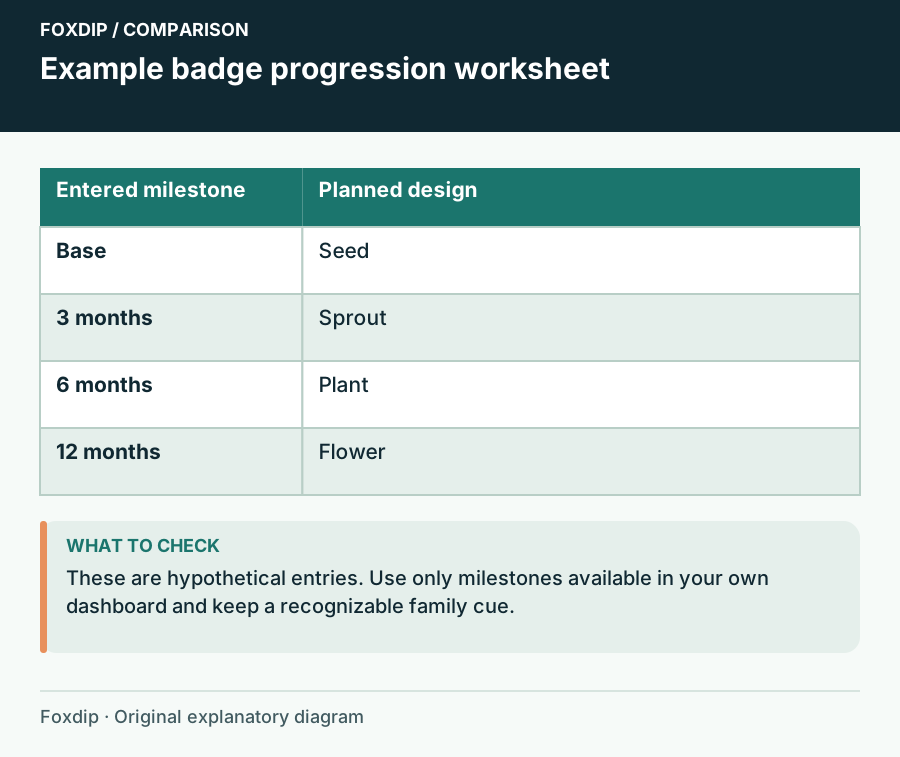
Foxdip worksheet example. Change the inputs above to make your own plan.
Write one complete mapping per row
Use the row format milestone, design, recognition cue. A recognition cue describes what makes that stage distinguishable, such as two leaves, an open flower or a changed outer shape. It gives the artist something more useful than 'make the next one better'.
Update the progression
Enter the milestones from your dashboard and choose Update preview.
Look for: Every listed milestone has one design and one visible cue beside it.
If several rows have the same cue or an empty design, revise them before commissioning additional artwork.
A seed-to-flower sequence is only an example
A four-row planning example might use Base → seed, 3 months → sprout, 6 months → plant and 12 months → flower. The cues could be a round seed outline, two leaves, a taller stem and open petals. Replace those milestone labels with the ones you actually have.
The visual story is growth, but the stages should remain individually recognizable. A slightly different green on every row may be too subtle in chat. Give each stage a useful shape or silhouette difference, then see whether the whole sequence still feels like one family.
Review the badge beside a name, not only on a large artboard
Place each candidate at the size where it will appear, on both light and dark chat backgrounds. Check the earliest stage as carefully as the latest: a new subscriber should still receive an intentional design. Keep unnecessary tiny details out of a stage whose identity depends on one simple cue.
Compare non-adjacent stages too. If the first and last designs look clear but the middle stages collapse into the same shape, simplify or exaggerate the relevant differences. The planner cannot inspect image pixels or approve a platform upload; that remains a separate file and dashboard check.
Keep the mapping with the exported files
Download notes or Print the list when sharing a brief or installing the finished set. Record the file name beside its intended milestone so someone handling the upload does not have to infer the order from colours alone. Save in this browser keeps a local working draft, while Reset starts a new plan.
When you unlock or choose to use another milestone, add it deliberately to this map. You can extend a coherent sequence without replacing familiar early badges. A useful progression plan explains what each stage means and how it differs, not merely how many files came in the download.
Want graphics that already fit? Browse ready-made sub badge sets ↗
Sources & references
An original Foxdip worksheet or calculation, with linked platform references reviewed on 27 October 2026.
- Twitch — Subscriber Badge Guide ↗Checked 2026-10-27
Spotted something out of date? Let Alex know.
How we put our guides together ↗