
Rehearse the guest’s picture and voice in a saved audience recording, then agree what happens if the call drops. Assign each check to a person before the session starts.
Try it with your setup.
Change the example, update the preview, then keep the notes you want to use. Everything stays in this browser unless you download or print it.
Worked example
A five-check rehearsal plan with owners and a written interruption response; no messages or invitations sent.
In this guide
Name the session and the people doing the checks
Use a session title that distinguishes this rehearsal from next week’s call. Add the guest’s display name or role, rather than private contact details. The worksheet is a shared plan you can copy; it does not create a call, send an invitation or configure Stream Together.
Start with the five default checks and give each an owner. The guest can adjust their framing, both hosts can judge a level comparison, and the host can confirm the audience feed. If a check says “both,” agree who will perform the action and who will listen. Otherwise two people can each assume the other one has finished it.
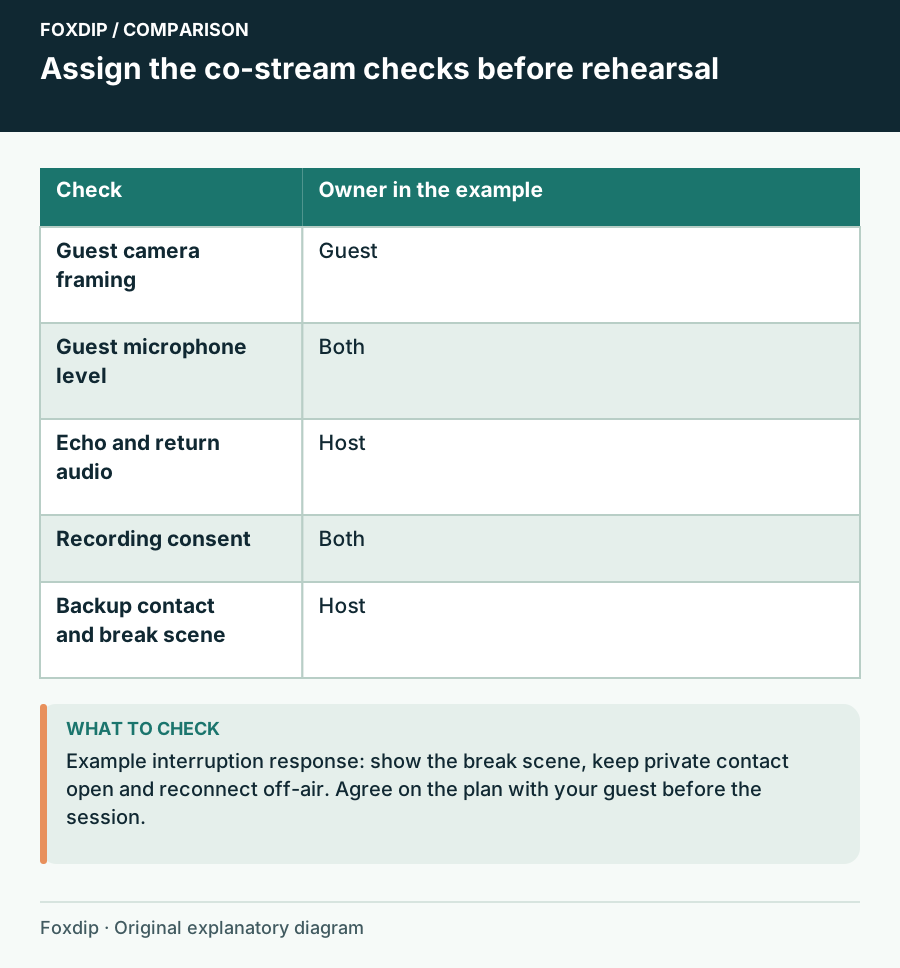
Foxdip worksheet example. Change the inputs above to make your own plan.
Check the picture that reaches the show
Have the guest sit where they will actually speak. Check the name label, face or avatar scale and the space needed for normal movement. Change to the shared-content scene too: an acceptable full-screen camera can become a tiny, awkward crop next to gameplay.
Include the intended layout in a short recording. A preview proves that a feed exists; the recording shows what your audience will receive. Keep a fallback scene ready that still looks intentional when only one host is visible.
Listen to one voice at a time, then the conversation
Ask each host to speak separately while the other stays quiet, then exchange a few ordinary lines. Listen for missing words, large level differences and a delayed copy of either voice. Check the saved audience recording rather than judging only the private call.
Twitch documents several Stream Together audio routes. Choose the route for your setup and avoid also capturing a second copy through desktop audio. Keep return listening separate from the audience feed: a guest needs to hear the conversation without receiving their own delayed stream voice.
Write the response before the feed disappears
The default backup says to show the break scene, keep a private contact open and reconnect off-air. Replace it with something both hosts can follow. Decide who speaks to the audience, what scene appears and how long you will try to recover before continuing solo.
Rehearse one harmless interruption, such as the guest turning off the camera. Confirm that the host can reach the fallback and that the guest understands the return cue. Add any recording or publication agreement to the checklist before collecting the clip; a technical rehearsal does not substitute for that agreement.
Take the agreed plan into the session
Enter rows as check | status | owner or next step. Use todo, review or done. Choose Update preview to collect the rows and backup plan into one report. Download notes or Print gives each host the same version; saving in this browser keeps a local working copy for later edits.
Use display names and ordinary instructions in the notes. Leave invitation tokens, private call links and account credentials out. When all the rows are done, you have a rehearsal record, not a guarantee that the network will behave for the whole show. The backup plan is part of being ready.
Sources & references
Original Foxdip worksheet guidance. Platform details follow the linked primary references.
- Twitch — Stream Together ↗Checked 2026-10-27
- OBS Project — Audio Sources ↗Checked 2026-10-27
Spotted something out of date? Let Alex know.
How we put our guides together ↗