
Describe the channel, assign roles to colours, list required assets and record the constraints. The builder organizes your decisions into a brief; it does not generate artwork.
A structured branding brief that explains the job and its constraints.
Try it with your setup.
Change the example, update the preview, then keep the notes you want to use. Everything stays in this browser unless you download or print it.
Worked example
A structured text brief with audience, tone, colour roles, asset list, constraints and rights/handoff notes.
In this guide
Before you start
- A channel/project name and an audience you can describe.
- An initial palette or a short list of colours to explore.
- The assets, scenes and delivery formats the project actually needs.
Describe what this stream should feel like to its viewers
Start with the audience and the activities they will watch. 'Calm puzzle solving with occasional chat breaks' gives a designer more direction than 'professional and unique'. Add a few words about tone, then explain what they mean through a real scene or moment.
Keep the brief grounded in the stream you can deliver. If your room, camera or schedule will remain modest for now, record that. A coherent identity can grow around those conditions without requiring a complex studio layout or a large collection of screens you will rarely use.
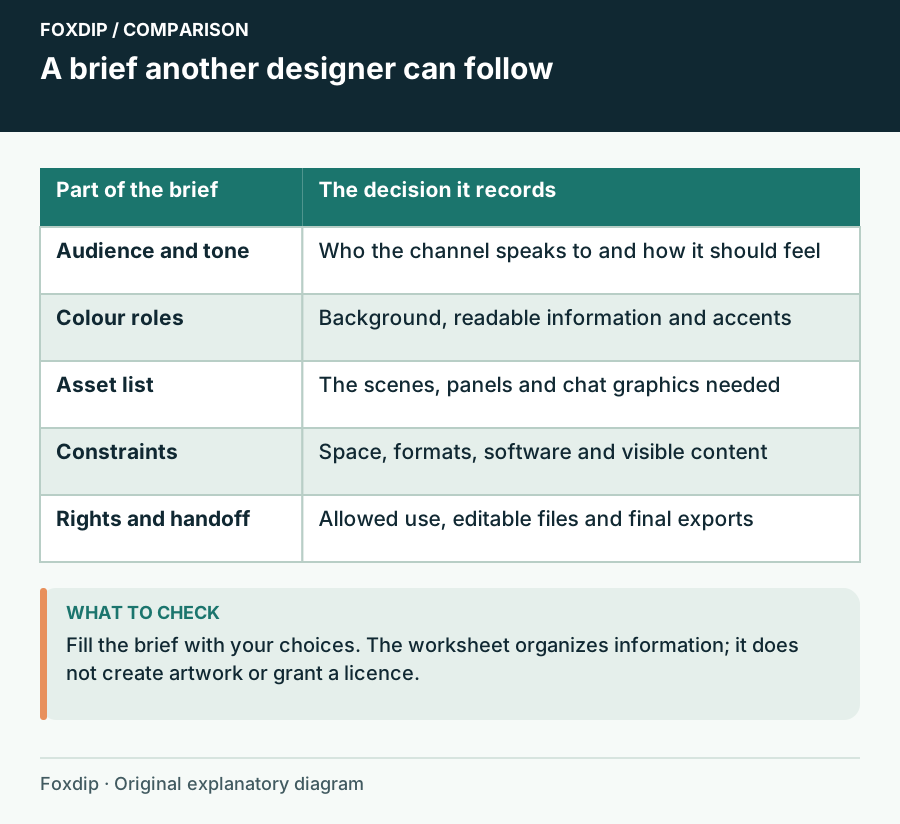
Foxdip worksheet example. Change the inputs above to make your own plan.
Give the palette jobs, not just colour names
Write down which colour is the background, which carries readable text and which is an accent. A palette of five attractive swatches does not explain where any of them should appear. Keep a restrained default so alerts or highlights can still draw attention when needed.
Check important text/background pairs in the contrast tool. Record the tested pair and its role in the brief. A result for white text on a dark panel does not apply when the same text is moved over gameplay or the panel becomes translucent.
Keep the solid pair and its intended role in your brief. Compare the text/background colours ↗
List the assets someone will actually produce
For each required asset, include the use and file expectations. A camera frame, starting screen, emote set and editable project are different deliverables. If you need editable text or a transparent export, say so before work begins rather than assuming a flat image includes its source project.
Record the scene constraints too: subtitles stay visible, the game map remains clear, the camera needs a certain shape. OBS layers and transforms determine how assets sit together, so dimensions alone do not explain the composition. Keep those practical conditions beside the visual direction.
Write a handoff someone can maintain
Use the rights/source field for shareable notes about asset origins and licence records. Identify where the legitimate source and licence can be found without pasting private paid-download links or confidential customer terms. The worksheet does not establish that you own rights merely because the field is filled.
Review the assembled brief
Choose Update preview, then read it as if you were seeing the project for the first time.
Look for: Audience, tone, palette roles, deliverables and constraints form a consistent request.
If a key decision is missing, mark it as a decision to make and identify who owns it rather than inventing certainty.
Keep the brief useful after the first design
Download notes produces a text handoff and Print gives you a review copy. Save in this browser can hold a local draft, while Reset starts a different project. The builder arranges your fields into a document; it does not make AI-generated visuals or contact an artist.
After a first mockup, update the brief with decisions you actually accepted. Keep rejected ideas out of the current direction unless they explain a constraint. The next person handling the channel should be able to tell what to reproduce, where to find the right assets and which parts are still open.
Sources & references
An original Foxdip worksheet or calculation, with linked platform references reviewed on 27 October 2026.
- OBS Project — Sources Guide ↗Checked 2026-10-27
Spotted something out of date? Let Alex know.
How we put our guides together ↗