
Note the disconnect time, check Roblox status and compare whether one experience or all experiences lose their connection. Rejoin after that first check.
Build a short disconnect timeline and choose the next test without assuming the code proves a network fault.
- Code / message
277- Platform
- Windows · macOS · iOS · Android · Amazon Fire OS · ChromeOS
- App / launcher
- Roblox Player
- Scope
- Current official support guidance reviewed on 27 October 2026; no specific affected client build is listed.
In this guide
Before you start
- The277 screenshot, device model and operating-system version.
- The experience link and the approximate disconnect time with time zone.
Start with what stopped at the same time
Roblox lists277 as a game-server connection problem on desktop and mobile devices. If you were already playing, preserve the last action and the disconnect time before immediately rejoining. Note whether the app stayed open, your avatar froze or Roblox closed entirely; those observations describe different failures.
A277 message is not a diagnosis of your router, and it does not guarantee that the session failed only after successful gameplay. Use your observed session history to guide this page. If you never entered the experience at all, record that too.
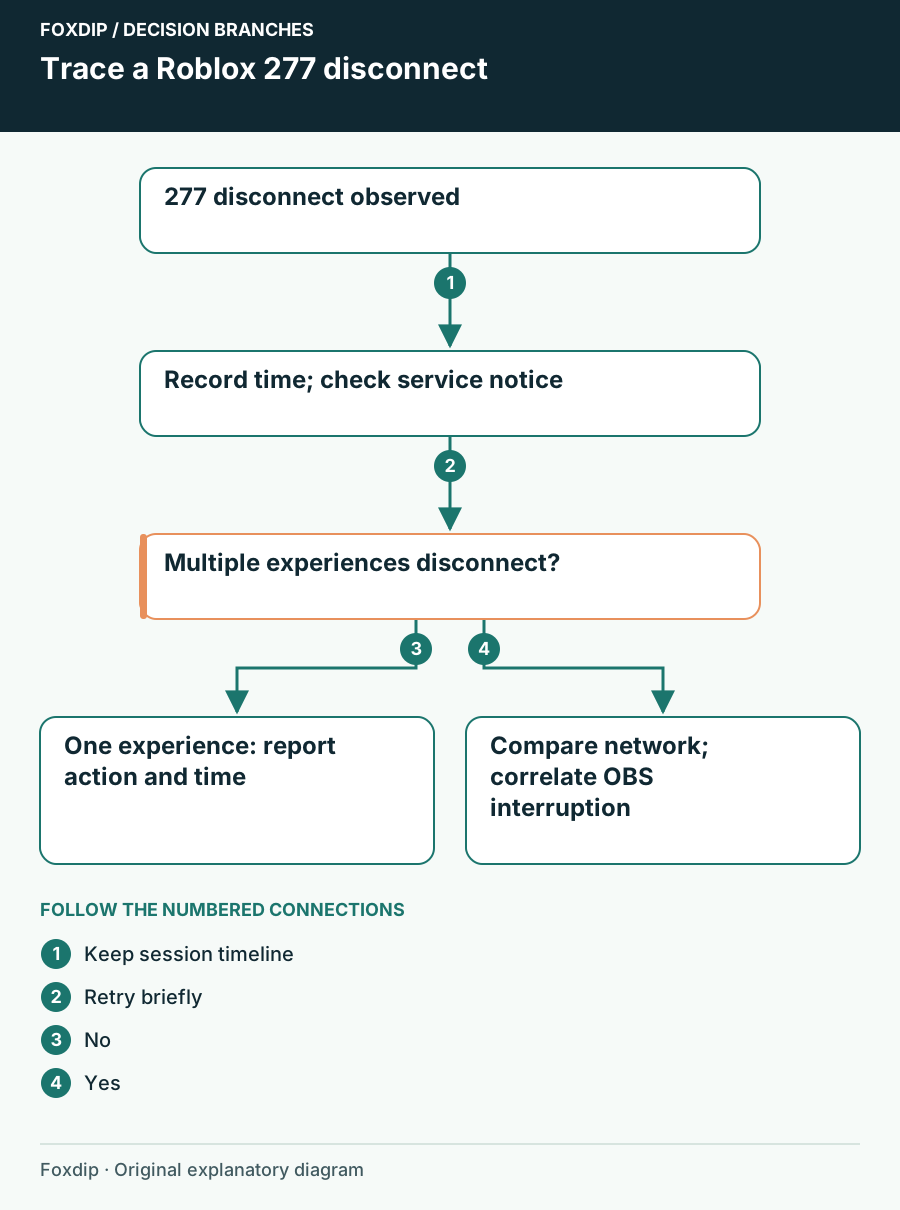
Original Foxdip schematic. Follow the labelled checks alongside the guide.
Find out whether the experience itself is affected
Check Roblox’s current service status and read any matching player or game-join notice. Then try the same experience once. If it disconnects again, try one different experience on the same device and connection. Keep the comparison short enough that you can describe it accurately.
If the first experience fails while another remains playable, send its creator the link, time and repeatable action. Do not ask viewers to flood the server or treat reports in chat as a verified platform-wide outage. A creator-side issue requires the creator’s intervention, not a Windows reinstall.
Record both outcomes
Write down which experience disconnected, how long you were connected and whether the second experience also failed.
Look for: You have a specific repeat pattern to report.
If multiple experiences fail, compare your connection next.
Restart before replacing software
Close Roblox fully and restart the device. On a phone or tablet, simply hiding the application is not the same as closing it. Retry once with the official current client. If you consider a reinstall later, confirm your sign-in and verification access and preserve any local creator work first.
Leave antivirus and firewall protection active during the simple tests. If there is a matching security event, use the vendor’s own instructions for the affected app. Do not repeatedly clear app data while you are still trying to learn whether the disconnect follows one experience or one network.
Send a timeline instead of ten guesses
For persistent277, include the full message, device, OS, experience links, disconnect times and alternate-network result in your Roblox ticket. Mention whether Roblox stayed open and whether other services failed at the same moment. These details let support distinguish a lost connection from an application crash.
After a stable join, run a short local OBS recording before returning live. Keep the original diagnostic notes until the session stays connected through the activity that previously triggered the interruption.
Confirm the restored game and voice tracks before streaming again. Check audio after reconnecting ↗
Still stuck?
Roblox and the stream disconnect at the same time
Compare connection diagnostics while keeping encoding overload separate.
Only one repeatable in-experience action disconnects
Report the experience link, action and timestamp to its creator.
Sources & references
Guidance follows the linked publisher and operating-system support resources.
- Roblox Support: Error 277 and server connection ↗Checked 2026-10-27
- Roblox: Service status and incident history ↗Checked 2026-10-27
- Roblox Support: Diagnose an experience connection ↗Checked 2026-10-27
- Roblox Support: Restart before reinstalling ↗Checked 2026-10-27
Spotted something out of date? Let Alex know.
How we put our guides together ↗