
In this guide
Pick the layout first, then listen to your typing
Start with CHERRY STREAM if you want a full-size wired keyboard, MX Keys S if backlighting and wireless suit your work-and-stream desk, or Keychron B1 Pro if you need a compact layout with several connection choices. Each offers a reason to look beyond a loud keyboard, but there’s no matched noise test here to crown one the quietest.
The deciding recording is the one from your own desk. Type an ordinary chat message, use the space bar and play the controls your games need. Can you still follow your voice easily? Include microphone position and the way you type in that decision. A keyboard that sounds gentle in a promotional clip may be much more noticeable beside your live mic.
What changes between these three?
All three are low-profile options, with different layouts, lighting and connections. The table keeps those differences visible so you can rule out an awkward fit early. The confirmed price is from the US store on 18 October 2026; local stock, tax and delivery still need checking when you buy.
| Exact model | Layout and connection | Tradeoff | Price and availability · 18 Oct 2026 |
|---|---|---|---|
| CHERRY STREAM KEYBOARD, wired | Full size; USB-A; manufacturer lists Windows | No illumination, N-key rollover or anti-ghosting | Current direct price and local stock not confirmed |
| Logitech MX Keys S, Graphite 920-011558 | Full size; Bluetooth or Logi Bolt receiver | Backlight and optional software; USB-C is described for charging | US store: USD 119.99; page displayed in stock |
| Keychron B1 Pro, ANSI Space Gray B1P-K1 | 75%, 77 keys; 2.4 GHz, Bluetooth or USB-C wired | 296 × 130 mm; no backlight or N-key rollover | Selected variant backordered; dated local price not confirmed |
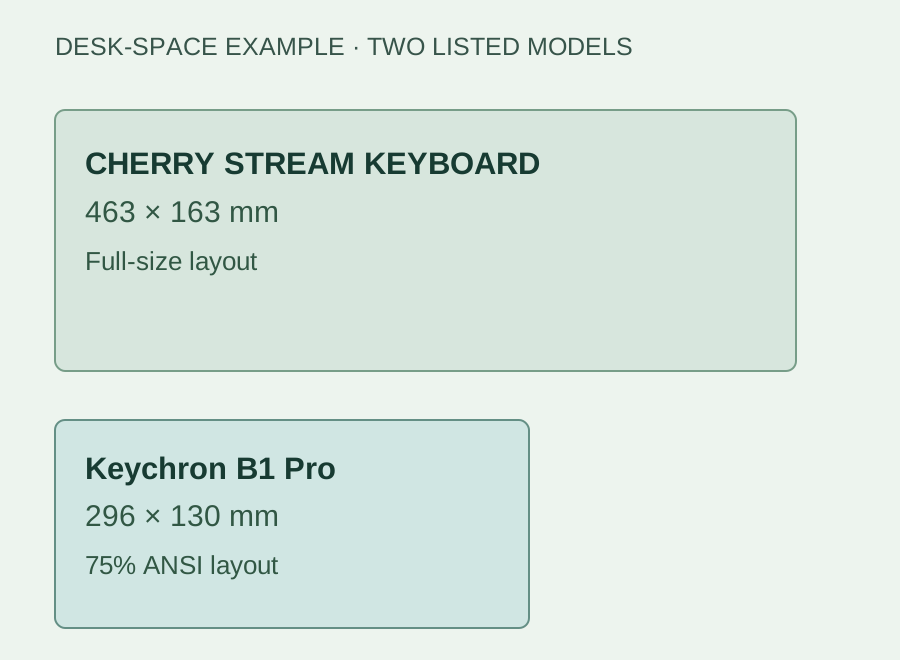
Manufacturer-listed width and depth for two of the models discussed here, drawn at the same scale. These rectangles are a planning diagram, not product photos; they do not compare sound levels.
Compare the microphone’s position relative to your voice and the keyboard. Microphone Distance and Placement: Find Your Speaking Position ↗
CHERRY STREAM: full-size keys, no charging routine
CHERRY STREAM uses the company’s SX scissor mechanism, which CHERRY describes as quiet. It measures 463 × 163 × 18 mm. That full-size layout is worth a look if you want familiar spacing and a USB-A cable instead of another device to charge. Choose the correct language variant and mark out its footprint before handing over a large part of a small desk.
CHERRY lists Windows support and no N-key rollover or anti-ghosting. If your games rely on holding several keys together, try those exact combinations within the seller’s return window. That is more useful than assuming an office-style board will cover every game. Despite the STREAM name, you’ll also need to set up any streaming shortcuts yourself.
Leave the keyboard cable enough movement to avoid tugging at the rest of the setup. Small-Desk Cable Routing: Keep It Tidy and Easy to Fix ↗
MX Keys S: backlighting for work and late streams
MX Keys S brings a low-profile layout, proximity-triggered backlighting and optional programmable actions. Logitech says improved key stability reduces typing noise. The lighting and software are reasons to consider it for a desk that handles editing as well as streams; judge the noise in your own recording once it’s in place.
Connection is the detail to get right before ordering. The setup guide lists Bluetooth or the included Logi Bolt receiver, with USB-C for charging. Plugging in that charging cable doesn’t give you a wired keyboard mode. Check the media-key default and F-key toggle when planning your shortcuts, and make sure your Windows or Mac setup supports any Options+ features you want to use.
B1 Pro: more mouse room, fewer extras
B1 Pro has a 75% ANSI layout with 77 keys in a 296 × 130 mm footprint. It offers 2.4 GHz, Bluetooth and USB-C wired connections. Keychron describes its scissor keys as quiet, while the specifications list no backlight or N-key rollover. Consider it when you want to reclaim space beside the keyboard and can live without those extras.
Keychron Launcher provides remapping and macros, so plan the shortcuts you need rather than expecting ready-made OBS controls. The selected Space Gray B1P-K1 was backordered when checked. Before buying, confirm the layout, current availability and checkout currency. A dollar amount on a global store doesn’t tell you the final Canadian price once the order reaches your door.
Make a comparison your microphone can settle
Record your present keyboard first. Keep the desk, microphone position, speaking level and recording settings the same when you try a replacement. Type a chat sentence, use the space bar and modifiers, then run through your game controls. Listen to the whole sequence with speech included. You’re choosing for a stream, so one pleasing key sound doesn’t tell the whole story.
Before buying another board or increasing audio processing, try a position change and record it. Note what improved and what became awkward to use. If ordinary typing is already acceptable in the saved file, keep the keyboard you own. If it still competes with your voice, use that recording to judge the replacement under the same conditions. Finish with the OBS audio check so the full mix gets a listen too.
Separate airborne key clicks from desk vibration
Record the same short phrase while typing, then repeat the typing without speaking. Next, reposition the microphone mount without changing the keyboard or input gain, keeping the microphone safely supported. Compare the saved files at one playback volume. This identifies whether changing the transmission path deserves attention before another keyboard order.
A gate only changes what happens around its opening and closing thresholds. If key noise remains distracting underneath speech, tuning it to hide quiet gaps does not answer that observation. Preserve quiet syllables and choose the physical change that helps during an actual sentence.
| Observation | Next change | Expected result |
|---|---|---|
| Thumps change strongly when the mic mount moves | Investigate desk coupling and mount placement | Less low thump with the same keyboard |
| Clicks remain mainly during spoken words | Try the mic/keyboard angle or a quieter typing action | Words remain intact while the intrusive sound reduces |
| Quiet words vanish after processing | Bypass the threshold filter and retune | Recover complete speech before judging the keyboard |
Use the gate guide only when the problem occurs between phrases. Your OBS Noise Gate Swallows Quiet Speech: Tune Both Thresholds ↗
B1 Pro works for typing but Launcher cannot see it
Wireless typing is not proof that the configuration connection is supported. Keychron’s B1 Pro instructions require a wired keyboard connection for Launcher and a current Chrome, Edge or Opera browser. Its mouse may support a different route, so do not copy the receiver instructions from the other half of a keyboard/mouse bundle.
Connect the keyboard by its supported data cable, select it in Launcher’s device chooser, then make one harmless Keymap change you can undo. Test the physical key before assigning it to OBS. A remap that works in a text field but fails only in a game is a different problem from a keyboard the browser never detects.
| Observation | Next change | Expected result |
|---|---|---|
| Keyboard types over Bluetooth but is absent in Launcher | Use the B1 Pro’s documented wired configuration route | The keyboard becomes selectable in the browser |
| Launcher connects but the intended key does not change | Check the selected key/layer and test a reversible mapping | Verify the keyboard mapping before OBS |
| Physical shortcut works; the macro does not | Compare the generated combination with the OBS binding | Diagnose the macro separately from capture software |
Continue with OBS only after the physical mapping works. OBS Hotkeys Stop Working in Games: Check Focus and Conflicts ↗
Sources & references
This shortlist uses manufacturer specifications checked on 18 October 2026; quietness claims are theirs, without a shared acoustic test here. November 2026 addition: documentation-based diagnostic examples; no new hands-on hardware result or platform upload test is claimed.
- CHERRY STREAM KEYBOARD — official product and variant specifications ↗Checked 2026-10-18
- Logitech MX Keys S — US Graphite SKU 920-011558 ↗Checked 2026-10-18
- Logitech Support — Getting Started with MX Keys S ↗Checked 2026-10-18
- Keychron B1 Pro — official product specifications ↗Checked 2026-10-18
- Keychron B1 Pro/BM24 official bundle description ↗Checked 2026-11-04
- OBS — Noise Gate Filter ↗Checked 2026-11-04
- Keychron — How to Remap a Key on Launcher ↗Checked 2026-11-04
Spotted something out of date? Let Alex know.
How we put our guides together ↗