
Use follower emotes for reactions everyone following your channel can share there; reserve subscriber slots for the subscription benefit your account actually offers.
Choose which reactions belong in your free follower slots and which belong in a subscriber set, then check the viewer’s access.
In this guide
Before you start
- A Twitch channel with follower/subscriber emote controls available.
- Original artwork and a note of current slot assignments.
Start with the viewer you want to include
Put your everyday hello, goodbye and celebration reactions in the follower set if you want newcomers to join in without subscribing. Use your subscriber set for additional expressions and recurring community jokes. This is a design choice: you don’t need to make free reactions deliberately less readable or less welcoming.
A follow and a subscription are separate entitlements. Twitch’s follower documentation says followers who aren’t subscribers use those emotes in the originating channel, while subscribers can use follower emotes across Twitch. Subscriber-emote portability also depends on the creator’s monetization status: don’t promise every channel the same off-channel benefit.
Twitch documents follower-emote slots for Partners and Affiliates. If those controls are absent, check your account’s available benefits before preparing a new upload; a different PNG cannot unlock an unavailable reward feature.
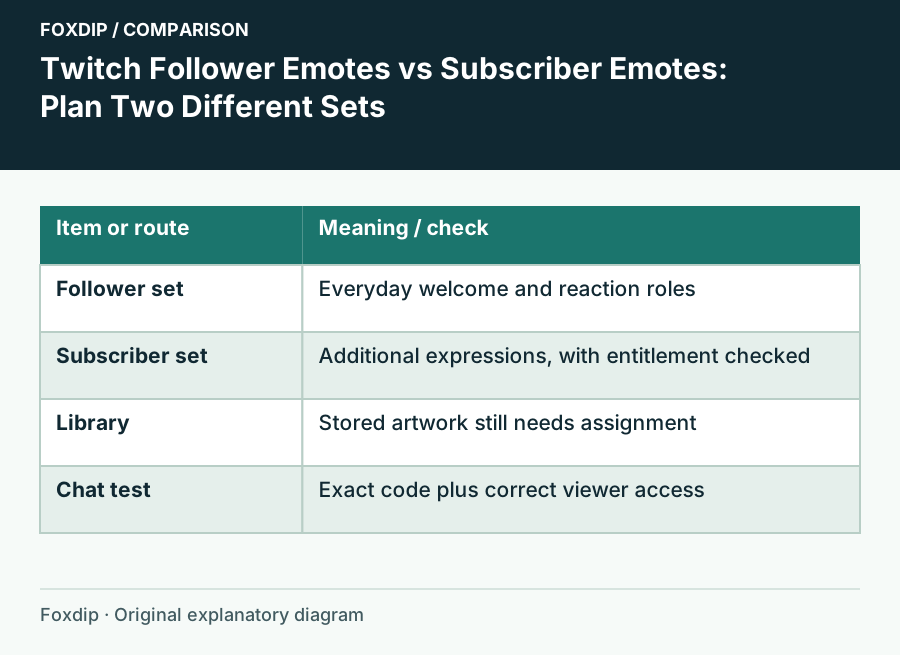
Original Foxdip schematic. Follow the labelled checks alongside the guide.
Give each slot a job
Before uploading, write a small reaction list. Five nearly identical happy faces leave viewers without a greeting or a way to show surprise. Choose distinct silhouettes and expressions that survive the small chat size. You can keep one visual family across both sets while giving each drawing a different purpose.
| Set | Example role | Question before assigning |
|---|---|---|
| Follower | Hello, wave, thanks, celebration, surprise | Can a new follower understand this without an explanation? |
| Subscriber | Specific character reactions or community references | Does this add an expression beyond the free set? |
| Unassigned library | Seasonal or replacement artwork | Is this intentionally stored rather than currently offered? |
Upload to the intended destination
Open Creator Dashboard and find Viewer Rewards → Emotes. Read the headings above the slot you are editing. A file stored in the library is not automatically a live reward in every tier. Preserve your original artwork locally before moving an existing emote between destinations.
Inspect the current allocation
Write down each displayed emote code and its current follower or subscriber destination before changing anything.
Look for: You have a simple rollback list.
Assign one reaction
Choose the follower or subscription slot you intend to change, then upload or select the image and save the assignment.
Look for: The reaction appears under the intended heading, with its current review status.
Confirm the code
Read the complete prefix and suffix from the dashboard rather than guessing from the file name.
Look for: You have the exact code to test in chat.
Check access as two different viewers
Ask a willing follower who isn’t subscribed to try the reaction in your channel. Then ask a subscriber to check the relevant subscriber reactions. Have them choose from the native emote picker first. This separates a naming mistake from an entitlement problem without requiring anyone to purchase a subscription for troubleshooting.
If the artwork is pending review, stop the access check until the dashboard reports that it is available. If the picker shows a lock, examine the account’s access and the slot assignment. Repeatedly exporting the same image won’t change a subscription or follower requirement.
Introduce the set where people will use it
Post a short message showing the greeting and celebration once they are available. Explain the follower set in plain language and let the subscriber set earn its place through additional reactions. If an old code changes, update commands and channel instructions that mention it.
Keep a small allocation note with the code, reaction and destination. When you refresh the artwork later, use that note to preserve the meaning viewers have learned. A coherent set makes chat easier to join; a larger set alone doesn’t tell people what to type.
Sources & references
Based on the official documentation linked beside the relevant sections. Follow the checks on your own setup; no hardware measurements or account tests are claimed.
- Twitch — Follower Emotes ↗Checked 2026-10-27
- Twitch — Subscriber Emote Guide ↗Checked 2026-10-27
- Twitch — How to Use Emotes ↗Checked 2026-10-27
- Twitch — Animated Emotes ↗Checked 2026-10-27
Spotted something out of date? Let Alex know.
How we put our guides together ↗