
Before changing a working installation, check Warzone and your platform’s online services. An incident that matches your platform can explain a connection failure. A normal status page simply means you need another clue.
- Platform
- Windows PC · PlayStation · Xbox
- App / launcher
- Battle.net / Steam / Xbox app / console
- Scope
- Service-check workflow for Warzone; local repair steps depend on your platform and full message.
In this guide
Before you start
- The complete message, including its prefix, punctuation and where it appeared.
- Your game or app, platform and approximate time of the failure.
1. Select Warzone, not another Call of Duty title
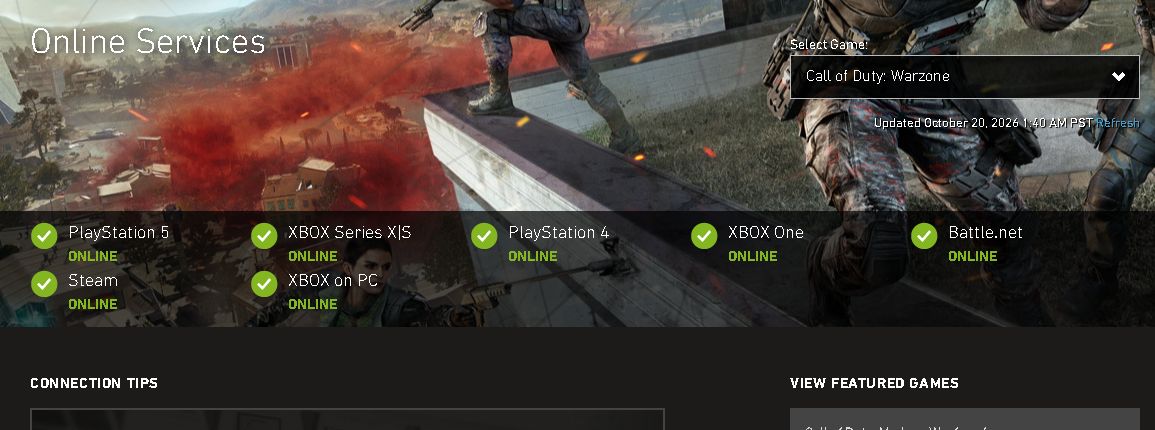
Open Activision’s Online Services source below. In Select Game, choose Call of Duty: Warzone. Wait for the selected title and the platform rows to appear. The default game can be different, so check the title before reading the status.
The page’s update time matters. If the rows have not loaded or the timestamp is old, use its Refresh control or return later. A blank status area is missing information; it is not an all-clear.
 12
1. Select Warzone. 2. Read the update time and your own platform row. These values are a saved 20 October example, not the current service status.
- Select the exact game
- Check time and platform
2. Read your platform, then its network
Choose the row that matches the copy you are playing. Steam, Battle.net and Xbox on PC are separate entries; an online row for one does not describe the others.
If Activision reports an incident for your platform, read the incident details and wait for the provider’s update. If it shows online while you still cannot connect, continue to the page’s Server Status by Network section and follow your platform’s official destination. That second check covers the platform service rather than the Warzone service alone.
This guide shows the game selector above. It does not reproduce every platform dashboard, whose layout and available incident details can differ.
3. Use the result to choose the next check
Incident matches the game and platform: keep the message and approximate failure time, then return to the live provider page for updates. Reinstalling the game will not repair the provider’s service.
No matching incident: record the full error, launcher, platform and exact action that fails. A normal dashboard doesn’t prove your network is healthy or your account is unrestricted. It narrows the question; the next guide needs the actual symptom.
Status unavailable: do not treat missing rows, a stalled request or a failed page load as proof that the game is online or offline. Check the provider’s own notices and keep the uncertainty explicit.
4. Retry the original connection after the relevant update
When the provider says the applicable incident has ended, reopen the game normally and try the same sign-in or connection. If it works, you have confirmed access at that moment. If the message persists, save its exact wording and compare it with the earlier failure before contacting support.
For a recurring failure, note whether the game had already connected successfully and when the disconnect happens. That separates an initial sign-in failure from a later interruption without asking you to reset unrelated settings.
Still stuck?
The page is online, but my game still fails.
Write down the complete message and launcher. Check the relevant platform network, then use a guide or support route for that exact symptom.
The saved screenshot says online.
Open the live source. This article has no real-time status connection.
Sources & references
Official support pages checked on 20 October 2026. Screens show the public web interface; they do not demonstrate a reproduced game error or a repaired stream.
- Activision Online Services ↗Checked 2026-10-20
Spotted something out of date? Let Alex know.
How we put our guides together ↗