
Check whether the failure happens on the go-live confirmation for a scheduled YouTube stream. Streamlabs documents that specific 403/500 case. At our 20 October check it was still under investigation, with no confirmed fix on that notice.
- Code / message
403·500- Platform
- Windows PC · macOS
- App / launcher
- Streamlabs Desktop → YouTube
- Scope
- Scheduled YouTube destination only; not a universal explanation of HTTP 403 or 500.
In this guide
Before you start
- The complete message, including its prefix, punctuation and where it appeared.
- Your game or app, platform and approximate time of the failure.
Match the whole situation
This guide applies when you have a YouTube livestream scheduled and Streamlabs fails at the final go-live confirmation with 403 or 500. Keep all three clues: destination, scheduled event and point of failure.
The same numbers in a browser page, a different app or an unscheduled destination are not enough to identify this incident. Don’t change your microphone, scene collection or graphics driver just because you recognise the number.
1. Open the current incident notice
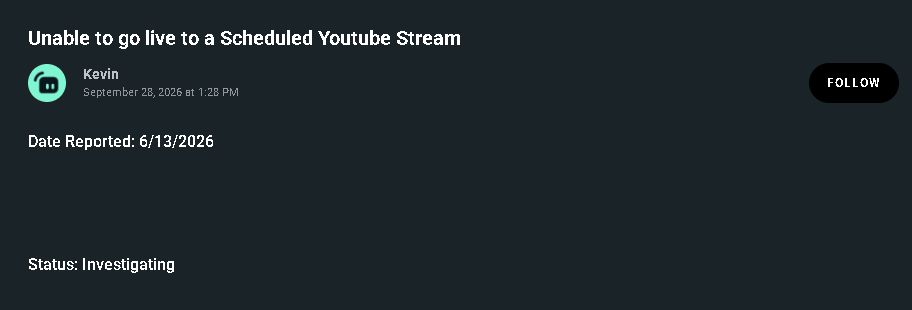
Use the Streamlabs source at the end of this guide. Check the title and status before trying an old workaround found elsewhere. The image below identifies the notice we checked; it is not a live incident feed.
At the check date the notice asked affected users to contact support. It did not establish a repair for this scheduled-stream case. If the live notice now contains a fix, check its version and scope before applying it.
 12
1. Match the scheduled-stream title. 2. Check the status on the live source; this image records the 20 October check.
- Match the incident title
- Read the current status
2. Collect the details before contacting support
Write down whether the code was 403 or 500, the Streamlabs Desktop version, your operating system and the time of the attempt with its time zone. Add that the event was already scheduled on YouTube and that the failure appeared on go-live confirmation.
If you include an image, crop it to the message and enough context to identify the step. Mask your email, stream key, authentication data and any private event information. Send details through Streamlabs’ official support route rather than a public comment thread.
3. Keep other YouTube errors separate
A generic access error does not prove a channel restriction, expired authorisation or a broken schedule. If the context differs, say so in the support request rather than choosing a repair based on the number alone.
Likewise, a fix for a resolved multistream incident is not automatically a fix for a scheduled YouTube stream. Follow the incident that matches the product and trigger, and preserve the scheduled event until you understand the consequences of changing it.
What counts as a useful result?
After a documented fix that applies to your build, repeat the same scheduled-event workflow and confirm that Streamlabs gets past the original confirmation step and YouTube receives the intended stream. Check the destination before sending any private scene or audio.
If the same code returns, report that result along with the applicable fix and version. If a different message appears, keep its wording. Getting further through the workflow is useful information, but it doesn’t identify the new problem by itself.
Still stuck?
My error happens outside a scheduled YouTube event.
This notice does not establish the cause. Use the exact destination, message and failure point in a separate support search.
An old video claims a guaranteed fix.
Compare its build, trigger and official incident status. Do not delete an event or reset your setup merely to try an unrelated fix.
Sources & references
Official support pages checked on 20 October 2026. Screens show the public web interface; they do not demonstrate a reproduced game error or a repaired stream.
- Streamlabs: Unable to go live to a Scheduled Youtube Stream ↗Checked 2026-10-20
Spotted something out of date? Let Alex know.
How we put our guides together ↗