
Copy the letters as well as the number. VAL 59 and VAN 59 belong to different error lists. Start with the matching Riot support page, then check its warning before treating the number as a diagnosis.
- Code / message
VAL 59·VAN 59- Platform
- Windows PC
- App / launcher
- Riot Client / Riot Vanguard
- Scope
- Code identification only; this page does not prescribe Windows security or firmware changes.
In this guide
Before you start
- The complete message, including its prefix, punctuation and where it appeared.
- Your game or app, platform and approximate time of the failure.
1. Keep the letters, the number and any minus sign
Look at the message that stopped you. Write down the full identifier, the game, your platform and whether the message came from the game or Vanguard. A search for “59” loses the part that tells you which list to open.
Use the two names above as an example of the distinction, rather than a claim that your problem has either code. If the window shows a different identifier, keep that exact text. A negative sign belongs to the code; don’t silently turn a negative value into a positive one.
| What the message starts with | Where to begin |
|---|---|
| VAN | Riot’s Vanguard error index |
| VAL | Riot’s VALORANT error page |
| Something else or no readable prefix | Record the full message and use support for the product that displayed it |
2. Open the matching support index
For VAN, open the Vanguard source at the end of this guide. Use your browser’s Find command with the full code, then open the matching entry. Compare the entry’s title with your message before following its instructions.
For VAL, use the VALORANT page linked in the note shown below. Don’t take a Vanguard procedure simply because its number looks familiar. You should end this step on a page for the same product and prefix as your message.
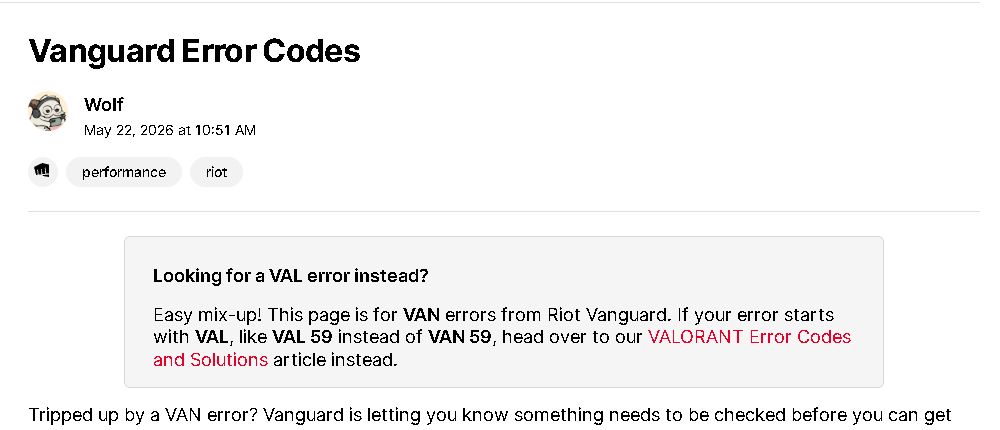 1
1. Use the prefix note to choose the correct support list. The number alone is not enough.
- Separate VAL support link
3. Read the warning before using a code table
At our 20 October check, the English VALORANT page warned that errors could display incorrectly and recommended contacting support. That makes a table lookup a clue, not a confirmed explanation of a current failure.
Open the live source and see whether that notice is still there. If it is, send support the full message and the moment it appears. If the notice has been removed, read the current article rather than relying on this saved image.
4. Follow one applicable branch and compare the result
Use only the branch that matches your system and message. When an official instruction asks you to restart, save your work first. When it concerns firmware, encryption or device security, use the manufacturer-specific route and its prerequisites rather than guessing from another computer’s menus.
Try the same launch or connection that originally failed. Getting past that screen tells you the immediate blocker has changed; it doesn’t establish that every future session will be stable. If a new code appears, record it as a new observation instead of continuing the old recipe.
Give support something they can match
Include the full code, game, Windows version, launcher and time zone. Say what you were doing when it appeared, and list only the steps you actually tried. Keep email addresses, authentication details and unrelated personal information out of public posts.
If support asks for logs, send them through its official private channel. You don’t need to publish your entire diagnostic folder to ask a focused question.
Still stuck?
The number is listed, but the prefix differs.
Stop and open the index for the prefix in your own message. A matching number is not a matching error.
The current page warns that codes display incorrectly.
Use the official support route and provide the full message. Avoid making a specific hardware or account diagnosis from the table alone.
Sources & references
Official support pages checked on 20 October 2026. Screens show the public web interface; they do not demonstrate a reproduced game error or a repaired stream.
- Riot: Vanguard error index ↗Checked 2026-10-20
- Riot: VALORANT error table and current warning ↗Checked 2026-10-20
Spotted something out of date? Let Alex know.
How we put our guides together ↗