
Choose the light and mount that let your eyes remain visible through normal head turns. First identify whether the reflection comes from the face light or a bright monitor. A panel or ring light can both reflect in glasses; useful placement freedom matters more than the shape alone.
When glasses show a bright reflection, change the light-camera-glasses geometry first. A movable side panel gives more placement freedom; a ring can still work if you like its look and the reflection check succeeds.
In this guide
Before you start
- Your usual streaming glasses and a live camera preview.
- Available light-mount positions and desk/floor measurements.
Start with what the camera can see
Put on the glasses you stream in and look at the camera preview. Turn your head toward chat, down to the keyboard and back to the game. A setup that hides a reflection in one still pose may bring it straight back during a normal sentence. Your target is a face that stays readable through those movements.
BenQ's lighting guidance explicitly calls for positioning that avoids glare on glasses and screens. The purchase decision follows that geometry: can the light be moved to a position where its reflection is less intrusive without leaving your face too dark? Neither a ring shape nor an edge-lit panel guarantees that result.
Identify the reflection before buying another light
Use a paused camera view of your normal seat. Switch off only the face light for one comparison, then restore it and change a bright monitor page to the content you usually watch. Record which reflection disappears in each case. This original isolation exercise helps distinguish a lamp reflection from a screen reflection before you pay for a different shape.
Next, keep camera and chair fixed and move the identified light off centre within the mount’s safe travel. Repeat your glance toward chat and keyboard. Judge whether your eyes remain readable in the final camera box. Dimming alone may make a reflection fainter without moving it away from the eyes; a mount with more usable movement can be the relevant upgrade.
| Observation | Next change | Expected result |
|---|---|---|
| Ring-shaped reflection disappears when the lamp is off | Move that lamp off the camera axis and compare height | Look for visible eyes through normal head turns |
| A rectangular reflection follows bright monitor content | Adjust that screen’s content/angle within a comfortable setup | Avoid buying a panel to solve a screen reflection |
| Reflection clears only in a position the stand cannot hold | Compare mount reach and available floor/desk space | Buy the placement freedom you actually need |
| Off-centre light leaves an unacceptable shadow | Try a less extreme position before a second light | Keep both facial detail and eyes readable |
Choose a repeatable single-light position before adding another unit. One Light for a Small Streaming Room: Choose the Position First ↗
Assess glare in the final crop, where reflections may hide the eyes. How to Crop a Webcam in OBS Without Stretching It ↗
Compare mount freedom, not just light shape
NEEWER RL-18 New Version, SKU 66606158, is an 18-inch/45 cm ring-light kit with a stand extending to 155 cm and white/orange filters for its stated 5600 K/3200 K options. Elgato Key Light is a 350 × 250 × 35 mm panel with adjustable 2900–7000 K output and a desk-clamp mounting arrangement.
Those specifications describe different footprints and adjustment systems. They do not prove which creates the better face image. A ring around the lens naturally invites a centered setup; a separate panel is easier to consider away from the lens. Try the available positions instead of treating the product name as the final lighting plan.
Move one thing at a time
Begin with a modest brightness that lets you see your face in the camera. Move the light slightly higher or to the side and observe the reflection. Keep the camera and chair still for the first comparison. Then repeat the head movements you actually make. This is a setup exercise, not a measured promise that a particular angle will remove all glare.
If moving the light creates a deep shadow you dislike, try a less extreme position before adding another unit. Check the bright monitor too: a white page facing your glasses can be part of the reflection. Use the content you normally keep on that screen rather than solving only the empty desktop view.
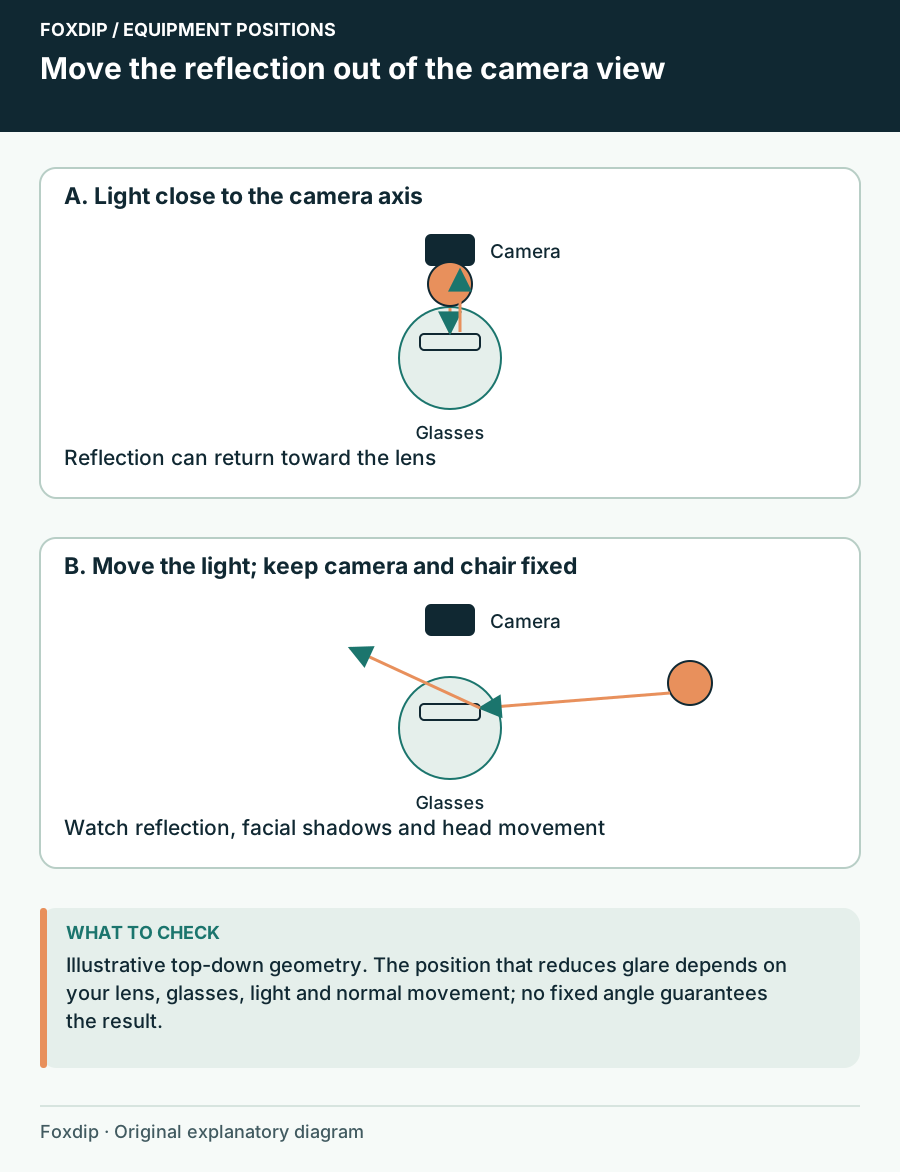
Original Foxdip schematic. Follow the labelled checks alongside the guide.
Give the stand and panel somewhere to live
Make a paper outline of a 45 cm ring and compare it with the space behind or beside the screen. Remember the stand legs and the path to your seat. For a clamp-mounted panel, inspect the desk edge and underside as carefully as you would for a microphone arm. A light that fits only in the doorway is not a small-room solution.
Check the exact model and bundle before ordering. Elgato's Ring Light page now marks that model discontinued, so it is an existing-owner or remaining-stock comparison rather than a default new-buy recommendation here. NEEWER also sells several similarly named RL-18 kits; use the SKU and included components, not the short family name.
Controls matter after you sit down
A light you can adjust from the chair makes fine tuning less disruptive. Check whether the chosen unit uses onboard controls, an app or both, and how power reaches it. A phone-camera shutter remote is not automatically a remote for the light's brightness. Read the control description for the exact kit.
Match color temperature to the look of the face and the other light you keep in the room. A wider adjustment range is useful only if you use it. Keep camera exposure behavior consistent while comparing positions so an automatic brightness change does not disguise what moving the light did.
Keep the light if placement solves it
Keep an existing ring light when you can find a repeatable position that shows your eyes and fits the room. Consider a panel when you need more freedom to place the light independently of the lens, or when the current ring and stand physically obstruct the desk.
Do a short seated recording before the return window closes. Include the screens, glasses and head turns used on stream. Judge the face in the final camera box, then record the working positions. Buying a second light is not necessary when a different position for the first already gives you the result you wanted.
Plan one light’s mounting and power needs before adding another unit. One Light for a Small Streaming Room: Choose the Position First ↗
Sources & references
Manufacturer specifications and primary support documentation checked on 27 October 2026. Recommendations are editorial inferences from connections, placement and documented capabilities; no hands-on performance or comfort measurements are claimed. November 2026 addition: documentation-based diagnostic examples; no new hands-on hardware result or platform upload test is claimed.
- BenQ lighting for video conferencing ↗Checked 2026-11-04
- NEEWER RL-18 New Version SKU66606158 ↗Checked 2026-10-27
- Elgato Key Light official specifications ↗Checked 2026-10-27
- Elgato Ring Light current product status ↗Checked 2026-10-27
Spotted something out of date? Let Alex know.
How we put our guides together ↗