
Try a supported phone you already own before buying a webcam. Choose a dedicated USB webcam when predictable mounting, availability and a separate device matter more than reusing the phone.
Try a supported phone you already own before buying a webcam. Choose a dedicated USB webcam when predictable mounting, availability and a separate device matter more than reusing the phone.
In this guide
Before you start
- Exact phone/computer models and operating systems.
- A stable mount and suitable power connection.
The phone is worth trying if it can stay on the mount
A phone you already own can be the least expensive camera change, but only if it can remain available for the session. Think about calls, two-factor codes, battery, cable reach and where the rear cameras will sit. A phone balanced on a shelf is not a finished camera setup.
Compare the final face-camera box in your stream, not a full-screen marketing sample. A small inset may make a lighting or framing improvement more valuable than a resolution upgrade. Keep the light and camera position similar when you compare, and save a short recording from each route.
Two documented phone-to-computer routes
Apple's Continuity Camera supports iPhone XR or later with iOS 16 or later and a Mac running macOS Ventura 13 or later. It requires the same Apple Account with two-factor authentication, with other connection conditions in Apple's guide. Wired use also requires trusting the Mac. Individual effects can have additional requirements.
Microsoft's connected-camera documentation specifies Windows 11 or later, Android 10 or later and Link to Windows 1.24022.0 or later. Those current support requirements are more relevant than the older Insider announcement. These examples establish supported routes; they are not a promise of the same frame rate or image quality on every phone.
What a dedicated USB camera changes
Elgato Facecam Neo is a concrete 1080p60 USB webcam option. Its manual lists Windows 10 64-bit or later and macOS 12 or later, and a USB-C 2.0 cable. Check the computer-end connector and any suitable data adapter you need before assuming every USB webcam requires a high-bandwidth USB 3 port.
A dedicated camera can stay mounted while the phone remains yours to use. That is a workflow benefit, not proof that its picture will beat your phone. Include mount position, privacy control, focus behavior and the settings you actually need when narrowing the shortlist.
Budget for a stable position and a repeatable start
Put the lens near a position where you can look toward it while speaking naturally. Measure whether a phone holder blocks the screen or the rear cameras, and leave room for the charging connector. With a webcam, check that the monitor mount does not cover the display or collide with a light.
For Continuity Camera, Apple specifies a stable, locked phone with rear cameras facing you and unobstructed. It can run wired or wirelessly, and a cable or charger can keep it charged. Calls and unlocking can interrupt the session, so practise the exact way you will start the stream and access any codes you need.
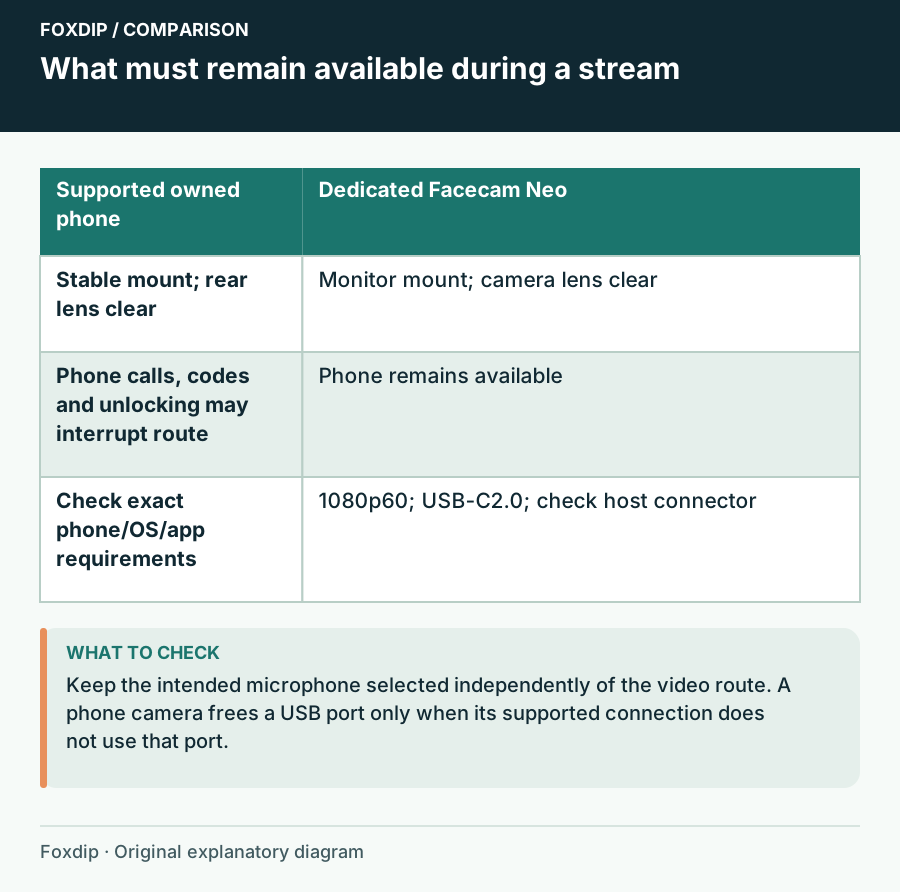
Original Foxdip schematic. Follow the labelled checks alongside the guide.
Compare under the conditions you will stream in
Record your seated face, a hand gesture and a lean toward the keyboard. Keep the same scene crop. Check whether the image stays framed, whether brightness changes distractingly and whether the device reconnects after the break you normally take. Run it long enough to include the workflow you intend, rather than judging one still frame.
Listen too: changing camera devices can expose another microphone option to the application. Keep the intended audio input selected. If lips and sound appear separated in the saved recording, identify the camera/audio route and assess sync there before adding a second capture application.
Buy the device that removes the recurring hassle
Keep the supported phone if its image, mounting and availability work for your sessions. Buy a dedicated webcam if using the phone repeatedly interrupts the stream or if its mounting arrangement is more trouble than you want. Buying a new premium phone solely to avoid a webcam is a much larger decision than reusing one you own.
Keep the current webcam when a better light position and crop already produce an acceptable inset. Write down the route that worked, including the OS requirements and connection. That makes the next camera change a specific comparison rather than another search for a universally best camera.
Fit the chosen camera image into your OBS frame without stretching it. Fit Your OBS Webcam to a Frame Without Stretching It ↗
Make recovery part of the phone-camera comparison
For an iPhone/Mac setup, rehearse the interruption you are most likely to cause: unlocking the phone or answering a call. Apple documents that these can pause Continuity Camera; resuming can require locking and mounting the phone again and reselecting it in the app. Keep a simple non-camera scene available while practising.
Write how many actions restore the intended camera and whether your separate microphone stays selected. A dedicated webcam may earn its cost through easier recovery even when the phone gives a pleasing image. Compare the result in the actual face-camera crop after the interruption, not only at first connection.
| Observation | Next change | Expected result |
|---|---|---|
| Phone returns but the scene uses another camera | Reselect the intended camera in the app | The familiar crop and angle return |
| Camera resumes but voice input changes | Select the dedicated microphone explicitly | Video recovery does not replace the voice route |
| A required phone task repeatedly interrupts the show | Compare a permanently mounted USB camera | The purchase addresses an observed workflow interruption |
Recheck the camera crop after reconnecting the device. How to Crop a Webcam in OBS Without Stretching It ↗
Sources & references
Manufacturer specifications and primary support documentation checked on 27 October 2026. Recommendations are editorial inferences from connections, placement and documented capabilities; no hands-on performance or comfort measurements are claimed. November 2026 addition: documentation-based diagnostic examples; no new hands-on hardware result or platform upload test is claimed.
- Apple Continuity Camera support ↗Checked 2026-11-04
- Microsoft: use your mobile device camera ↗Checked 2026-10-27
- Elgato Facecam Neo user manual ↗Checked 2026-10-27
Spotted something out of date? Let Alex know.
How we put our guides together ↗