
Place one controllable light where it can illuminate your face without blocking the desk or reflecting badly. Add another light only after you can name what that first position cannot do.
Place one controllable light where it can illuminate your face without blocking the desk or reflecting badly. Add another light only after you can name what that first position cannot do.
In this guide
Before you start
- Your final camera framing and available mount positions.
- USB/power-supply capability and clearance for the microphone.
Light the camera view you actually use
Open your normal face-camera scene and sit in your streaming position. Decide whether viewers need to see a head-and-shoulders inset, your hands or a wider seated view. Lighting a small face box is a different job from lighting the whole room. Keep the screen layout visible while you plan so the light does not take the microphone's only usable spot.
First try the light you already own in a better position. Make one change, record a short passage and compare the face at its final stream size. An attractive room when viewed from the doorway can still leave the face poorly exposed on camera.
Two panels, two ways to occupy the room
Key Light Neo mounts on a monitor with its supplied mount and has physical brightness/color controls. Key Light Air MK.2 is a larger 319 × 207 × 33 mm panel, sold with a clamp desk mount or as a light-only option. The generation matters: the MK.2's USB-C power and controls should not be copied onto specifications for the original Key Light Air.
| Exact model | Placement advantage to investigate | Constraint to measure |
|---|---|---|
| Elgato Key Light Neo | Monitor-mounted starting point; onboard controls | Whether that position lights the face well and clears the webcam |
| Elgato Key Light Air MK.2 with mount | Independent desk-clamp position; onboard touch controls | Clamp clearance, panel movement and available power |
| Keep an existing light | No new hardware footprint | Whether a different position already gives an acceptable recorded face |
Mark the light, mount and cable route
Look beside and behind the display as well as on the tabletop. A monitor mount may avoid a stand base, but it fixes your starting location near the screen. A separate clamp can provide more freedom while requiring a suitable desk edge and room underneath. Rehearse the seated view before buying an extension arm.
Keep the light outside the path of the microphone arm and camera. Check that you can still move the monitor, reach mute and stand up without pulling a cable tight. Use only the manufacturer's intended mount and surface arrangement. A panel balanced on a narrow object is not a substitute for a supported position.
Use the camera preview to balance the face against the background. Start below maximum brightness and increase only as needed. Check a bright game screen and a dark one, since the monitor may contribute light. If your glasses reflect the panel, work on its angle and position before making the whole room brighter.
If you want app control, check its requirements separately from physical operation. Air MK.2's optional Control Center listing specifies Windows 11 64-bit or later or macOS 13 or later. Onboard controls can matter when you want to adjust the light without adding another app dependency.
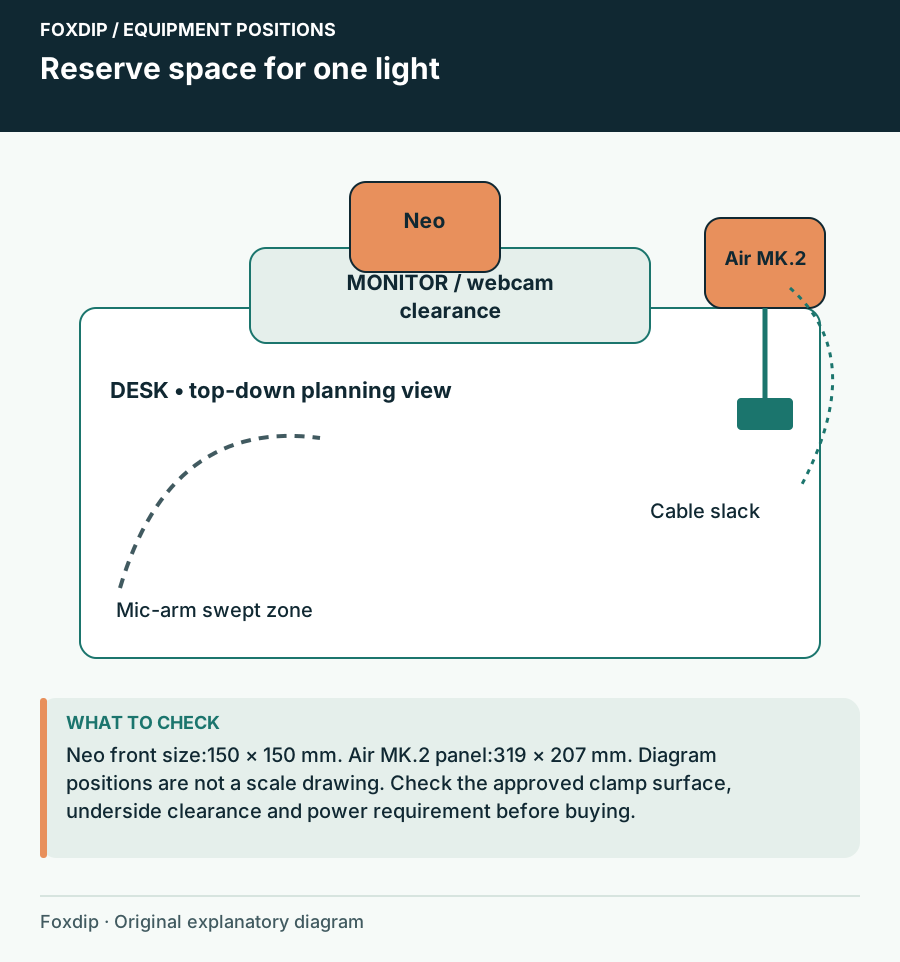
Original Foxdip schematic. Follow the labelled checks alongside the guide.
USB power can change the available light
Neo's manual lists different maximum output depending on supply: 400 lumens from its stated USB-A mode, 700 from USB-C and 1000 with a 3 A power supply. Those are manufacturer ratings, not Foxdip measurements. A dimmer-than-expected result can therefore be a power question rather than proof you need another panel.
For full brightness, Key Light Air MK.2 calls for a USB-C PD adapter rated at least 30 W. Check the exact purchase bundle instead of assuming the adapter is included automatically. Compare usable output at the supply you will actually provide, and keep high-demand lighting separate from a hub already serving video devices.
Let a named shortfall justify a second light
A second light may help when you deliberately want a different shadow balance or need a separately lit area in the frame. It also consumes another mount, outlet or USB supply and another control to remember. Decide which visible problem it solves before fitting it into a cramped room.
Keep one light when your face stays readable through normal movement and the desk remains comfortable to use. Save a note or photo of the working position and control settings. Repeating a good setup at the start of each stream often matters more than adding a second panel without a place for it.
If glasses reflections determine the position, compare the lighting geometry next. Ring Light or Key Light When You Wear Glasses? ↗
Check the supply before adding a brighter lamp
A light set to its maximum control value may still be limited by its supply. Key Light Neo is a concrete example: Elgato documents different maximum output with computer USB-A, computer USB-C and the specified external supply. Keep the power connection in your setup notes alongside brightness and position.
After verifying the documented supply, compare a dark game scene and a bright desktop page without moving the light. Note whether the camera changes face brightness or colour. Resolve that visible inconsistency before deciding that the room needs a second lamp.
| Observation | Next change | Expected result |
|---|---|---|
| Neo seems too dim on computer USB-A | Compare its documented supply options before another light purchase | Evaluate the existing light at the intended supported output |
| Face brightness changes whenever the screen changes | Inspect camera exposure behaviour and screen contribution | Choose a repeatable face exposure for normal content |
| Face is readable but one shadow is the problem | Change the first light’s position and compare | Add fill only for a named remaining shadow |
Check reflection placement while adjusting the first light. Ring Light or Key Light When You Wear Glasses? ↗
Sources & references
Manufacturer specifications and primary support documentation checked on 27 October 2026. Recommendations are editorial inferences from connections, placement and documented capabilities; no hands-on performance or comfort measurements are claimed. November 2026 addition: documentation-based diagnostic examples; no new hands-on hardware result or platform upload test is claimed.
- Elgato Key Light Neo user manual ↗Checked 2026-10-27
- Elgato Key Light Air MK.2 current product page ↗Checked 2026-10-27
- Elgato — Key Light Neo Brightness Information ↗Checked 2026-11-04
Spotted something out of date? Let Alex know.
How we put our guides together ↗