Give your face or avatar the main role, then reserve a second region for the topic or thing you are discussing. Add chat only if seeing it on the video helps the programme, rather than filling every empty area.
In this guide
Choose the conversation format first
A face-led conversation, a news discussion and a viewer-art review have different needs. If you mostly speak directly to viewers, a large camera and a brief topic line may be enough. If you frequently show an item, give that item a proper region instead of dropping it over your face at the last minute.
Write the scene’s job in one line: “host plus current topic,” or “host discussing one shared item.” This keeps the layout from becoming a collection of generic chat widgets. Your scene can be attractive while still leaving a large quiet region for the actual conversation.
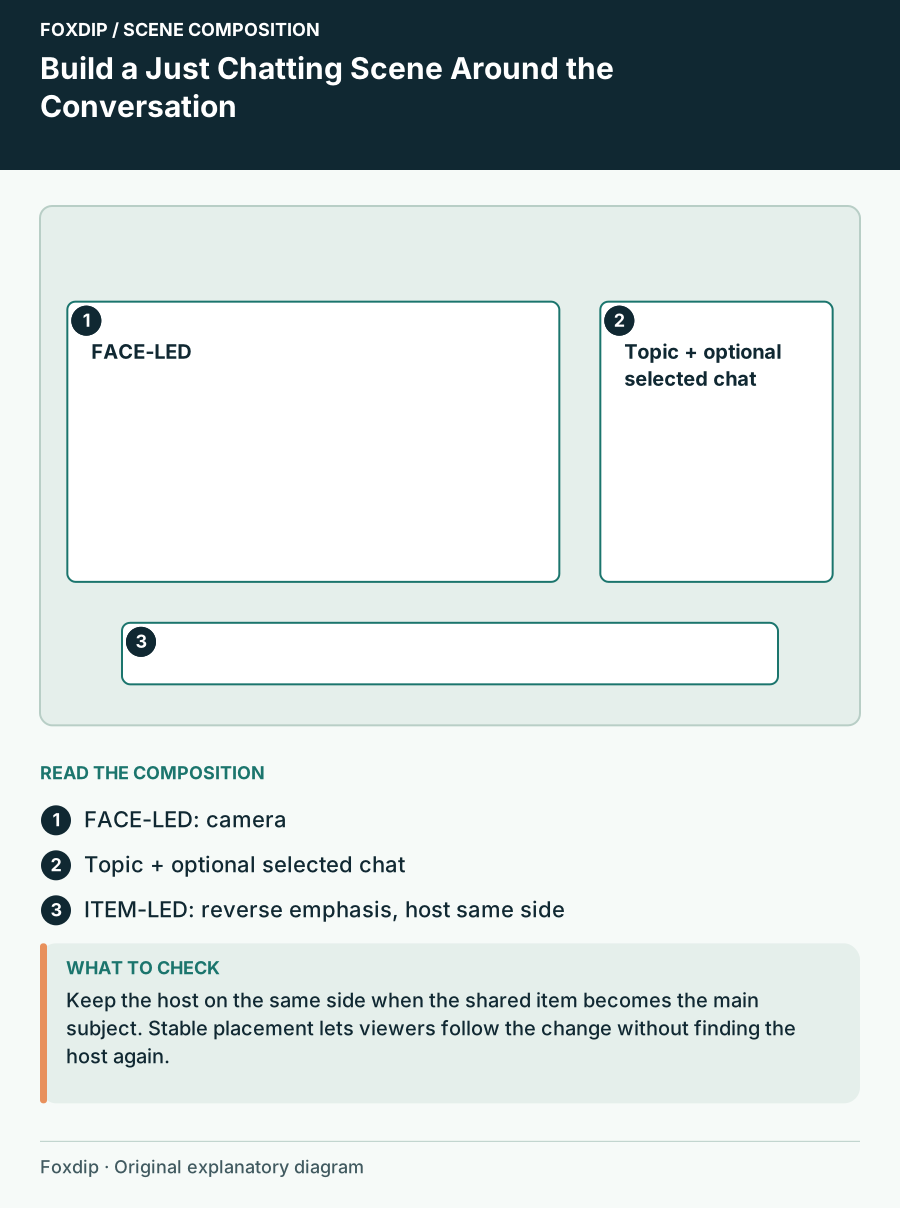
Original Foxdip scene plan. Positions illustrate this example; check the actual game or camera view.
Use two deliberate focus states
Create a face-led state and an item-led state with the same basic alignment. In the first, the camera is large and the topic card is short. In the second, the shared item expands while the camera becomes a smaller companion. Keep the host on the same side so the viewer does not have to relearn the whole composition.
For a worked 1920×1080 layout, the face-led version might give roughly two-thirds of the width to the camera and the remaining area to a topic and a few messages. The item-led version reverses the emphasis without stretching the camera. These proportions are design examples; fit them to your actual footage and content.
Decide what chat contributes
On-screen chat can preserve context in a recording or show the question you are answering. It can also duplicate the platform’s chat while reducing the available camera or item space. Choose the job before adding the widget. A short selected question may serve the discussion better than a permanent wall of messages.
If you display messages, reserve a readable region with a stable background and enough room for longer names. Keep it away from your face and the important part of the shared item. Consider what material could appear there and use the moderation and display controls appropriate to your chosen service.
| Element | Keep it when | Simplify it when |
|---|---|---|
| Topic card | It explains the current segment | It repeats the stream title |
| Chat region | Messages are part of the show | It duplicates context without adding value |
| Shared-item region | You regularly discuss material | It stays empty most of the time |
Leave room for captions and temporary labels
Mark the caption region, guest introduction or short acknowledgement before choosing the camera crop. An attractive lower-third plate may occupy exactly the area where captions or your hands need to be seen. Use a predictable temporary region rather than improvising each announcement.
OBS source transforms can size and crop the camera deliberately. Preserve face proportions when adapting the image to a frame. If your usual pose includes gestures, check the wider movement envelope too. A tight crop that looks composed while still can become awkward as soon as the conversation becomes animated.
Rehearse a topic change and a shared item
Record yourself introducing a topic, showing an item, returning to the camera and acknowledging a message. Check whether the viewer can identify the focus at every moment. Watch for stale topic text, an item that covers the host unexpectedly and chat that becomes too small after the layout changes.
Choose graphics around those successful regions. You may need a camera frame, a plain topic card and a background rather than a densely illustrated full layout. Keep the visual style consistent between the two states, while letting the size of the content tell viewers where to look.
Sources & references
Foxdip editorial design advice with platform behavior grounded in the linked official documentation. Layout dimensions and palettes are worked examples, not platform requirements.
- OBS: Sources Guide ↗Checked 2026-10-27
Spotted something out of date? Let Alex know.
How we put our guides together ↗