
Use one microphone only when both hosts can stay in a suitable pickup area. Two close microphones give independent level control, but require two real mic inputs and a listening plan for both people.
Use one microphone only when both hosts can stay in a suitable pickup area. Two close microphones give independent level control, but require two real mic inputs and a listening plan for both people.
In this guide
Before you start
- Both hosts in their actual seats.
- A list of simultaneous microphone and headphone requirements.
Put the people on the plan first
For two people in the same room, draw the chairs, cameras, screens and hands before adding microphones. An interview across a table is different from two people facing the same game. Ask whether each person can speak comfortably without leaning into the other person's seat or looking away from the screen.
A shared microphone saves an input and a cable. It also ties the two voices together. If one host is much quieter or moves further away, you cannot turn that person up independently after the voices have already reached one channel. Buy for the conversation you will have, including interruptions and laughter.
One cardioid is a constrained seating arrangement
An existing cardioid microphone can be worth trying for a short, occasional conversation. Both people need to occupy its intended front pickup region; sitting opposite each other around a side-address cardioid is not the same as sitting together in front of it. Turn-taking helps, but it is not a substitute for checking the recorded balance.
For a concrete example, RØDE's NT1 Signature Series is a side-address cardioid XLR condenser. It needs P48 power and an interface. Its documented pattern does not make it an all-direction table microphone. Keep it if your seated rehearsal records both voices well; do not buy a second unit solely because a diagram looks symmetrical.
Two close microphones solve a different problem
Separate microphones let you set each host's input level and mute individually. They also allow each person to keep a normal position. Start with the microphones close to their intended speaker and consider where their less sensitive directions point. Both mics will still hear some of the room and the other person.
Do not promise perfect separation or repair a placement issue with an aggressive gate. A guest who interrupts mid-sentence still needs to be audible. Rehearse both people talking at once, a quiet reply and a loud laugh. If each input sounds acceptable alone but the combined result is hollow or roomy, revisit positions before adding processing.
Count microphone preamps, not the number in the product name
Scarlett 2i2 4th Gen provides two microphone preamps. Scarlett Solo 4th Gen has one mic preamp plus an instrument/line input, so it is not the same two-XLR-microphone purchase. A passive XLR splitter does not turn one preamp into two independently controlled inputs.
| Example plan | Connections to budget | Limitation to accept |
|---|---|---|
| Keep one suitable XLR mic | One mic input, suitable power and one mount | Hosts share pickup and a single recorded balance |
| Two XLR mics into Scarlett 2i2 4th Gen | Two XLR cables, two mounts, both mic inputs | One built-in headphone socket; check how both hosts will listen |
| Two unrelated USB mics | Two USB devices plus a documented software route | Do not assume the streaming app can combine and independently manage them without additional planning |
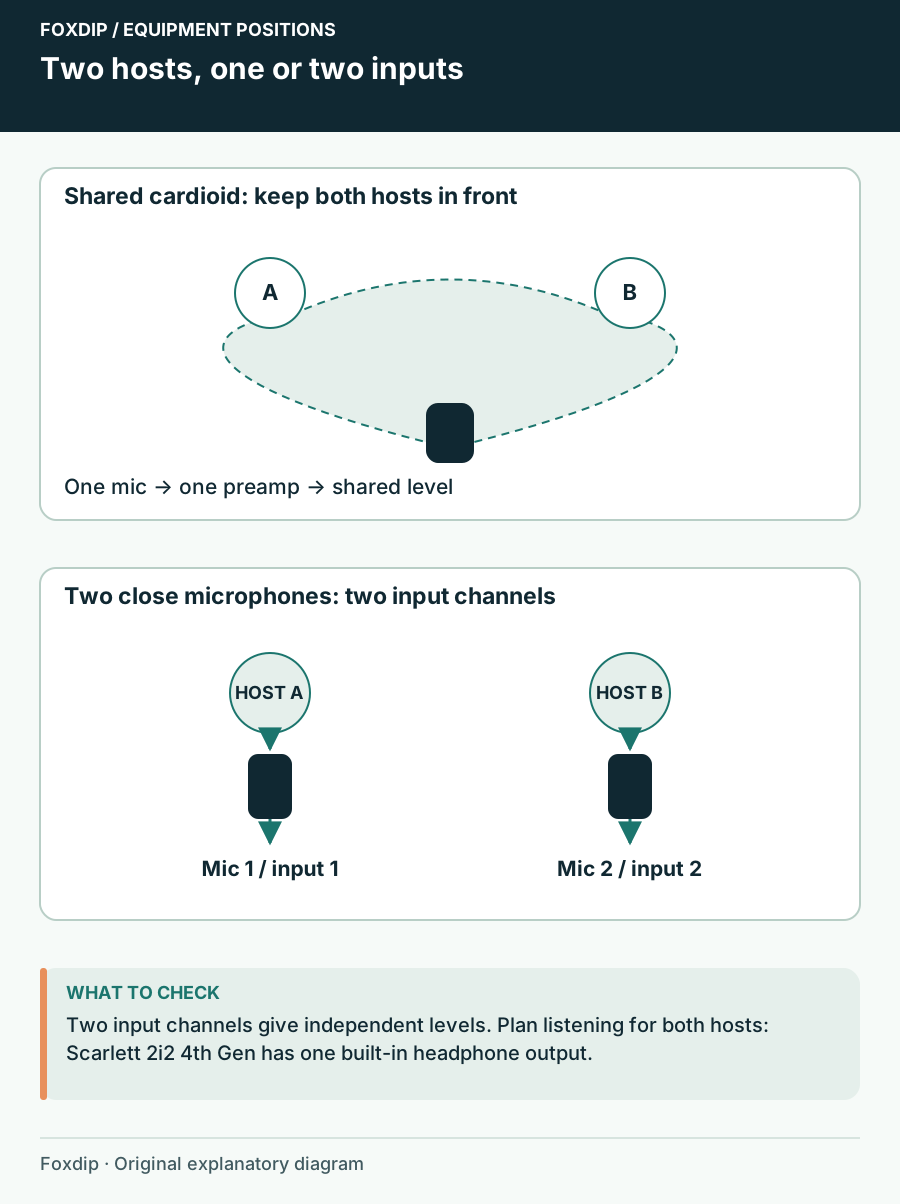
Original Foxdip schematic. Follow the labelled checks alongside the guide.
Give both hosts a listening route
Two mic inputs do not guarantee two headphone outputs. Decide whether both people must hear remote guests, game sound and their own voices. A suitable headphone distribution device may be part of the purchase; check input level, connector type and independent volume controls. A simple splitter shares a source but does not create separate mixes.
Keep speakers out of the first rehearsal so you can identify microphone pickup without an extra acoustic return. On a remote interview, also confirm that the guest does not receive their own voice back. That return-routing question belongs in the equipment plan before you order a larger mixer.
Rehearse the smallest workable setup
Record a few minutes in the real seats. Have each person introduce the segment, turn to the game, reach for the keyboard and interrupt naturally. Listen to the combined file, then to separate inputs if your recording route provides them. Label the louder and quieter moments instead of judging only a sustained microphone check.
Keep one mic for occasional segments when both people are comfortably intelligible. Add a second when independent level control or freedom of movement solves a recurring problem. Add more mixer features only when you can name the missing route, such as a separate guest return or a second headphone mix.
Compare dynamic and condenser placement needs before choosing each host’s microphone. Dynamic or Condenser Mic for an Untreated Streaming Room? ↗
Run a three-part conversation check
With two microphones, record host A alone, host B alone and then a natural interruption. Keep all gains fixed through the sequence. If possible, inspect each isolated recording input before listening to the combined mix. The result should reveal which control belongs to which person and how much of the other voice it also captures.
Two physical inputs and two recording tracks are separate choices. Plan both when independent editing matters. A mixed review track remains useful, but do not play that track alongside its isolated copies during the edit. The rehearsal below is a routing exercise, not a claim of acoustic isolation.
| Observation | Next change | Expected result |
|---|---|---|
| A speaks and both supposed isolated tracks contain the same full mix | Recheck input selection before microphone placement | Each track receives its intended device/input route |
| Each host sounds clear alone but interruptions sound roomy | Compare microphone positions with both active | Keep the conversation natural without abrupt gates |
| One person is audible only in one headphone ear | Determine whether the channel pair contains two separate people | Do not sum away control before deciding the track plan |
Use a written track matrix when separate editing is a requirement. Record Mic, Game and Voice Chat on Separate OBS Tracks ↗
Sources & references
Manufacturer specifications and primary support documentation checked on 27 October 2026. Recommendations are editorial inferences from connections, placement and documented capabilities; no hands-on performance or comfort measurements are claimed. November 2026 addition: documentation-based diagnostic examples; no new hands-on hardware result or platform upload test is claimed.
- RØDE NT1 Signature Series datasheet ↗Checked 2026-10-27
- Focusrite Scarlett Solo 4th Generation ↗Checked 2026-10-27
- Focusrite Scarlett 2i2 4th Generation ↗Checked 2026-10-27
- OBS — Multiple Audio Track Recording Guide ↗Checked 2026-11-04
Spotted something out of date? Let Alex know.
How we put our guides together ↗