
Map the microphone, console, headphones and stream destinations separately. Choose a conventional interface for computer inputs, or documented console support when the same microphone must reach party chat.
Map the microphone, console, headphones and stream destinations separately. Choose a conventional interface for computer inputs, or documented console support when the same microphone must reach party chat.
In this guide
Before you start
- A diagram of stream audio and console party-chat destinations.
- Your computer OS, ports and exact console model.
Draw four arrows before looking at channel counts
Write down where your voice enters, where game audio enters, what you hear and what the audience hears. Then add a fifth arrow if console friends need your microphone. That last route often changes the shortlist: receiving HDMI game sound on the PC does not send your XLR microphone back into console voice chat.
A USB-C connector identifies a physical connector, not guaranteed PlayStation or Xbox audio support. A purchase should have a manufacturer diagram for the console and direction you need. If the page only describes Windows and Mac recording, do not treat a spare USB port as evidence of console compatibility.
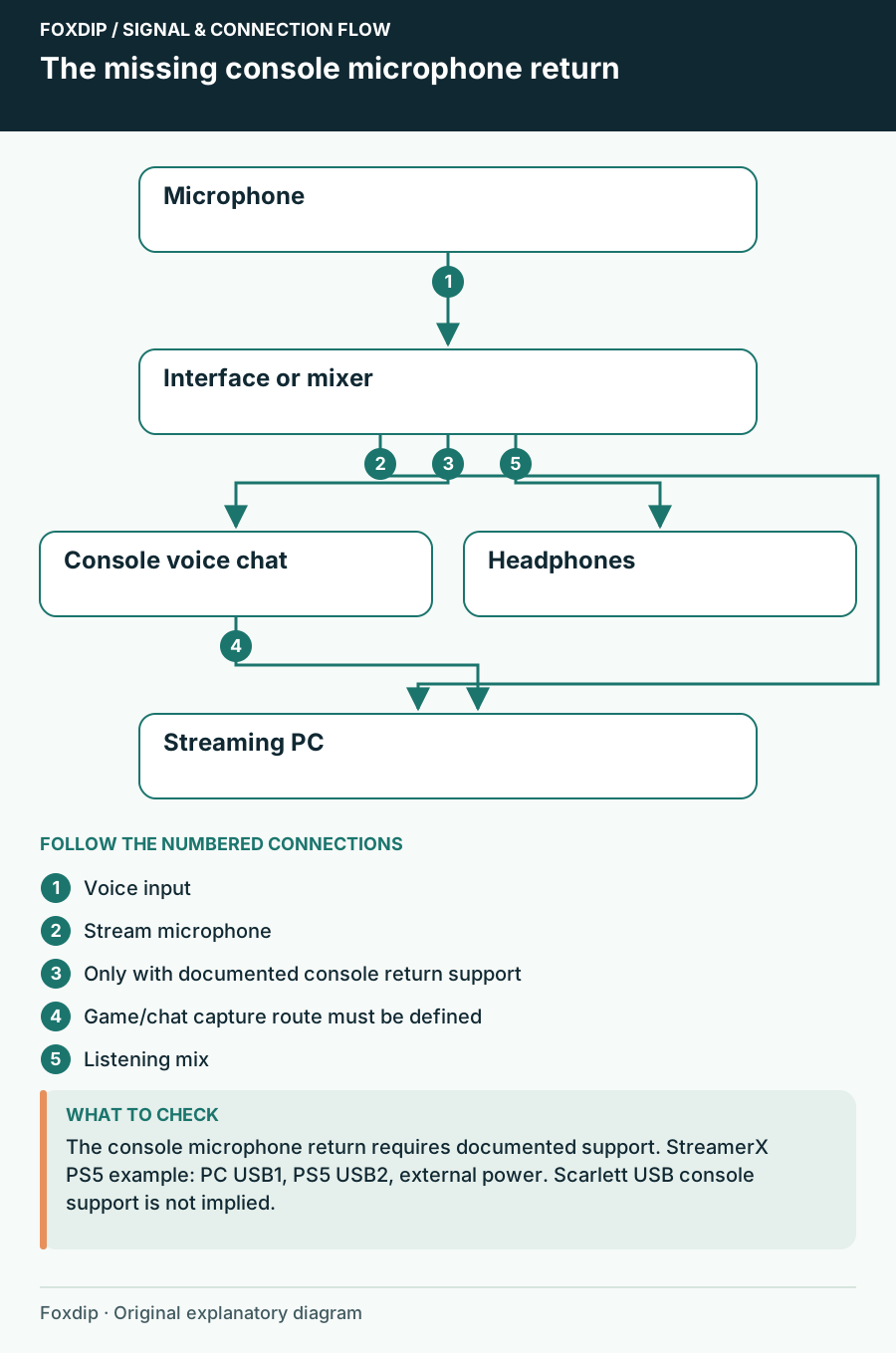
Original Foxdip schematic. Follow the labelled checks alongside the guide.
PC microphone only: keep the interface small
Scarlett Solo 4th Gen has one microphone preamp; Scarlett 2i2 4th Gen has two. Both are USB 2.0 devices using Type-C connectors. Choose between them around real simultaneous inputs: a solo XLR voice does not become better merely because a second preamp exists.
Focusrite Control 2's page currently lists Windows 10 64-bit and Windows 11, plus macOS Sonoma 14, Sequoia 15 and Tahoe 26. Check your computer and the current download before depending on its controls. These are documented software requirements, not a claim that Foxdip tested every listed system.
An analog stereo source consumes two line inputs
If you need to bring an external stereo line source into the interface while keeping your microphone connected, count left and right separately. Scarlett 4i4 4th Gen adds rear line inputs 3 and 4 alongside its two mic/line/instrument inputs. That is a different need from simply having two microphone sockets.
Use only a suitable line-level output and the correct cable arrangement. A console's HDMI port is not an analog line output. Adding a 4i4 alone does not extract HDMI audio or establish a console microphone return. Identify any capture card, display output or supported adapter in that plan, including the level it supplies.
PS5 party chat: compare a documented return route
RØDE documents a specific Streamer X arrangement: the PS5 connects to USB2, the computer to USB1 with the supplied SuperSpeed cable, and the unit uses its power supply. The console selects Streamer X Secondary for microphone and audio output. This is evidence for that setup, not blanket support for every console.
Streamer X can therefore belong on a shortlist when one microphone must reach both a PC workflow and PS5 chat. Compare its complete routing controls against what you already own. If you only want your voice on the stream and already use a separate headset for console friends, a conventional PC interface may be enough.
Use this purchase matrix
Fill in one row for your actual evening, including whether voice chat runs on the console or computer. When a route is missing, ask the manufacturer about that route rather than asking whether a device is generally good for streaming.
| Need | Concrete example to investigate | Question that must be settled |
|---|---|---|
| One XLR voice to PC | Scarlett Solo 4th Gen | Does the headphone route and software support fit this PC? |
| Two local XLR voices | Scarlett 2i2 4th Gen | How will two people share or distribute monitoring? |
| Mic plus external stereo analog audio | Scarlett 4i4 4th Gen | Where does a compatible line-level stereo source come from? |
| One mic also sent to PS5 chat | Streamer X documented USB1/USB2 setup | Does the exact console routing match the complete stream plan? |
Keep the existing route if it already delivers every arrow
A larger mixer is hard to justify when the current interface already records the microphone once and gives you the listening mix you need. Rehearse voice, game, chat and an alert, then play back the saved file. Ask a console friend to confirm the separate chat route if you use one.
Buy when a named connection is missing, not because a front panel looks more professional. Include cables, any headphone distribution and occupied USB ports in the basket. Save a simple diagram with the working configuration so a future app change does not send you shopping for a routing problem.
Compare the complete USB and XLR equipment lists if the microphone connection is still undecided. USB vs XLR for Streaming: What Does Your Setup Need? ↗
Identify which app input contains the mix
After drawing the hardware arrows, list the input name selected in each application. A console chat app, OBS and a recorder may choose different channels from the same interface. Do not change a global interface mode during a live conversation without checking what that change sends to every destination.
Focusrite’s current Solo/2i2 4th Gen instructions distinguish Audio capture, Video call and Stream modes. The selected mode changes where the mix appears; use the current Control 2 documentation beside the application’s input selector. This is a PC software routing feature and does not establish direct console USB compatibility.
| Observation | Next change | Expected result |
|---|---|---|
| OBS needs isolated mic; chat needs one combined input | Check whether the interface can expose both required routes together | Each app receives only its planned material |
| Remote guests hear their own voices back | Check the return mix before adding another cable | Their incoming audio is excluded from their return |
| The interface is visible but one mix is missing | Check the selected mode and exposed channels | The app selects the mix, not merely the device family |
Trace a repeated voice through every application route. OBS Double Audio or Mic Echo? Find the Duplicate Capture ↗
Sources & references
Manufacturer specifications and primary support documentation checked on 27 October 2026. Recommendations are editorial inferences from connections, placement and documented capabilities; no hands-on performance or comfort measurements are claimed. November 2026 addition: documentation-based diagnostic examples; no new hands-on hardware result or platform upload test is claimed.
- Focusrite Scarlett Solo 4th Gen ↗Checked 2026-10-27
- Focusrite Scarlett 2i2 4th Gen ↗Checked 2026-10-27
- Focusrite Control 2 supported systems ↗Checked 2026-10-27
- Focusrite Scarlett 4i4 4th Gen ↗Checked 2026-10-27
- RØDE: connect Streamer X to PS5 for audio ↗Checked 2026-10-27
- Focusrite — How to use Loopback in Focusrite Control 2 ↗Checked 2026-11-04
Spotted something out of date? Let Alex know.
How we put our guides together ↗