
Choose IEMs if you want in-ear listening and can get a suitable seal. Keep or choose a headset when its over-ear fit, controls and microphone backup better suit your sessions.
Choose IEMs if you want in-ear listening and can get a suitable seal. Keep or choose a headset when its over-ear fit, controls and microphone backup better suit your sessions.
In this guide
Before you start
- Your intended listening output and any needed adapter.
- Seller return terms for opened earphones.
Name the reason you want to change
If a headset is hot, presses on your glasses or dominates the camera frame, in-ear monitors can be a reasonable alternative to investigate. If you simply want your voice to sound better to the audience, changing the listening device may not help: a separate microphone and its captured route determine that part of the stream.
Write down two requirements you will notice during a session. Examples include no headband, a cable that reaches the interface, an emergency boom microphone or controls you can find without looking. These are more useful buying criteria than deciding that one style is inherently more professional.
Two concrete wired arrangements
Shure SE215 with the standard 3.5 mm audio cable is an in-ear listening option with detachable cable and interchangeable sleeves. HyperX Cloud III wired is a closed-back over-ear headset with a detachable microphone and 3.5 mm, USB-C and USB-A connection options. Check the exact bundle: other SE215 cables and Cloud III Wireless are different arrangements.
| Option | Route to check | What you gain or give up |
|---|---|---|
| SE215 with standard 3.5 mm cable | Analog headphone output; adapter if your device uses 6.35 mm | No headband or boom; ear-tip seal and cable handling become daily tasks |
| Cloud III wired | 3.5 mm or supplied USB connection appropriate to the platform | Over-ear pads, headset controls and a removable backup mic; more visible hardware around the head |
A headphone socket is still the first compatibility check
Trace the cable all the way to the output you want to use. Plugging into a USB microphone or interface may let you hear its direct-monitor path. Plugging into the computer instead may require a separate route for your own voice. Decide which you need before buying another adapter.
A standard stereo IEM cable is a listening connection. It does not add a microphone return to a console controller. Conversely, a headset's four-pole connection and USB dongle may carry a microphone that you do not want OBS to select. Keep your separate mic explicitly chosen in streaming and chat apps after changing devices.
Try reading chat, looking at a second screen and reaching for the keyboard. Does a cable catch under your arm? Can you remove and replace the listening device when someone enters the room? Is the volume control within reach? Evaluate both sides independently if the fit or balance seems inconsistent.
Record ordinary speech while listening at your usual level. Check for escaped playback and whether your own voice level changed because you hear yourself differently. This is a personal setup check, not an isolation measurement or a claim that Foxdip wore either model for a long session.
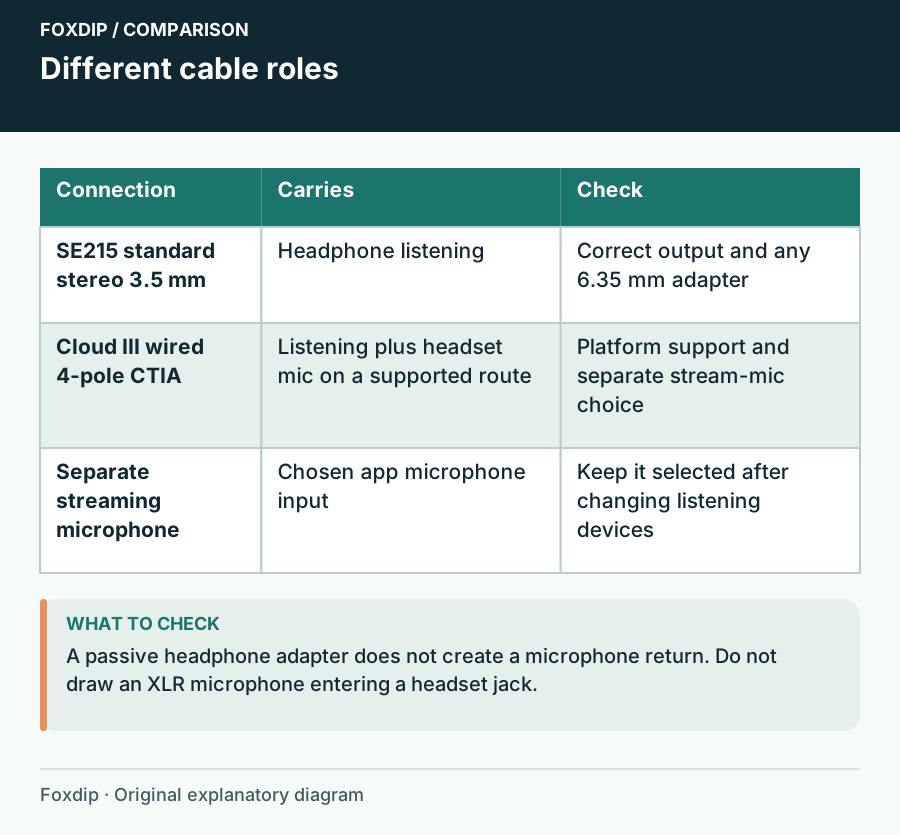
Original Foxdip schematic. Follow the labelled checks alongside the guide.
IEM fit is a purchase condition, not a promised result
Shure's guide explains that a poor sleeve seal can reduce bass and isolation. Try the supplied sleeve choices according to its instructions rather than judging the sound from a loose fit. Seat the cable so ordinary head movement does not pull at the earphones. Follow the cleaning guidance for the earphones and sleeves.
Do not assume a smaller device will be more comfortable for you. Some people dislike pressure from ear tips just as others dislike a headband. Check the seller's opened-earphone return policy before ordering, since fit can be difficult to settle from dimensions alone. Stop using a fit that hurts rather than trying to outlast it.
Keep the headset when it already meets the need
With a separate microphone, you can remove the Cloud III's detachable boom when you do not need it. That may be enough to simplify the camera view. Keep a working headset if it stays comfortable, reaches the correct output and provides the listening you need.
Choose IEMs when the in-ear format solves your actual obstacle and the sleeve fit works through a representative session. Include any required adapter and replacement sleeves in the comparison. Neither format should require louder listening to compensate for a poor fit or a routing mistake.
Compare open and closed over-ear designs if an in-ear fit does not suit you. Open or Closed Headphones When You Stream with a Separate Mic? ↗
Check the adapter before judging the earpieces
Use the same familiar stereo clip for the IEMs and headset, beginning at a low comfortable volume. If vocals disappear, a channel drops out or a plug works only when held, first check that the selected socket and adapter are intended for that connector. A failed connection is not a useful sound-quality comparison.
After confirming ordinary playback, make a short voice recording through your separate microphone while moving your head normally. Listen for cable rubbing as well as voice. Choose a cable route that stays relaxed, then assess comfort over the length of session you need.
| Observation | Next change | Expected result |
|---|---|---|
| All playback loses the same side | Inspect the listening connection and balance | Both channels work before changing OBS |
| Your mic is one-sided but known stereo playback is normal | Inspect the microphone source channels | Solve the recording route independently of earpiece fit |
| Cable movement creates a distracting sound | Change the cable route and repeat normal head turns | Choose fit using the actual seated workflow |
Use the mono routing guide when only the microphone is one-sided. Microphone Only in the Left Ear in OBS? Check the Source Channels ↗
Sources & references
Manufacturer specifications and primary support documentation checked on 27 October 2026. Recommendations are editorial inferences from connections, placement and documented capabilities; no hands-on performance or comfort measurements are claimed. November 2026 addition: documentation-based diagnostic examples; no new hands-on hardware result or platform upload test is claimed.
- Shure SE215 official product page ↗Checked 2026-10-27
- Shure SE215 user guide ↗Checked 2026-10-27
- HyperX Cloud III wired product page ↗Checked 2026-10-27
- HP HyperX Cloud III wired datasheet ↗Checked 2026-10-27
- OBS — Audio Mixer Guide ↗Checked 2026-11-04
Spotted something out of date? Let Alex know.
How we put our guides together ↗