
Check the exact microphone guidance and interface gain range, then record ordinary speech. A high knob position alone is not a fault or proof that you need an inline booster.
Check the exact microphone guidance and interface gain range, then record ordinary speech. A high knob position alone is not a fault or proof that you need an inline booster.
In this guide
Before you start
- Exact microphone model and interface generation.
- A saved recording of normal and louder speech.
The end of the knob is not a diagnosis
If your dynamic microphone needs a lot of gain, first ask whether the recorded voice is usable at that setting. A knob near its maximum is not automatically defective. Headphone volume, microphone input gain and an OBS fader do different jobs; turning up the wrong one can make the headphones louder without changing the recording.
Record your normal voice from the position you can hold during a game. Include a quieter sentence and a louder reaction. Keep the microphone and cable unchanged while you inspect input gain. Otherwise it becomes difficult to tell whether a new setting or a new position caused the improvement.
Different dynamic microphones have different guidance
Elgato says Wave DX should be paired with an interface providing at least 45 dB of gain. Shure's SM7B documentation points toward more than 60 dB or an inline boost/stronger preamp when the preamp cannot provide it. Do not turn one model's recommendation into a universal requirement for all dynamics.
The microphone's sensitivity specification describes electrical output for a stated acoustic input. It helps explain why two microphones may need different gain for the same voice, but your speaking level and distance still matter. Manufacturer minimum guidance is a compatibility starting point, not a guarantee of one perfect setting for every host.
Read the generation as carefully as the number
For a concrete interface comparison, Focusrite publishes a 57 dB mic gain range for Scarlett Solo 4th Gen and 69 dB for Scarlett 2i2 4th Gen. That difference matters when choosing for a low-output mic. It does not mean the larger model will improve a microphone that already reaches a suitable recording level cleanly.
| Combination to evaluate | Published starting point | Decision |
|---|---|---|
| Wave DX with a suitable existing interface | Elgato asks for at least 45 dB | Check the existing specification and recording before adding hardware |
| SM7B with Scarlett Solo 4th Gen | 57 dB interface range; Shure guidance exceeds 60 dB | Plan around the mismatch in the published guidance instead of assuming all Scarlett models are equivalent |
| SM7B with Scarlett 2i2 4th Gen | 69 dB interface range | More range is documented; still set gain for your voice and check noise/headroom |
Separate low level from unwanted sound
Listen to the quiet gaps and the speech after setting playback to a normal level. If the voice is quiet everywhere, check input choice, cable seating and the actual gain control. If the voice is loud enough but room noise dominates, extra gain will raise that unwanted sound too. Moving a distant microphone closer may answer a different problem from buying a stronger preamp.
If only the loud reactions distort, adding gain is the wrong direction. Reduce input gain and repeat the same passage. If the saved file is fine but live listening is quiet, inspect the headphone level and monitoring balance. Keep these observations separate so you do not buy an inline device to fix a headphone setting.
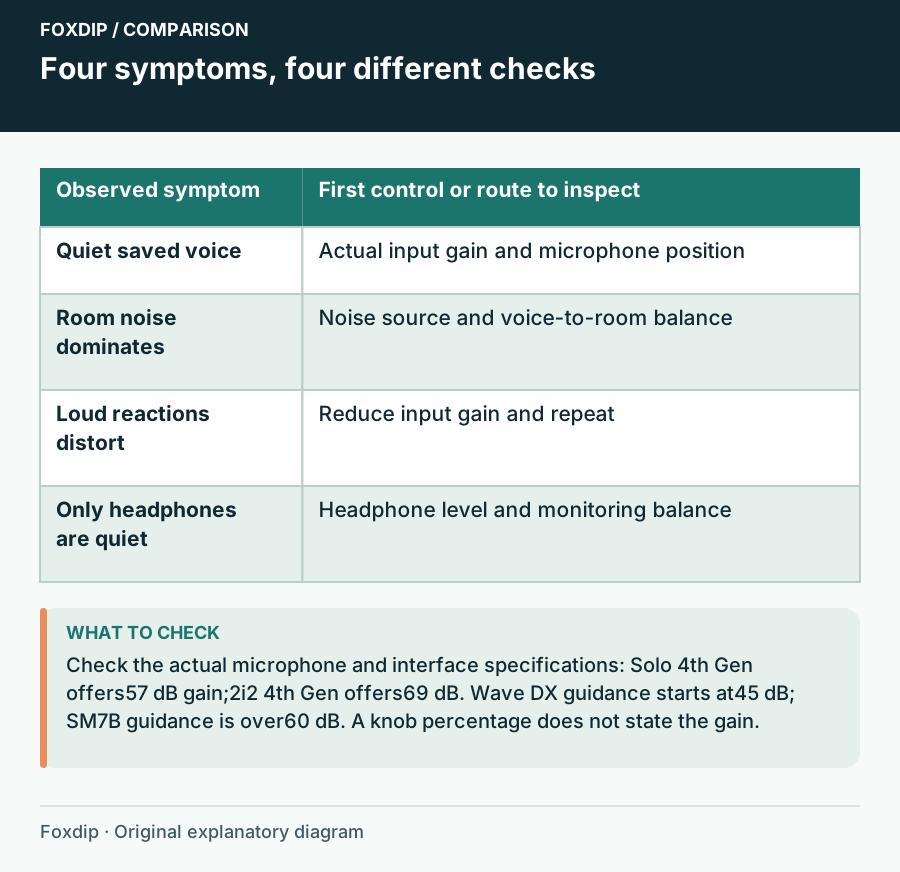
Original Foxdip schematic. Follow the labelled checks alongside the guide.
What an inline booster adds to the basket
A compatible inline preamp can provide gain before the interface input. It also adds another device, connectors and a power requirement. Read its manual: many active boosters need phantom power from the interface, and the handling of that power toward the microphone depends on the device. Do not guess based on the presence of an XLR socket.
Compare that complete addition with an interface that supplies the documented range by itself. A booster is easier to justify when you like the current interface's routing and monitoring and only lack suitable gain. An interface change can make more sense when you also need another mic input or a different return route.
Keep a working combination, even if the knob looks busy
Save a short voice sample and write down microphone position, gain and any software processing. If you have usable speech, room for a louder reaction and acceptable noise in the actual stream, the setup can stay. There is no reward for leaving a particular percentage of knob travel unused.
When comparing a new device, keep the position and finished voice level similar. Assess the issue you wanted to solve and the connections you gain or lose. Buy more gain when the evidence points there; keep the current interface when its recording already does the job.
Compare capsule and room-position needs before replacing a working microphone. Dynamic or Condenser Mic for an Untreated Streaming Room? ↗
Separate three kinds of quiet recording
Keep the microphone at its documented starting position and record an ordinary sentence with processing bypassed. Compare the input meter, the saved file and your headphone volume independently. Write down which of the three is quiet. An interface gain specification cannot diagnose all three observations at once.
If the recorded voice is already clear at a useful level, unused gain-knob travel is not a purchase target. If increasing input gain makes loud words harsh, preserve headroom and investigate the level of the other sources instead. An inline booster should solve a demonstrated input-chain limitation.
| Observation | Next change | Expected result |
|---|---|---|
| Input meter is healthy; headphones are quiet | Adjust the listening level or monitor balance | Listening changes without overdriving the microphone input |
| Input and file are quiet at a practical speaking position | Compare the exact mic guidance with the interface gain range | Establish whether additional clean input gain is the missing capability |
| Voice level is usable but the room is too prominent | Change position and noise conditions | Avoid amplifying voice and room together as the only fix |
Check a sustainable speaking distance before adding gain. Microphone Distance and Placement: Find Your Speaking Position ↗
Sources & references
Manufacturer specifications and primary support documentation checked on 27 October 2026. Recommendations are editorial inferences from connections, placement and documented capabilities; no hands-on performance or comfort measurements are claimed. November 2026 addition: documentation-based diagnostic examples; no new hands-on hardware result or platform upload test is claimed.
- Elgato Wave DX compatible interfaces ↗Checked 2026-10-27
- Shure SM7B user guide ↗Checked 2026-10-27
- Scarlett Solo4th Gen official gain specifications ↗Checked 2026-10-27
- Scarlett 2i2 4th Gen specifications ↗Checked 2026-10-27
- Elgato — Wave DX: How to get the Best Sound ↗Checked 2026-11-04
- Focusrite — What is direct monitoring? ↗Checked 2026-11-04
Spotted something out of date? Let Alex know.
How we put our guides together ↗