
Choose around the display signal you want to keep and the computer port you can provide. A 1080p60 stream can still need a card that passes a higher-resolution or higher-refresh game signal.
Choose around the display signal you want to keep and the computer port you can provide. A 1080p60 stream can still need a card that passes a higher-resolution or higher-refresh game signal.
In this guide
Before you start
- Console/display resolution, refresh rate and HDR requirements.
- Computer OS, USB data capability and audio plan.
Write three separate format requirements
Write the console's output, the mode you want on the game display and the capture format sent to the computer. For example: play at 4K60 HDR, send 1080p60 SDR to the stream. Those are three related requirements, not one number printed on the front of a box.
If you only need clips occasionally, first consider whether the console's own recording or broadcasting function already meets the job. A capture card earns its place when you want a computer scene, your own sources or a recording workflow that the console alone does not provide.
Two USB options for different priorities
Game Capture Neo documents 4K60 HDR passthrough and up-to-1080p60 capture. Its current resolution matrix includes 1080p120 input with 1080p60 capture, but not a universal promise for every high-refresh mode. For a card purchase, open the matrix for the actual input you intend to use.
Elgato 4K S also captures 1080p60, while its documented passthrough extends to 1440p120 and 1080p240. It adds higher-resolution capture options as well. That makes it worth investigating when those display modes or future recordings matter; it does not make a basic 1080p60 scene automatically better.
Check the computer before the HDMI cable
Neo's manual calls for a direct USB 3.0 or better connection and says not to use a USB hub. Its supplied host cable is USB-C to USB-A. 4K S specifies a USB 3.0 Type-C host port. Match both data capability and connector, including any adapter recommended for your machine.
Their documented host requirements differ. Neo lists Windows 10 64-bit, macOS 12 and iPadOS 17 or later. The current 4K S requirements list Windows 11 64-bit, macOS 13 on Apple M1 or better, or iPadOS 18 or later on a USB-C iPad. Check CPU/GPU requirements on the linked pages as well as the OS.
A workable console route has two HDMI legs
Connect console HDMI to the card input, then the card output to the game display. USB goes to the streaming computer. Play on the display route rather than assuming the software preview is the same experience. Count both HDMI cables and check that each supports the format you want throughout the chain.
For PS5, external HDMI game capture requires HDCP to be off for the supported gameplay route. Protected entertainment content is a separate limitation, not a capture-card fault to bypass. Read the console and card guidance before switching applications and interpreting a black screen.
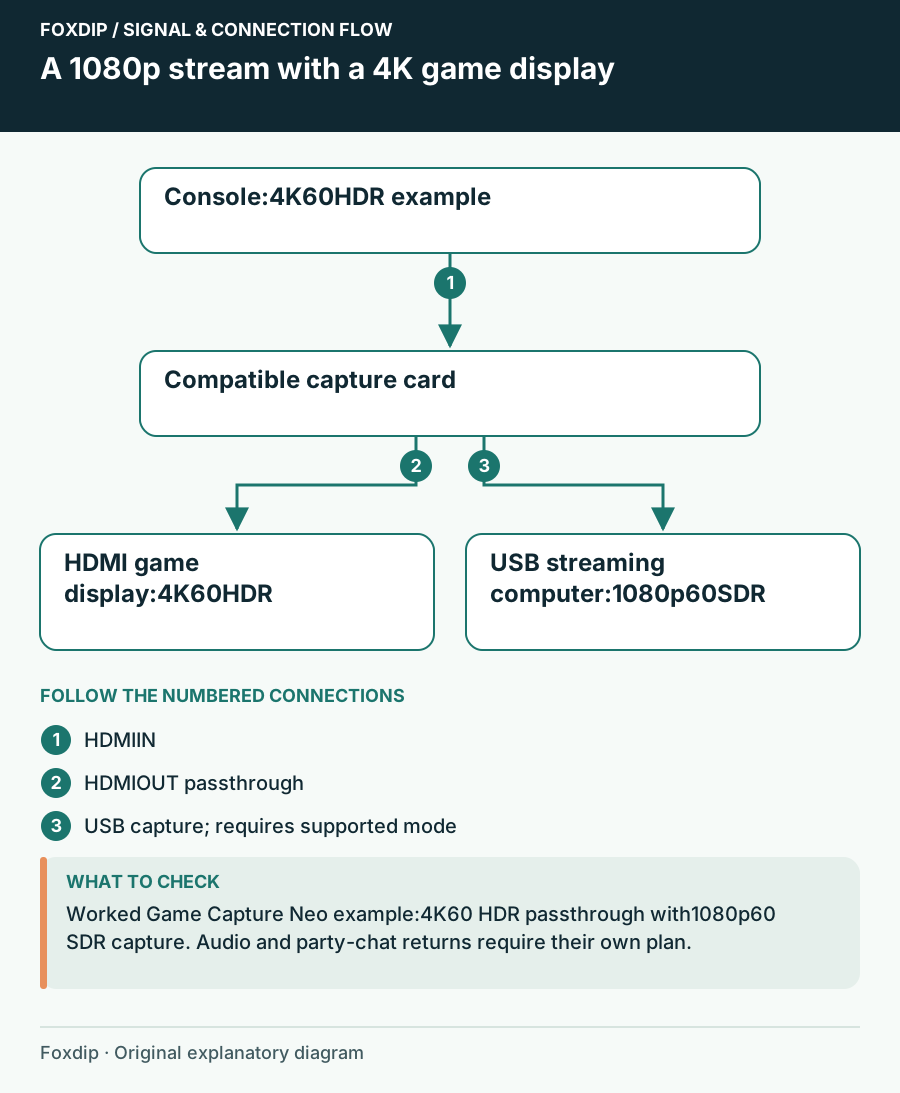
Original Foxdip schematic. Follow the labelled checks alongside the guide.
Resolve headset audio before checkout
A capture card receiving HDMI only receives audio present on that route. If the console sends all sound to a headset, your game or chat recording plan may change. Write down whether you need game sound, friends' chat and your own voice, and where each is supposed to enter the stream.
4K S lists a 3.5 mm stereo line input; Neo's listed interface is HDMI and USB. That is a real connection difference, but a line input alone does not establish the complete controller/headset route. Include a compatible documented chat cable only when your setup requires it, and keep your stream microphone route separate.
Make the purchase conditional on the missing capability
Choose Neo when its supported display modes and 1080p60 capture meet the plan on a compatible host. Compare 4K S when you need one of its extra passthrough modes, analog input or higher-resolution capture options. Keep an owned card if it already carries the display signal and saved recording you want.
During the return period, record a typical game segment with voice and chat, then inspect the file and the game display. Confirm the console did not quietly fall back to an unwanted format. A complete working path is more valuable than a larger maximum number you never use.
Read the separate capture and passthrough numbers before paying for a4K label. 4K Passthrough or 4K Recording? Read the Capture Card Spec ↗
Read three observations when the first picture is black
Before ordering a replacement, record what happens at three points: console directly into the display, display through the card, and preview on the computer. Use the same documented gameplay format. This distinguishes a failed basic display route from a capture-only issue without guessing from one black preview.
For Elgato models with configurable EDID, the current settings are in Elgato Studio’s Device tab. The supported-model list matters: do not assume every card has the same EDID controls. A settings experiment cannot add an unsupported capture mode or bypass protected content.
| Observation | Next change | Expected result |
|---|---|---|
| Console-to-display is already black | Resolve that source/display combination first | Establish a working picture before inserting capture |
| Passthrough works but capture is absent | Check the host cable, supported mode and app selection | Investigate the computer-facing half of the path |
| The display loses the desired format through the card | Compare the exact input/passthrough matrix and EDID guidance | Find a supported combination rather than a larger headline number |
Check the exact passthrough and recording combination before changing hardware. 4K Passthrough or 4K Recording? Read the Capture Card Spec ↗
Sources & references
Manufacturer specifications and primary support documentation checked on 27 October 2026. Recommendations are editorial inferences from connections, placement and documented capabilities; no hands-on performance or comfort measurements are claimed. November 2026 addition: documentation-based diagnostic examples; no new hands-on hardware result or platform upload test is claimed.
- Elgato Game Capture Neo resolution matrix ↗Checked 2026-10-27
- Elgato Game Capture Neo manual ↗Checked 2026-10-27
- Elgato 4K S technical specifications ↗Checked 2026-10-27
- Elgato 4K S system requirements ↗Checked 2026-10-27
- PlayStation PS5 FAQ: HDMI capture support ↗Checked 2026-10-27
- Elgato Studio Software — EDID Settings ↗Checked 2026-11-04
Spotted something out of date? Let Alex know.
How we put our guides together ↗