
Passthrough is what reaches the game display; capture is what reaches recording software. A card labelled 4K can pass 4K while sending only 1080p to the computer.
Passthrough is what reaches the game display; capture is what reaches recording software. A card labelled 4K can pass 4K while sending only 1080p to the computer.
In this guide
Before you start
- The game-display format and final recording format you want.
- The card manufacturer format matrix for your OS/host connection.
The two outputs do different work
A capture card with HDMI output can let the game display receive one format while the computer receives another over USB. That is useful when you want to play at a higher resolution than you stream. It is also why the word 4K on a listing is not enough to choose a recording device.
Read a specification as a complete sentence: input resolution and frame rate, HDMI passthrough format, capture resolution and frame rate, SDR or HDR, host port and software. If any part is missing, you do not yet know whether your intended combination works.
Example one: 4K60 HDR play, 1080p60 SDR capture
Game Capture Neo's matrix documents 4K60 input with 1080p60 capture. Elgato also says it passes HDR10 and converts HDR input to SDR for capture using onboard tone mapping. The game display and the saved stream therefore do not have to share the same dynamic-range format.
This can fit a 1080p stream perfectly well. It cannot satisfy a requirement to record a native 4K60 HDR master merely because the HDMI display remains in 4K HDR. If you already own Neo and only want a 1080p SDR stream, the different numbers may be the intended design rather than a reason to replace it.
Example two: 4K capture still has format limits
4K S lists capture up to 2160p60 and passthrough up to 2160p60. Its separate HDR capture limit is up to 1080p60, and the specification says HDR capture is currently Windows-only. Reading only the maximum SDR resolution would miss both qualifications.
| Wanted result | What must be stated | Documented example |
|---|---|---|
| Play 4K60 HDR; stream 1080p60 SDR | 4K60 HDR input/passthrough plus SDR capture conversion | Game Capture Neo matrix and tone-mapping description |
| Save 4K60 video | 2160p60 capture for the selected format and host | 4K S lists 2160p60 capture; check SDR/HDR separately |
| Save HDR on a Mac | Explicit OS support for HDR capture | Do not infer it from HDR passthrough; 4K S HDR capture is listed for Windows only |
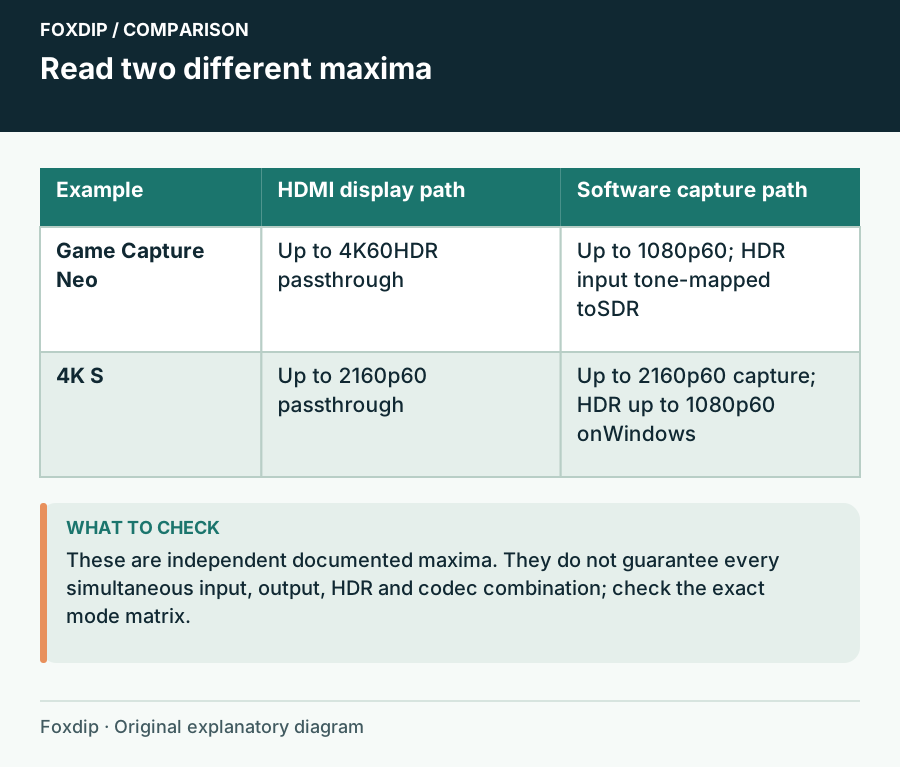
Original Foxdip schematic. Follow the labelled checks alongside the guide.
Host bandwidth is part of the format
4K X is a documented 10 Gbps USB 3.2 Gen 2 device. Elgato says a Gen 1 connection works with reduced capture resolution. Its detailed matrix separates capture formats and USB speeds, which is the level of detail to inspect for a demanding recording plan.
Do not add every advertised maximum together. A listed high frame rate, HDR mode and resolution may describe different rows of a matrix. Color format and bit depth can also change what the connection carries. Find the row that matches your source, your operating system and the intended capture format rather than building an unsupported combination from the headline numbers.
The rest of the chain can change the result
Check the console, both HDMI cables and the display against the desired format. Put an older display or cable in the chain and you may find that the console negotiates a different mode. A visible image proves that some signal works; it does not establish the resolution, frame rate and HDR state you wanted.
The recording software also has its own canvas, output and encoder settings. A card capable of sending 4K does not force the saved file to be 4K. Inspect the source properties and a short saved recording before committing a long session, and assess HDR using a workflow that supports it.
Buy for the file you need and the game mode you want
Write one sentence before shopping: 'I want to play at this format and record at this other format on this computer.' A creator editing a 4K master has a different requirement from someone making a 1080p live inset. Both can be sensible, but they should not use the same single-number shortcut.
Keep the current card when it delivers that sentence. Pay for more capture capability when you will use the resulting file and can provide the host bandwidth, storage and software path. Pay for more passthrough capability when preserving the game display is the missing feature. They are separate reasons to upgrade.
Build a1080p60 console shortlist around your actual computer ports. Choose a 1080p60 Capture Card for Your Console and USB Ports ↗
Why an EDID change can fix one screen and break another
EDID describes the formats a source is told it may send. On supported Elgato cards, Studio offers Merged, Internal and Display modes. Merged combines display and card capabilities; Internal follows the selected internal profile; Display copies the connected screen. They change negotiation, not the capture hardware’s maximum capability.
Write the current mode before changing it. Compare the console’s reported output, passthrough image and captured file after one change, then restore the previous mode if the intended pair no longer works. An Internal profile can advertise something the screen cannot display, while Display mode can expose something capture cannot accept.
| Observation | Next change | Expected result |
|---|---|---|
| Game display works only after using Display mode | Verify the resulting capture format too | The screen fix must not silently remove capture |
| Internal mode restores headless capture | Keep its chosen profile with the setup notes | A later attached display still needs a compatible signal |
| Both images appear but file dimensions are wrong | Inspect source and recording output settings | EDID success is not mistaken for the intended saved resolution |
Translate the working signal pair into a purchase requirement. Choose a 1080p60 Capture Card for Your Console and USB Ports ↗
Sources & references
Manufacturer specifications and primary support documentation checked on 27 October 2026. Recommendations are editorial inferences from connections, placement and documented capabilities; no hands-on performance or comfort measurements are claimed. November 2026 addition: documentation-based diagnostic examples; no new hands-on hardware result or platform upload test is claimed.
- Elgato Game Capture Neo supported formats ↗Checked 2026-10-27
- Elgato 4K S specifications ↗Checked 2026-10-27
- Elgato 4K X resolutions and frame rates ↗Checked 2026-10-27
- Elgato 4K X system requirements ↗Checked 2026-10-27
- Elgato Studio Software — EDID Settings ↗Checked 2026-11-04
Spotted something out of date? Let Alex know.
How we put our guides together ↗