
Use a large story area beside your camera and show one milestone at a time. Keep each claim dated, label photos or clips clearly and let the festive decoration frame the recap rather than replace it.
In this guide
Choose a story instead of a wall of numbers
A year-end stream can celebrate the first completed project, a memorable collaboration or a challenge your community followed. Choose three to five moments with a beginning, change and outcome. You do not need audience statistics to make the recap meaningful, and you should not invent totals to fill an attractive scoreboard.
Write one sentence per moment and identify the material you can legitimately show: your own screenshot, a permitted photograph, a clip you can use or a simple text card. Keep private messages and viewer details out unless you have appropriate permission. A clear story card is better than a collage of material you cannot responsibly display.
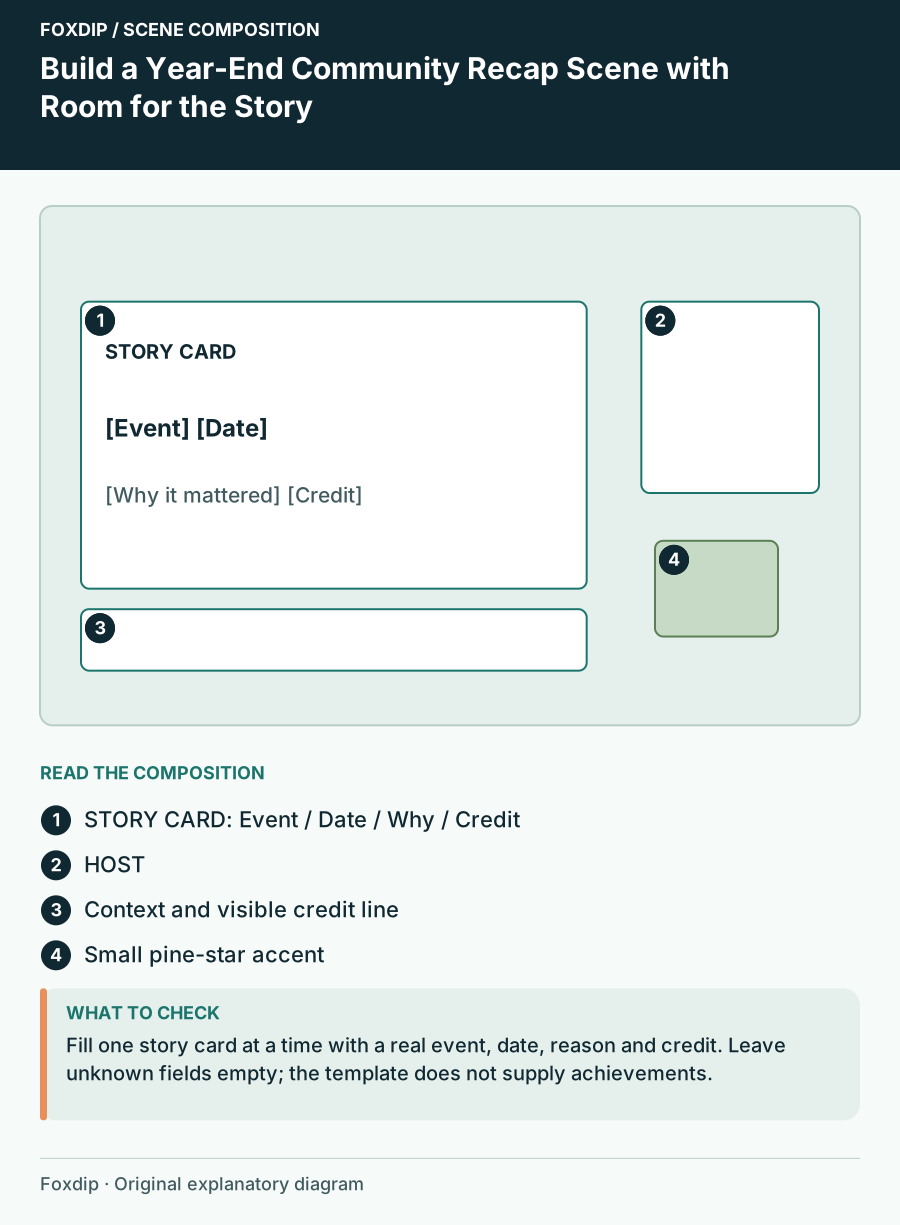
Original Foxdip scene plan. Positions illustrate this example; check the actual game or camera view.
Give the story area most of the scene
On a 1920×1080 example canvas, a large card can occupy the left two-thirds while your camera sits in a right-side column. Put a short year or event label above the card and a modest caption underneath. This differs from a standard gameplay layout because the recap material is the programme, not background decoration.
Use a stable frame so successive moments do not cause the whole scene to jump. Portrait photographs can sit within a quiet matte; wide screenshots can fit proportionally inside the same story region. Avoid stretching each item to fill the opening. Let the surrounding space absorb differences in shape.
Put dates and context next to each claim
Label a project with its name and date, then explain why it mattered in your voice. If you use a counter, identify its source and the period it covers. “Projects finished this season” and “projects ever finished” are different statements. A year-end title does not make an undated total accurate.
Use the example card structure below. The placeholders are fields to fill with your real information, not sample achievements to present as facts. Keep the credit line visible long enough to read, especially when a guest or collaborator contributed to the moment.
| Card field | What to enter | What to avoid |
|---|---|---|
| Moment | A real project or event | An invented milestone |
| Date | The actual date or clear period | An unexplained total |
| Why it mattered | One specific sentence | Generic celebration copy |
| Credit | Relevant creator or source | Uncredited borrowed material |
Keep the seasonal layer modest
Choose one festive material, such as warm paper stars or a small pine accent, and place it outside the story opening. A warm light colour can connect the cards to the holiday season without covering the material. Use a quieter camera border so the face remains easy to follow beside the recap.
Prepare a plain version of the scene for moments that need a different tone. A recap can include setbacks as well as celebrations, and constant confetti may be inappropriate for every story. You can keep the same geometry while changing only the decorative accent and card colour.
Rehearse the sequence and preserve the credits
Run the cards in order while speaking the transitions. Check whether the story changes before you have finished explaining it and whether a clip’s audio competes with your voice. Keep a manual fallback card ready in case a media item does not play. The viewers should still understand the moment from the caption and your explanation.
Finish by returning to the ordinary conversation scene with a short next-year question or thank-you. Archive the recap assets, dates and credits together after the stream. The scene can become an annual format while the contents remain specific to the year you are actually discussing.
Want graphics that already fit? Browse animated overlays ↗
Sources & references
Foxdip editorial design advice with platform behavior grounded in the linked official documentation. Layout dimensions and palettes are worked examples, not platform requirements.
- OBS: Aspect Ratio Guide ↗Checked 2026-10-27
Spotted something out of date? Let Alex know.
How we put our guides together ↗