
Balance the hosts by displayed head size and attention, not just equal box dimensions. Give each a stable name label, reserve shared content deliberately and prepare a one-camera fallback before the guest arrives.
In this guide
Choose equal conversation or host-led presentation
If both people are equal participants, use two comparable camera regions with a shared topic line. If one person demonstrates while the other interviews, give the demonstration more room and make the role difference visible. The layout should reflect the programme rather than force every two-person show into a symmetrical grid.
For an equal conversation, start with two side-by-side regions and a small central gap. Keep both labels aligned along the same baseline. For a shared-screen segment, move both cameras into a quieter row or side column while the content expands. Plan that state before a document or game has to be shown.
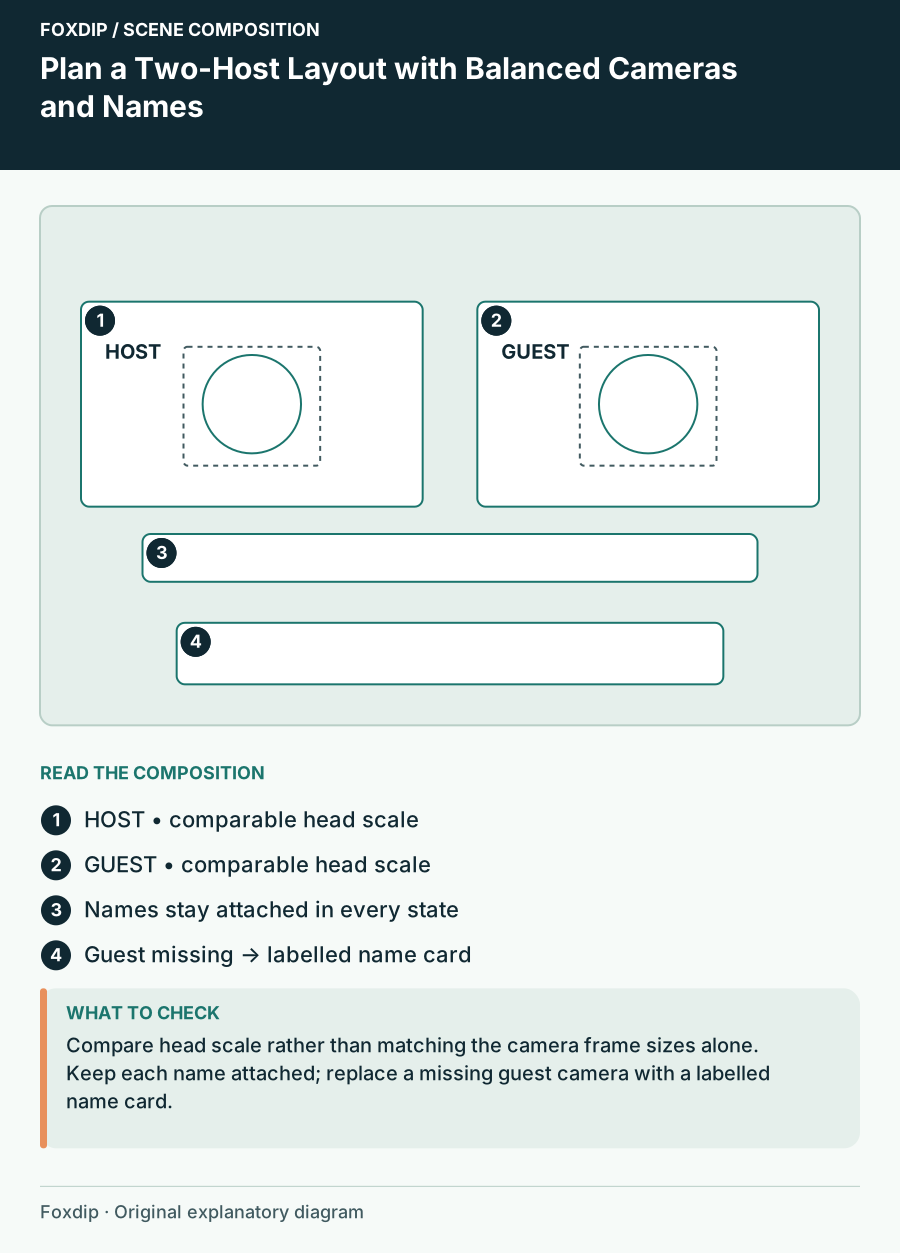
Original Foxdip scene plan. Positions illustrate this example; check the actual game or camera view.
Match perceived scale rather than stretching footage
Two equal rectangles can contain very different faces if one camera is close and the other shows the whole room. Adjust the crop and placement so the heads have comparable prominence while preserving each picture’s proportions. Do not stretch a narrow camera feed to imitate a wide one.
Allow room for gestures and head movement. A close crop may balance a still frame but become uncomfortable during the conversation. If the cameras have different aspect ratios, use quiet matte space or deliberate cropping rather than warping the image. OBS’s transform controls support numeric sizing and cropping; the balance is an editorial decision.
Keep names attached to the right person
Place a label inside or immediately below each host’s region and keep it in the same position across scene states. Use the preferred public name and, if necessary, a short role. Avoid long biographies in the lower third. Detailed links and introductions can live elsewhere.
Check whether a participant’s image is mirrored in the capture you actually receive before positioning directional decorations or physical text. Keep left and right references in your rehearsal unambiguous. “Your camera is on the left side of the broadcast” is clearer than assuming each host sees the same arrangement on their own screen.
| Element | Equal conversation | Shared-content state |
|---|---|---|
| Host cameras | Comparable prominence | Smaller consistent row or column |
| Names | Attached to each camera | Remain attached after movement |
| Topic | One shared line | Context for the displayed item |
| Alert region | Outside faces | Outside content and faces |
Plan the empty-camera state
Create a fallback for a missing or interrupted guest feed. A name card can temporarily occupy the region while the host explains the pause. If the guest leaves for a longer period, switch to a host-led scene rather than leaving half the programme as an unexplained empty rectangle.
The fallback should remain part of the same visual family: matching background surface, label style and topic placement. Do not use a misleading frozen portrait as though the guest is still present without making the state clear. Keep any private call controls or connection information off the broadcast.
Rehearse movement between all three states
Run a short exchange, show a shared item, simulate one missing camera and return to the conversation. Check both people at their widest expected gestures and longest labels. Make sure a transition does not temporarily put one host’s name under the other image.
This composition rehearsal does not replace an audio and connection test. Keep those checks alongside the visual plan, especially for remote guests. When choosing graphics, confirm the actual number and proportions of openings and whether labels are fixed. Two attractive frames are only useful if the two people can occupy them comfortably.
Want graphics that already fit? Browse animated overlays ↗
Sources & references
Foxdip editorial design advice with platform behavior grounded in the linked official documentation. Layout dimensions and palettes are worked examples, not platform requirements.
- OBS: Sources Guide ↗Checked 2026-10-27
Spotted something out of date? Let Alex know.
How we put our guides together ↗