Plan pixel art around its pixel grid and the final output size. Prefer whole-number enlargement when it fits, compare sampling choices, and avoid resizing the same border several times along the way.
In this guide
Find the grid behind the illustration
Pixel art relies on deliberate blocks and edges. A border with one-pixel steps can change character if some blocks become two output pixels wide and others become three. Start by identifying the supplied artwork dimensions and the intended display area. Do not judge only a large shop preview that may already have been resized.
For a simple exercise, imagine a 64×64 ornament. Enlarging it to 256×256 makes each original pixel a 4×4 block. Enlarging it to 250×250 cannot preserve that same whole-number grid. The latter may still be acceptable, but it is a different visual result. Decide whether the crisp grid is central to the style before choosing the layout.
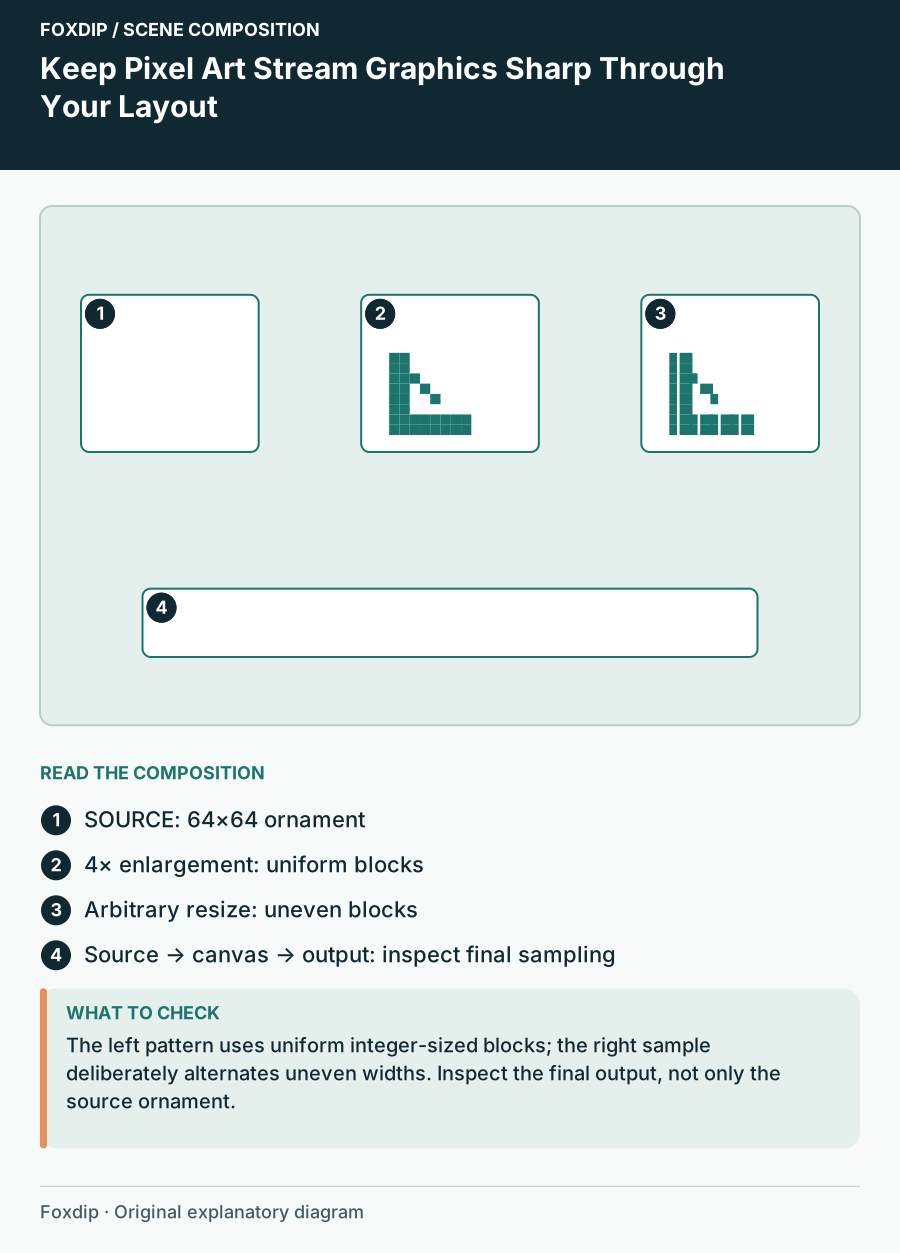
Original Foxdip scene plan. Positions illustrate this example; check the actual game or camera view.
Choose the scene size before fitting the border
Check both the working canvas and the actual output resolution. A border carefully enlarged on the canvas may be downscaled again in the final video. That second operation can introduce a new uneven relationship, so assess the complete path from supplied image to final recording.
OBS’s aspect-ratio guide recommends trying integer scaling for pixel art and notes point or area filtering as options. Compare those choices with the artwork at the size you will use rather than applying one setting to every source. A camera image and a pixel-art frame may need different treatment.
Preserve corners before stretching long edges
Look at the frame’s corner decorations and line thickness. Stretching a finished rectangular frame to a new ratio can make the top border and side border behave differently. If the product supplies modular edges and corners, follow its instructions for assembling them. If it supplies one flat frame, choose an opening closer to its intended proportions.
For a custom composition using your own simple pixel shapes, keep corners at a consistent scale and extend repeating straight segments between them. That preserves the grid better than pulling one whole picture sideways. This is a design method, not a promise that a purchased pack includes editable or modular parts.
| Operation | What to inspect | Possible result |
|---|---|---|
| Whole-number enlargement | Uniform block size | Consistent grid |
| Arbitrary resize | Alternating block widths | Uneven edges |
| Stretch to another ratio | Horizontal versus vertical thickness | Changed style |
| Final output downscale | Small border and text | New sampling artefacts |
Keep live text independent of the pixel illustration
A pixel-styled frame can surround plain readable labels. You do not need to render every changing name in a tiny pixel font. Give live information its own quiet area and compare the longest expected text. If the font is part of the style, choose a size and output scale that leave its letter shapes distinct.
Keep animated elements aligned with the same grid when possible. A smoothly moving high-resolution glow may be a deliberate contrast, but it will feel different from a stepped pixel animation. Choose that contrast intentionally rather than adding effects solely because the frame has empty space.
Inspect the recording, then lock the dimensions
Record a still scene and a moment with movement. Pause the output and inspect corners, diagonal steps and small lettering. Compare the result in a smaller player as well. A perfectly crisp screenshot of the working canvas does not show what later scaling has done to the exported video.
Save the accepted source scale, frame opening and output dimensions in your scene notes. When you replace a camera or change the stream resolution, revisit those relationships. When buying pixel graphics, confirm actual file dimensions and supplied layout variants; a pixel-art theme alone does not guarantee a good fit for every canvas.
Sources & references
Foxdip editorial design advice with platform behavior grounded in the linked official documentation. Layout dimensions and palettes are worked examples, not platform requirements.
- OBS: Aspect Ratio Guide ↗Checked 2026-10-27
Spotted something out of date? Let Alex know.
How we put our guides together ↗