Keep only the information viewers need throughout the current activity. Show temporary details when their moment arrives, and move long-lived reference information into the channel’s own panels or links.
In this guide
Name the permanent layer
Watch a typical minute of your stream and identify what a viewer must know for the entire minute. In gameplay, that might be the game itself and your face. In a tutorial, the demonstrated application and a short task title may be enough. A list of every social account rarely needs the same permanent space.
Build the first draft from those essentials only. Use plain rectangles for the camera and any information block before choosing decorative art. If the arrangement works without a frame, you can later add one that supports its proportions. A minimalist look is easier to achieve through selective information than by buying a thin border and leaving every old widget visible.
Make a removal pass: hide one item and ask what becomes harder to understand. If nothing important changes, leave it hidden for a real rehearsal. You can restore it if the stream reveals a reason, rather than keeping it indefinitely because it was present in an earlier layout.
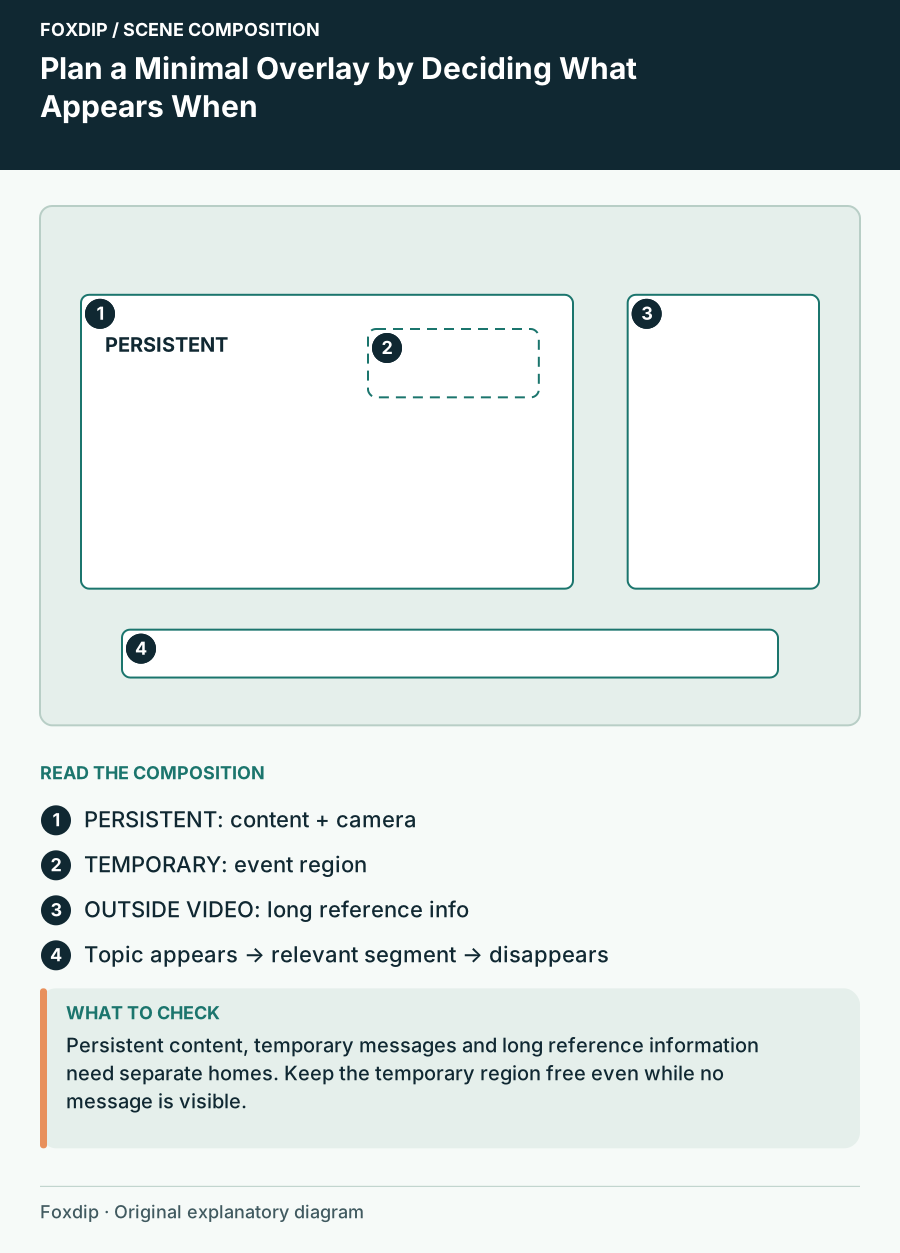
Original Foxdip scene plan. Positions illustrate this example; check the actual game or camera view.
Assign temporary information an entrance and an exit
An alert, a guest name or the next segment can appear when relevant and disappear afterwards. Give each a designated region and a reason to leave. A temporary label that remains for the whole show becomes part of the permanent layer, even if its original purpose was a single announcement.
For example, a conversation scene might show the current topic below the camera, then briefly replace that line with a guest introduction. A gameplay scene might reserve an alert region above the camera instead of keeping a large recent-events list on screen. These are editorial options; pick the timing your actual workflow can manage.
Keep the event region free even when it is invisible. Minimal does not mean unplanned. If a popup has no reserved landing area, it can still cover subtitles or a face at the busiest moment.
| Information | Visibility plan | Example |
|---|---|---|
| Main activity | Persistent | Game or demonstration |
| Current topic | During that segment | Route planning |
| New event | Temporary | A brief acknowledgement |
| Long reference information | Outside the video | About panels or links |
Use spacing as the visual identity
Choose a repeatable gap between blocks, one alignment line and one accent. A camera, topic label and small event region can share a left edge without being enclosed in one large illustrated box. The repeated alignment supplies structure while leaving more of the content visible.
Keep text on a stable surface when the underlying game is busy. A small solid panel can be visually quieter than a transparent label that needs outlines and shadows to survive every background. Minimalism is not a requirement to make everything transparent or faint.
OBS lets you arrange and hide sources individually. Use descriptive source names so you can identify the essential camera, temporary topic and event region. Avoid creating multiple nearly identical elements whose purpose becomes unclear when you revisit the scene a month later.
Rehearse the layout as a sequence
Try a complete short show: waiting, greeting, activity, alert, break and return. Check what appears and disappears at each point. A layout that looks beautifully empty in a still image can fail if the relevant topic or guest identity never arrives when needed.
Watch the recording in a small player. Ask whether you can explain the current activity without reading tiny details. Check that an alert has room and that no old label remains after a scene change. Keep a simple list of permanent and temporary sources with their intended use.
If you buy graphics, compare their visual weight and adaptability with this plan. You may need only one camera border and a restrained status background. Choose a kit because its parts fit the information structure you have designed, rather than adding every included widget to prove you used the whole download.
Sources & references
Foxdip editorial design advice with platform behavior grounded in the linked official documentation. Layout dimensions and palettes are worked examples, not platform requirements.
- OBS: Sources Guide ↗Checked 2026-10-27
Spotted something out of date? Let Alex know.
How we put our guides together ↗