
In this guide
Three things to check before your next stream
This week brought an OBS release candidate, a Streamlabs menu reshuffle and a fresh look at how audiences move between platforms. The common thread is your next broadcast: does the scene still work, can you find the controls, and can someone who enjoys a clip find the live show?
We have pulled out what each announcement means for a smaller channel. These are notes on the official posts, with suggestions you can try in your own setup. Because this recap covers October 5–11, follow the current release link before installing anything; a development build may have moved on by the time you read this.
OBS 33.0.0 RC1 addresses beta bugs
OBS published its first 33.0.0 release candidate at 02:15 UTC on October 9: 10:15 p.m. on October 8 in Toronto. It was marked as a pre-release. The RC1 notes list fixes for browser-source audio monitoring, browser sources turning blank after a refresh and local-network requests that failed in the preceding betas. They also cover Plugin Manager behaviour in Safe Mode.
If you are testing that development branch and one of those problems sounds familiar, the notes are worth reading. If your stable setup is working, this list alone is not a reason to replace it just before going live. The fixes describe that beta branch and its reported problems.
Before trying a build, export your profile and scene collection. Rehearse the parts you rely on: trigger an alert, refresh the browser source, switch scenes and listen to a short recording. Opening OBS successfully is only the first check. Keep your working production configuration within reach until the rehearsal is finished.
Give the viewer somewhere obvious to go
On October 8, Streamlabs published its interpretation of September viewing figures. The article argues that a creator’s audience can stretch across platforms and formats, so a leaderboard for one platform tells only part of the story. The publication was new that week; the data described September.
For a smaller channel, there is a more manageable question: someone liked your clip—where do they go next? A short highlight can point to a scheduled broadcast, and the broadcast page can make the replay easy to find. You can test one of those connections without building a presence everywhere at once.
Choose a route you can maintain. Keep track of the time it takes and whether viewers actually follow it. Examples involving large creators can give you ideas, but your own results will decide whether the extra work makes sense. Before adding another live destination, check its terms and what your setup can support.
Pick one thing and finish it
Take the part that touches your next stream and make it your task for the week. Rehearse the software change, find your way around the menu, or give a clip one clear destination. You can come back to the other ideas when this one is working. Keep a brief note of what you changed so you have something specific to compare next time.
- Record a short rehearsal and listen for unexpected audio.
- Check the next broadcast time and replay links on the pages where you share your channel.
- When you change a setting, note its old value as well as the new one.
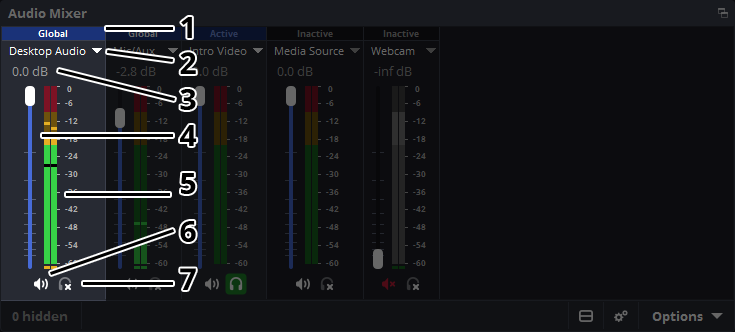
An OBS mixer reference for your next sound check. This documentation image does not verify the historical release notes discussed earlier in the article.
Sources & references
A recap of official posts from October 5–11, 2026, using Toronto dates and checked on October 18.
- OBS Studio 33.0.0 Release Candidate 1 — official release notes ↗Checked 2026-10-18 · Published October 8, 2026 · Event October 8, 2026
- The Biggest Lesson From September’s Streaming Data Isn’t Who Finished #1 ↗Checked 2026-10-18 · Published October 8, 2026
Spotted something out of date? Let Alex know.
How we put our guides together ↗