
Sidetone lets you hear your own microphone locally; ChatMix balances game and call playback. Identify the exact Nova 7 variant before turning its dial.
Separate local mic monitoring from game/chat balance and remove only the unwanted copy of your voice.
In this guide
Before you start
- The full Nova 7 variant and generation.
- GG Engine or supported hardware/Companion App control.
Read the full model name
On the original Nova 7 family, Nova 7 and Nova 7X have a ChatMix dial, while Nova 7P replaces that dial with a sidetone control. That makes a similar-looking wheel do a different job. Read the headset’s model rather than following a photo of another variant.
Generation matters too. SteelSeries documents Companion App control for the Nova 7 Gen 2 family, including sidetone. Don’t assume an original Nova 7 gains those phone controls just because the names look similar. The local-monitoring question is the same; the place you adjust it may differ.
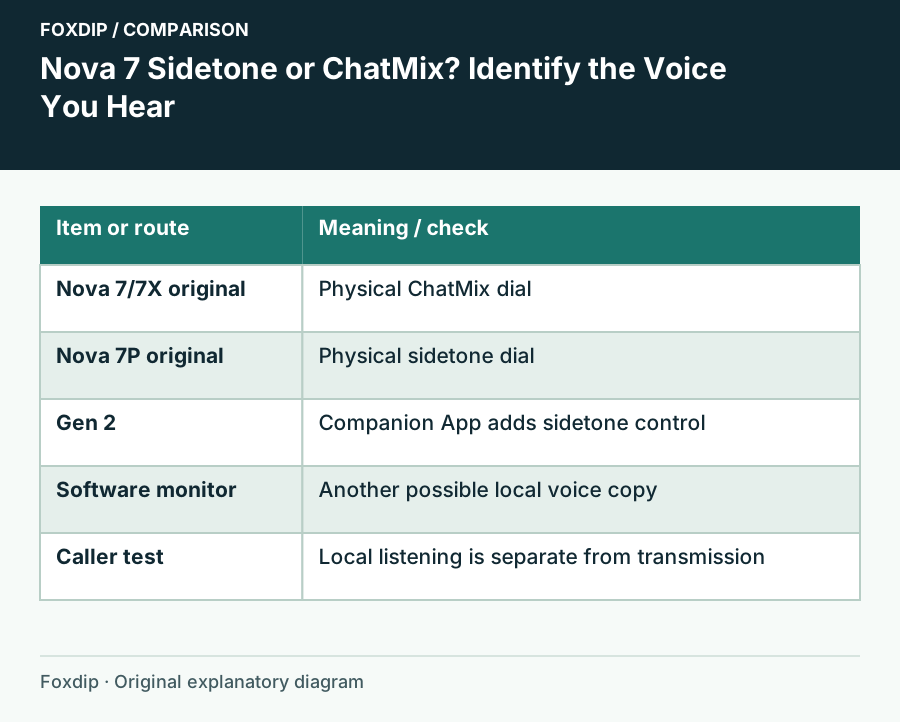
Original Foxdip schematic. Follow the labelled checks alongside the guide.
Separate three things you might hear
Sidetone is a local copy of your mic for your own headphones. ChatMix changes the balance between game sound and chat playback in a supported route. A software monitor can send another, potentially delayed, copy of your voice through OBS or another app. Turning ChatMix is therefore not a reliable way to remove mic monitoring.
| Sound or control | Purpose | First check |
|---|---|---|
| Your own voice immediately in the headset | Local sidetone | Headset sidetone setting |
| Game quieter while callers become louder | Game/chat balance | Model, platform and ChatMix route |
| Your own voice with an obvious delayed copy | Possible software monitoring | OBS or another app monitoring the mic |
Change local sidetone deliberately
For a supported GG connection, open Engine, select the exact headset and inspect Audio → Mic Sidetone. Note the starting value, reduce it or choose Off, then Save. SteelSeries’ sidetone guide specifically calls out saving before leaving the device page. Keep the call and game volumes unchanged for this comparison.
For an original Nova 7P, use the physical sidetone dial as described for that variant. For a Gen 2 headset with Companion App support, use its corresponding sidetone control. Choose a small amount if hearing yourself helps you avoid shouting; Off is an option, not a universal requirement.
Find a second monitor route
If your voice remains after sidetone is Off, stop any Discord Mic Test playback and inspect audio monitoring in the apps you have open. Mute the monitor route temporarily, keeping the actual call input selected. A local monitor and a transmitted microphone are separate decisions.
Speak with sidetone off
Use the same normal phrase after saving the local setting.
Look for: You can tell whether the headset’s local copy stopped.
Stop software playback tests
End Mic Test or other test loops, then compare again.
Look for: A settings playback loop cannot masquerade as permanent sidetone.
Check one monitoring app
Temporarily disable the microphone’s monitor output in OBS or the relevant app.
Look for: A disappearing delayed copy identifies another listening path.
Check what the other person hears
Ask a willing caller whether your voice is single and clear while you change only local sidetone. They should not need your monitoring loudness to hear you. If they hear themselves returning, inspect your call input and mixed audio routes; that is a different problem from hearing your own voice locally.
Keep the final sidetone setting and the exact model in your setup note. If the real issue is a ChatMix control that does not affect game/chat balance, use the dedicated route guide. Don’t keep adjusting mic gain to solve a listening preference that belongs in the headphones.
Sources & references
Based on the official documentation linked beside the relevant sections. Follow the checks on your own setup; no hardware measurements or account tests are claimed.
- SteelSeries — Nova 7, 7P and 7X differences ↗Checked 2026-10-27
- SteelSeries — Nova7 versus Nova7 Gen2 ↗Checked 2026-10-27
- SteelSeries — Manage headset sidetone ↗Checked 2026-10-27
Spotted something out of date? Let Alex know.
How we put our guides together ↗