
Stop re-importing the same file. Corsair documents that some older profiles are incompatible with newer iCUE versions; keep the original export while you rebuild only the affected profile.
In this guide
Match the timing before choosing this fix
This route applies when an import of a previously exported or downloaded profile is followed by an iCUE crash. A crash during device detection, an update or an unrelated session does not establish the same cause. Note the exact version and the last action before the crash.
Corsair’s compatibility article explains that changes to its profile format can leave some old profiles unusable. It says that incompatible profiles need to be recreated. It does not identify every old file as incompatible or diagnose every iCUE crash.
Preserve the original and the profiles that still work
Keep the imported .cueprofile file in a separate folder. If iCUE still opens, export the working profiles you care about before removing anything. Use clear filenames so you can distinguish the suspect old import from a newly exported working profile.
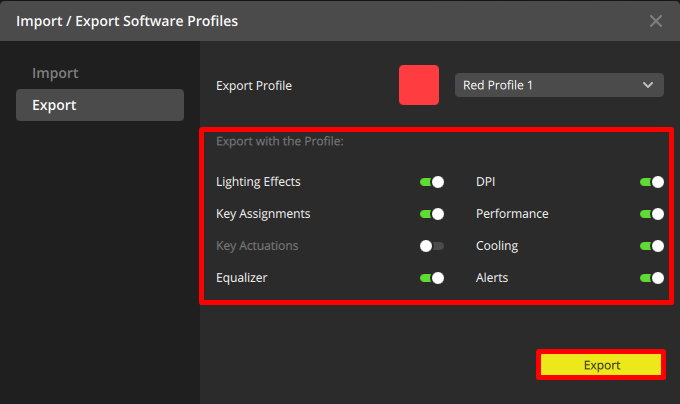
Review the components selected for the export. You may need assignments as well as lighting, depending on the profile. An exported file is a backup to preserve; it is not a guarantee that a future software version can import every part.
 123
Corsair’s export example lets you choose which parts of a profile to include in the backup.
- Choose the intended profile.
- Review the components included.
- Export to a separate file.
Recreate the affected profile in the current version
When you can reach iCUE’s profile controls, create a new profile in the installed version. Rebuild a small part of the setup first and check that it works before adding the rest. Keep the old file for reference; do not keep importing it into every new profile.
Remove only the incompatible profile when you have identified it and preserved the useful data. Do not delete the whole profile collection, application-data folders or device-memory slots as a shortcut. If iCUE cannot open far enough to identify the imported profile, stop here and use Corsair’s support route for that exact startup condition.
Check software behavior before testing onboard storage
First confirm that the rebuilt profile remains usable while iCUE is open. Then, if you need the setting with iCUE closed, configure only the device-memory functions supported by the exact peripheral. These are two separate checks.
For example, a profile can import without crashing but still rely on a software integration for its effect. That does not mean the import failed. Write down whether the remaining symptom is an app crash, a missing assignment or a difference after the app closes.
Use that route once the software profile itself is stable. Save supported settings to device memory ↗
Send the smallest useful support record
If the crash continues with a newly created profile or before any import, contact Corsair with the model, iCUE version, operating system and failure stage. Keep account details and unrelated personal files out of the report. Provide the suspect file only through a support channel you intended to use.
A clean reinstall is not the first step in this compatibility exercise. Preserve the working configuration and use the vendor’s specific instructions if support determines that a different repair is needed.
Sources & references
The steps follow the linked platform documentation. Practice downloads and planning examples are original Foxdip resources.
- Corsair — Importing profiles causes iCUE to crash ↗Checked 2026-10-27
- Corsair — Import and export iCUE profiles ↗Checked 2026-10-27
- Corsair — Set up and manage profiles ↗Checked 2026-10-27
Spotted something out of date? Let Alex know.
How we put our guides together ↗