
Choose Lantern Library for a bookish room with amber lamps and a forest view, Emberstone Cottage for a stone-and-oak interior with a warm hearth, or Rainy Loft Atelier for an artist's workspace overlooking city rooftops. All three share evening and rainy-night options, subtle animation, and a separate desk PNG. Your setting is the main difference; you supply your own avatar.
In this guide
Choose the room around your on-screen presence
Picture your avatar at the size you use while chatting. A bright window directly behind the face, or a desk at the wrong height, can change how the composition feels. These rooms provide a relatively quiet central area and a separate foreground desk so you can choose a seated arrangement.
The motion is deliberately limited: fixed cameras, local light variation, and rain in the night versions. Furniture and books stay still. Choose these if you want a room with subtle background movement; choose a different kind of asset if you're looking for a moving camera, interactive props, or a fully rigged 3D environment.
Choose the room you want to return to
The file structure is shared across these three rooms, so choose by the setting and the space around your avatar. Library is the bookish option, Cottage puts a hearth at the centre of the mood, and Loft gives an art-stream workspace. There is no need to buy a larger resolution package simply to get another room style.
Before buying, compare the current room previews at the avatar size you intend to use. Look at the eye line, the desk edge and the brightest area. Those are the details most likely to change how comfortably your avatar sits in the scene.
| Room | Setting | Look at first |
|---|---|---|
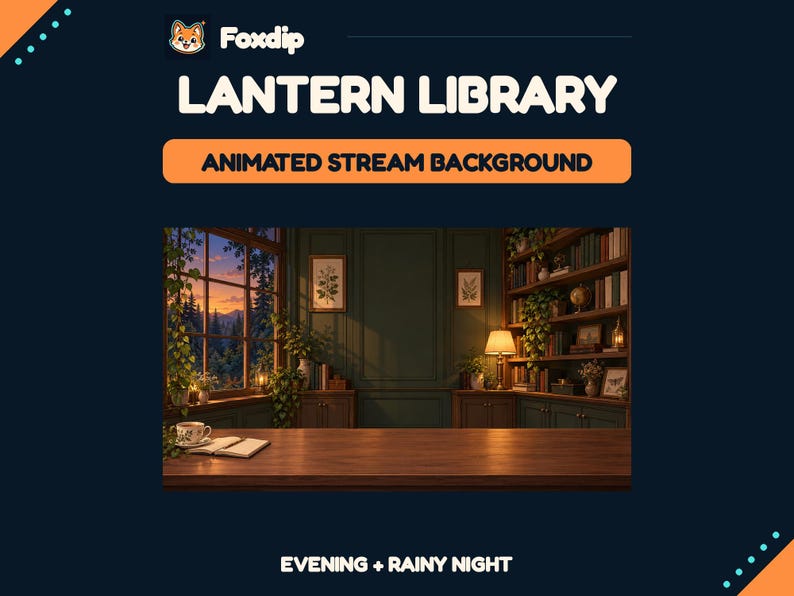
| Lantern Library | Forest window, books and amber lamps | Face placement against the quieter central panel. |
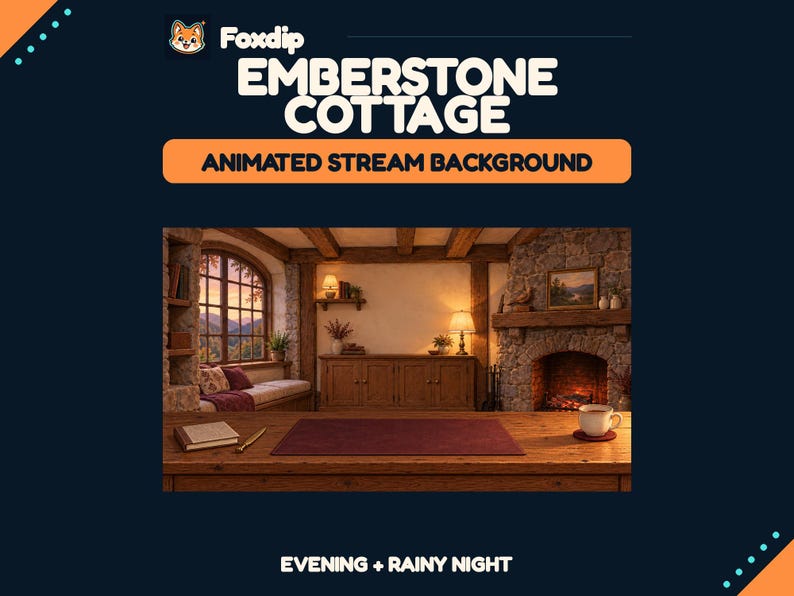
| Emberstone Cottage | Stone, oak and a warm hearth | How the seated avatar meets the foreground desk. |
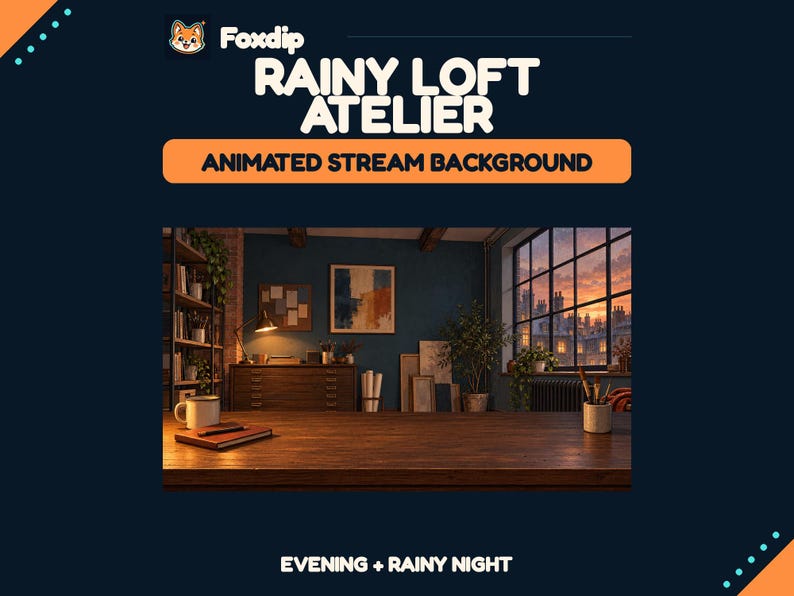
| Rainy Loft Atelier | Drawing tools and an urban studio | Whether the art-workspace theme supports your content. |
| All three | Evening and rainy-night moods; separate desk option | Matching room/desk files and a 16:9 output plan. |
Browse the actual available rooms together. Explore the room backgrounds ↗
Lantern Library: a reading room with a forest view
Lantern Library combines spruce green, warm wood, amber lamps, and a forest window. It's our pick here for a bookish or woodland presentation, particularly if reading and conversation are central to your channel. Warm Evening and Rainy Night offer two moods within the same room rather than two unrelated scenes.
The desk is supplied as a separate transparent PNG as well as appearing in room variants. That matters if you want your avatar to sit behind it instead of floating in front of a flattened illustration.
 Animated
Cozy Animated Library Stream Background, VTuber Room, Desk Overlay, Evening and Rainy Night
HTML · MP4 · PNG · TXTDownload
CA$10.05CAD
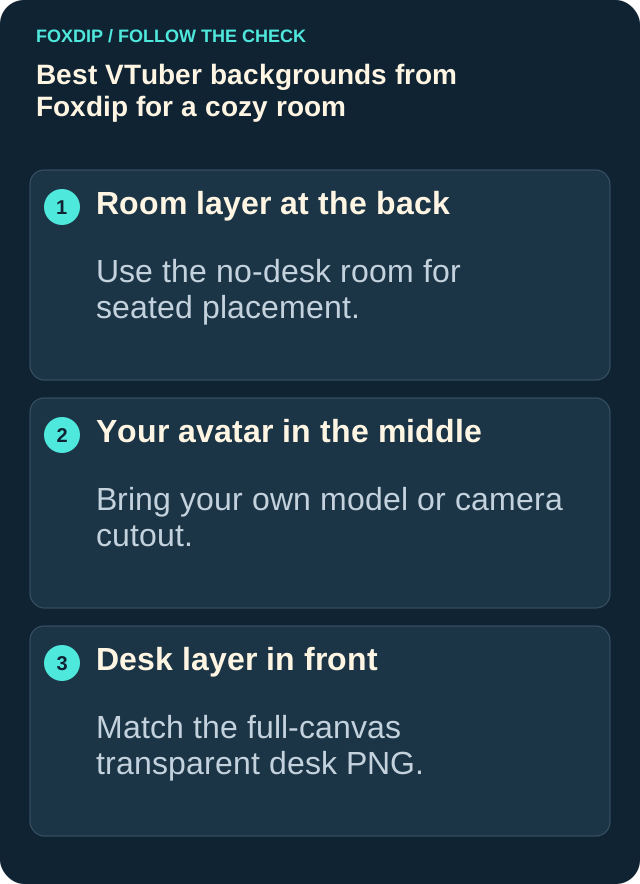
Illustration: compare these jobs before choosing your pack.
Emberstone Cottage: a hearth and warmer interior
The Cottage room uses stone and oak, a linen reading seat, burgundy details, and an ember hearth. Consider it if a warm interior is more important to your channel's look than shelves or an urban studio. The ember-light variation doesn't turn the room into a fully animated fireplace scene: the logs and furniture remain still.
Its evening and rainy-night versions share the same layout, making them options for a consistent room identity. Choose the mood you want for the stream rather than expecting a live day-and-night system.
 Animated
 Cottage Stream Background, Hearth VTuber Room, Separate Desk Overlay, Evening and Rainy Night
HTML · MP4 · PNG · TXTDownload
CA$8.77CAD
Rainy Loft Atelier: an artist's workspace
The Loft has a petrol-blue interior, walnut flat files, drawing tools, and a city-rooftop view. It's the most directly art-studio-themed choice of these three. Consider it for drawing sessions or a channel where a workspace feels more natural than a cottage lounge.
The room still uses a fixed camera and subtle lighting or window-rain movement. It doesn't provide drawing software, a working tablet display, or editable objects you can rearrange individually.
 Animated
 Loft Stream Background, Artist VTuber Room, Separate Desk Overlay, Evening and Rainy Night
HTML · MP4 · PNG · TXTDownload
CA$8.77CAD
Understand the 18 media files and the resolution
Each selected room has 18 media files: four animated room MP4s, four static room PNGs, two transparent desk PNGs, six animated stream screens, and two static Offline screens. The room options cover evening and night, with and without a desk. The animated screens cover Starting Soon, Be Right Back, and Stream Ending in both moods.
Exports are 1920×1080 at 16:9. Videos are silent 15-second H.264 MP4 loops at 24fps. The room artwork was resampled from 1672×941 sources; these are resampled 1080p exports rather than native 4K assets. Screen text is baked in, and editable layered room sources aren't included.
Layer your own avatar between the room and desk
For seated placement, use the no-desk room behind your own avatar and the matching desk PNG in front. The room and desk share a full-size canvas. In OBS, use a Media Source with Loop enabled for an MP4 room, and an Image Source for the desk.
Check the seated composition
Place the room at the bottom, your own avatar source in the middle, and the matching desk PNG above it. Preview the arrangement before streaming.
Look for: The desk covers the intended lower part of the avatar while its face stays clear.
Buy the setting, with the licence in view
All three are digital room assets with non-exclusive use for one creator or creator brand, including monetized streams and videos. They exclude avatars, chat widgets, alerts, audio, and tracking tools. Check Etsy for the current price and full Creator License. Pick Library for a reading room, Cottage for the hearth, or Loft for the artist's workspace; the shared file structure makes the setting the main difference.
Keep the room, avatar and desk separate
Use a no-desk room when you want the avatar behind the separate foreground desk. If you accidentally use a flattened room-with-desk underneath another desk layer, you can end up with duplicate edges. Start with one matching room/desk pair and keep the avatar between them.
A desk PNG is a foreground image, not a clipping system for your model. Check the lower edge of the avatar and any arms or accessories against it. Your tracking software and model remain separate purchases or tools.
Already have your avatar file? Choose its scale and desk position before adding foreground elements. Place an avatar in the room ↗
Sources & references
These are picks from the Foxdip collection, based on the supplied artwork, listed files and the uses explained above. Etsy confirms the current price and availability.
- Foxdip on Etsy — Lantern Library ↗Checked 2026-10-23
- Foxdip on Etsy — Emberstone Cottage ↗Checked 2026-10-23
- Foxdip on Etsy — Rainy Loft Atelier ↗Checked 2026-10-23
- OBS — Media Sources ↗Checked 2026-10-23
- OBS — Sources Guide ↗Checked 2026-10-23
Spotted something out of date? Let Alex know.
How we put our guides together ↗