
Earlier pack previews · 2026-10-23
Etsy Profit Dashboard Excel Spreadsheet
Put your Etsy sales and recorded costs in the same Excel dashboard. The pack includes a blank workbook, a fictional demo, a local CSV preparation tool and a guide to getting your own figures into place.
CA$13.17CAD
1 ZIP · Files available after verified payment.
Buy on FoxdipListing availability checked 2026-11-07 · File details checked 2026-10-23. The files and licence below apply to your Foxdip purchase.
- Files you receive
- XLSX · PDF · CSV. The download list below separates designs from their exported sizes.
- Editing
- A PNG is a flattened image. Editable project files are included only when the listing names them.
- Delivery
- After payment verification, Foxdip unlocks your private download page and emails your order confirmation. Download every ZIP listed below. No physical item is shipped.
What’s in the download +
- One downloadable ZIP containing:
- - A blank .xlsx workbook for your shop
- - A populated demo workbook with fictional sales and matching costs
- - An illustrated PDF quick-start guide
- - IMPORT_CSV.html, a self-contained local CSV preparer
- - Ten sample monthly statement CSVs and one sample Order Items CSV
- - A single-shop license
One design can come in several sizes or formats. Those exports are not extra reactions.
Pack details & setup +
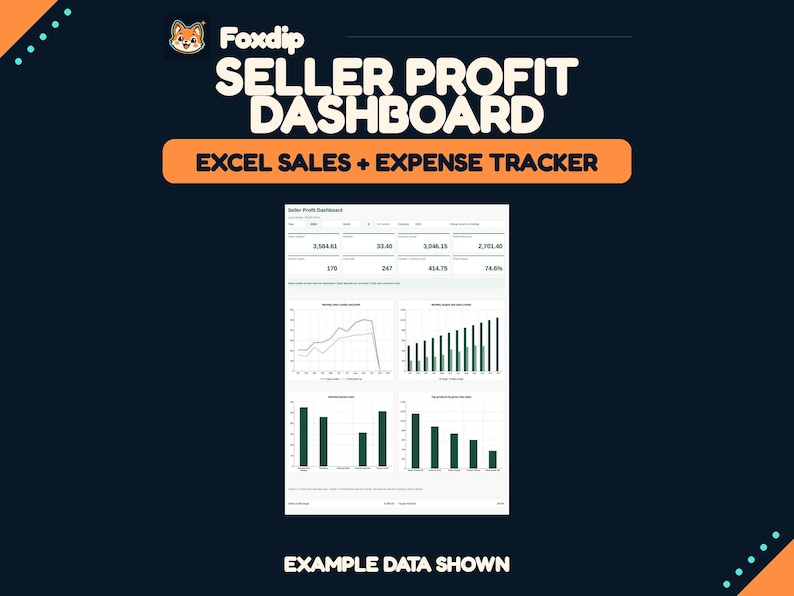
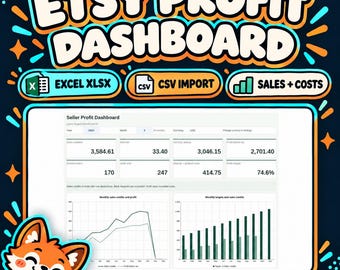
See your Etsy activity, recorded costs and profit in one clear dashboard. Seller Profit Dashboard - Etsy Edition helps you turn English Etsy CSV exports into monthly results. Review sales credits, refunds, separate Etsy charges, outside expenses and the product costs you enter. Explore your orders, units, goals and best-selling products without an ongoing subscription to this template. WHAT YOU RECEIVE One downloadable ZIP containing: - A blank .xlsx workbook for your shop - A populated demo workbook with fictional sales and matching costs - An illustrated PDF quick-start guide - IMPORT_CSV.html, a self-contained local CSV preparer - Ten sample monthly statement CSVs and one sample Order Items CSV - A single-shop license TEN ORGANIZED TABS Start Here, Dashboard, Settings, Monthly Summary, Product Report, Etsy Statement, Order Items, Other Income, Expenses and Product Costs. HOW THE CSV IMPORT WORKS 1. Download your English monthly statements from Etsy's Payment account and your Order Items CSV from Download Data. 2. Open the included HTML preparer in a current desktop browser. Select your files, currency, date order and decimal separator. It checks and arranges the data locally. 3. Replace the input tables (blue entry text) with the prepared rows using Paste Special > Values. Add your product costs and any outside entries, then choose a year and month. This is a file-based import. You download and refresh the data yourself. The preparer requires no account, installation or upload to a separate service. WHAT THE DASHBOARD MEANS Sales credits come from Net on Sale rows after deductions already taken on those rows. Separate Etsy charges are counted once. Bank deposits and transfers are excluded from income. Profit is calculated from the imported activity plus non-Etsy income, less the outside expenses and product costs you record, before your own income tax. Product costs are stored by product and month so a later cost change does not silently rewrite earlier months. A confirmed zero cost is valid; missing costs are flagged. Import issues or sales periods without Order Items data make profit unavailable. Gross item sales equal quantity multiplied by unit price, before discounts, refunds and fees. They are used for product analysis and are not added to shop income again. Product contribution is an estimate: shop net Etsy activity is allocated by each product's share of gross item sales; outside income and outside expenses are excluded from that allocation. CAPACITY AND WORKFLOW Up to 5,000 statement rows and 5,000 item rows per workbook; 200 distinct products in the product report; 2,000 product/month cost records; 500 entries in each outside log. Formulas are prefilled within these limits. To add a month, load the complete set of statement and item files you want to report and replace the full input blocks. Repeated identical files are skipped by the preparer. Different statement files covering the same month are rejected for review. Import rows must stay in the prepared order; filters are available without sorting. Keep your original exports and backup workbook copies. FORMAT AND COMPATIBILITY Delivered as .xlsx files. Tested in Microsoft Excel for the Web, build 16.0.20610.42300, in a desktop browser. File and calculation checks also used LibreOffice Calc 26.8. Desktop Microsoft 365 Excel has not been separately tested. The .xlsx files contain no macros. A current desktop browser is required for the included local CSV preparer. Excel software is not included. A Microsoft account and internet access are needed for Excel for the Web. Google Sheets, Numbers and mobile Excel are not included or claimed. English column headers are required. The preparer supports reordered headers, quoted text, supported date formats and dot/comma decimal settings. Supported currency codes: USD, CAD, EUR, GBP, AUD and NZD. One currency per workbook; changing its code does not convert money. Shop-specific fees, taxes, unknown statement types, cancellations and cost-unit adjustments may need your review. There is no automatic inventory restoration or international tax-filing engine. DIGITAL DELIVERY AND LICENSE This is a digital download; no physical item will be shipped. Download the ZIP from your Etsy purchase page in a desktop browser, extract it, and read START_HERE.pdf. The license permits use and modification for one shop or business. Redistribution and resale of the template or preparer are not permitted. The examples shown are fictional. It is independent of Etsy and is not endorsed by Etsy, Inc. It is a management template, not professional accounting advice or a promise of earnings. Unlimited support, custom bookkeeping and lifetime updates are not included. FAQ Q: Does this connect directly to Etsy? A: You download Etsy CSV files, prepare them locally, and paste the prepared values into the workbook. There is no account connection or live sync. Q: Can I try the import before using my own shop records? A: Yes. The demo workbook and fictional sample CSVs are included. The guide gives the expected demo results. Q: Will reimporting the same file double my figures? A: The supported workflow replaces the complete input snapshot. The preparer skips identical repeated files and rejects different monthly statements covering the same month. Do not append or sort prepared rows. Q: Do digital products need a cost? A: Enter a real zero for a product/month with no unit cost. Leave a cost blank only when it is still unknown; the workbook flags it. Q: Why is profit unavailable? A: Check missing product costs, import issues, undated rows, and whether all sales periods have Order Items data. The guide shows how to correct these. Q: Can I use more than one currency? A: Use a separate workbook for each currency. This version does not perform currency conversion. Q: Are the product contribution figures exact accounting by order? A: They are estimates based on the product's share of gross item sales. Shop totals use statement activity; product costs use item sale dates. Timing and discount differences can occur. Q: How do I unlock the formulas? A: In Excel, choose Review > Unprotect Sheet. No password is needed. Cells with blue entry text remain editable while the sheets are protected. Q: What happens when a CSV format is different? A: The preparer reports missing headers, unsupported dates, amounts or currency conflicts. This edition requires the documented English exports. Keep the original CSV and review the guide before pasting.
Explore the setup guideFormats, software & platform use +
| Format | How to use it | Before uploading |
|---|---|---|
| XLSX | Follow the included product guide for this format. | Confirm that your application supports the file and its intended use. |
| A document for a PDF reader, often instructions or printable content. | This is not an emote or a scene image. | |
| CSV | Follow the included product guide for this format. | Confirm that your application supports the file and its intended use. |
The artwork licence and your platform’s upload features are separate. OBS source reference ↗
Licence & permitted use +
WHAT YOU RECEIVE One downloadable ZIP containing: - A blank .xlsx workbook for your shop - A populated demo workbook with fictional sales and matching costs - An illustrated PDF quick-start guide - IMPORT_CSV.html, a self-contained local CSV preparer - Ten sample monthly statement CSVs and one sample Order Items CSV - A single-shop license DIGITAL DELIVERY AND LICENSE This is a digital download; no physical item will be shipped. Download the ZIP from your Etsy purchase page in a desktop browser, extract it, and read START_HERE.pdf. The license permits use and modification for one shop or business. Redistribution and resale of the template or preparer are not permitted.
About product licencesDelivery & support +
After verified payment, open your private download page from the confirmation email and download all listed ZIP files. For help, contact support@foxdipstudio.com with your order reference. Keep private download links out of screenshots.
Download and unzip help ↗